Are you stuck trying to launch a faceless YouTube channel but can’t decide on the right tech stack? You aren’t alone. The battle of OpenArt vs HeyGen often confuses creators because these platforms solve two very different problems. While HeyGen is the industry standard for professional talking head avatars, the costs can skyrocket for beginners.
Meanwhile, smart marketers are increasingly testing OpenArt for its unique text-to-video workflow and creative flexibility. If you are hunting for the best AI video generator for YouTube or simply need a reliable HeyGen alternative, this guide breaks down exactly which AI content automation tool belongs in your strategy. Let’s stop wasting credits and start ranking.
What Is OpenArt Suite? (For Bloggers, Publishers, Beginners, and Marketers)

If you’ve only heard of OpenArt as an image generator, you’re missing half the story. The platform has pivoted hard. It’s no longer just about generating a pretty picture; it’s a full generative media platform designed to keep you in one tab. Think of it as a creative sandbox where images are just the starting point.
How OpenArt’s AI creator studio works for images, video, audio, and characters
The core of OpenArt is integration. In most workflows, you’d generate an image in Midjourney, animate it in Runway, and then drag it into an editor. OpenArt tries to kill that app-switching fatigue. Their “Studio” lets you generate a consistent character, upscale it, and then immediately animate it into a video clip—all without leaving the project file.
For beginners, this “all-in-one” approach is a massive time-saver. You aren’t juggling five different subscriptions. You can start with a simple prompt, refine the visual style using their control nets (which give you scary-good control over composition), and then push that asset directly into a motion workflow.
Using OpenArt to generate faceless content and stories for social media and YouTube
This is where the money is for many of you reading this. OpenArt is arguably the best AI video generator for YouTube channels that don’t want a human host. The “Story” mode is particularly interesting for “faceless” channels. It allows you to maintain character consistency across multiple scenes—a notorious pain point in AI art.
If you’re running a mythology channel or a “scary stories” TikTok account, OpenArt lets you generate a storyboard where your protagonist looks the same in slide 1 as they do in slide 10. That consistency is the holy grail for storytelling content.
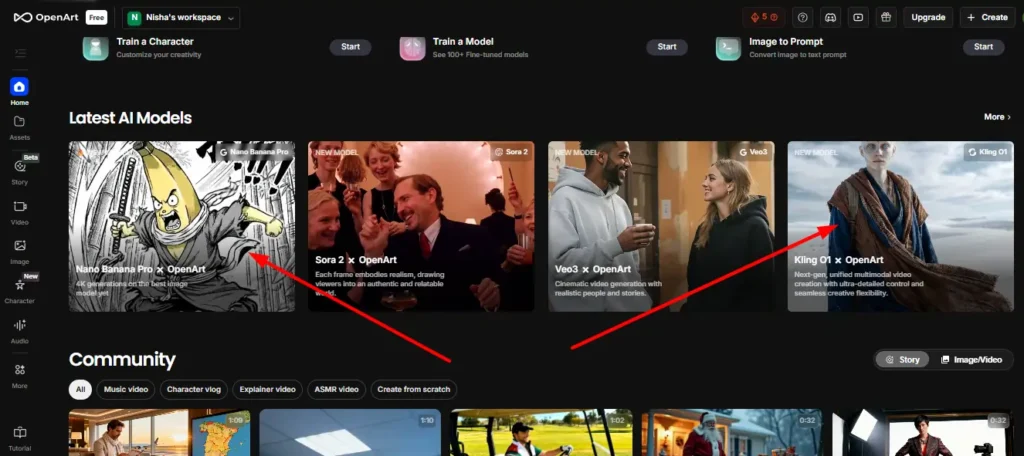
OpenArt models explained (Kling, Veo, Nano Banana Pro, Seedance, and more)
OpenArt acts as an aggregator for some of the heavy hitters in AI models. You aren’t just stuck with one engine.
- Kling & Veo: These are your go-to models for high-fidelity video generation. They handle motion surprisingly well, reducing that weird “AI shimmer” you often see.
- Nano Banana Pro: Don’t let the silly name fool you; this is optimized for speed and efficiency, perfect for iterating on concepts before committing to a high-res render.
- Seedance: This model shines when you need cinematic shots with specific camera movements.
What Is HeyGen? Inside the AI Video Generator With Lifelike Avatars

If OpenArt is the creative artist, HeyGen is the corporate spokesperson. HeyGen has zeroed in on one problem: putting a human face on video content without actually needing a camera, studio, or actor. It is the gold standard for AI avatar generators.
How HeyGen’s AI avatar generator turns text, images, and audio into videos
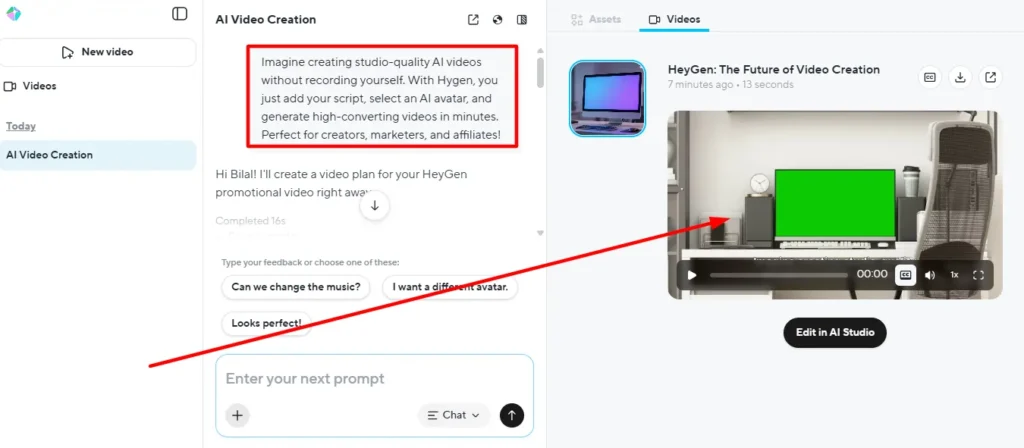
The magic of HeyGen is its “text-to-video” simplicity. You type a script, choose an avatar (or upload your own), and the AI lip-syncs the audio perfectly to the character’s mouth. It’s not “generating” a video from scratch like OpenArt does; it’s animating a performance.
This distinction is crucial. You don’t use HeyGen to create a sci-fi movie scene; you use it to create a sales deck, a training module, or a personal greeting. The realism is currently unmatched—sometimes it’s genuinely hard to tell it’s not a real person on a webcam.
Using text to video, image to video, and audio to video for business content
For marketers, this tool is a conversion machine. You can take a static blog post, feed the text into HeyGen, and get a 2-minute video summary delivered by a professional-looking presenter.
- Text to Video: Ideal for scalable content like personalized sales emails.
- Audio to Video: Upload a real voice recording (maybe your CEO’s), and the avatar will perform it. This adds a layer of authenticity that synthetic voices sometimes miss.
Video translation, localization, and 175+ languages for global brands
This feature alone justifies the price for many enterprise users. HeyGen can take a video of you speaking English and translate it into Spanish, French, or Japanese—while changing your lip movements to match the new language. It’s mind-bending tech. If you are targeting a global audience, this video translation capability is a massive competitive advantage that OpenArt simply doesn’t offer.
OpenArt vs HeyGen: Core Features Compared
Let’s get into the nitty-gritty. Why would you pick one over the other? It comes down to your primary output.
Generative media platform vs AI avatar video generator: what’s the real difference?
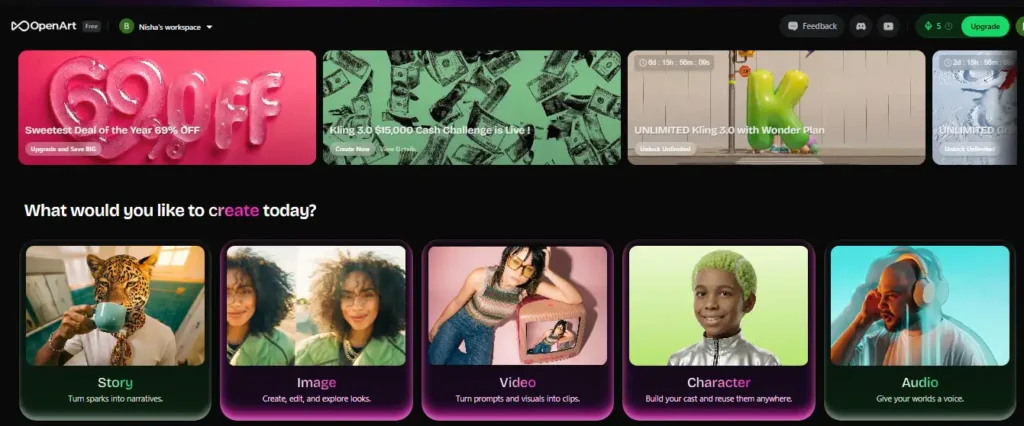
The difference is “Creation” vs “Performance.”
- OpenArt creates new visuals. You dream up a dragon flying over NYC, and it generates it.
- HeyGen simulates human delivery. You need a guy in a suit explaining a graph, and it delivers it.
Comparing them directly is apples and oranges, but your budget likely only has room for one “video” tool, so the choice matters.
Story, image, video, character, and audio workflows in OpenArt vs HeyGen Studio editor
OpenArt’s workflow is messy but creative. You’ll find yourself tweaking prompts, upscaling, and re-rolling dice to get the perfect shot. It feels like an art studio.
HeyGen’s Studio is linear and clean, much like Canva. You pick a template, drop in your script, and hit render. It’s built for efficiency, not exploration. If you need 50 videos by Friday, HeyGen’s workflow is superior. If you need one masterpiece, go with OpenArt.
Lip-sync, motion sync, and camera control in OpenArt vs HeyGen avatar dynamics
OpenArt has introduced “Motion Sync” and lip-sync features, allowing characters in images to speak. However, it’s still “puppetry”—you can tell it’s an animated image.
HeyGen is miles ahead here. Their “Avatar IV” model captures micro-expressions, head tilts, and natural blinking that OpenArt can’t replicate yet. If your content relies on trusting the speaker, HeyGen wins hands down.
Pricing, Credits, and Free Plans: OpenArt vs HeyGen
This is usually where the decision is made. HeyGen pricing vs OpenArt is a battle of credits vs duration, and understanding the “real” cost is tricky.
OpenArt free tier, Wonder Plan, and unlimited Kling/Veo options
OpenArt is aggressively pricing itself to capture the market, especially with annual commitments.
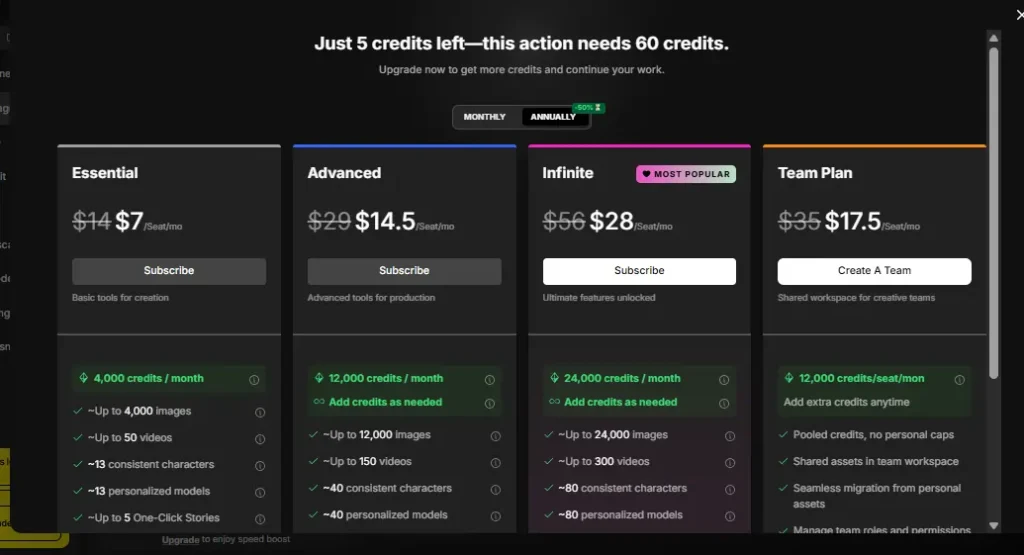
- Free Plan: You get 40 one-time trial credits. It’s enough to test, but not to work. The catch? Everything you make is public.
- Essential Plan ($14/mo or $4.30/mo billed annually): This is a steal. You get 4,000 credits/month (approx. 50 videos or 4,000 images). If you pay for the year, you are effectively paying the price of a coffee for a month of AI access.
- Wonder Plan: The “Unlimited” claim is the big hook here. For serious power users, having unlimited generations on specific models like Kling or Grok removes the “credit anxiety” that plagues other tools.
HeyGen free plan, paid plans, and API pricing for teams and enterprises
HeyGen positions itself as a premium B2B tool.
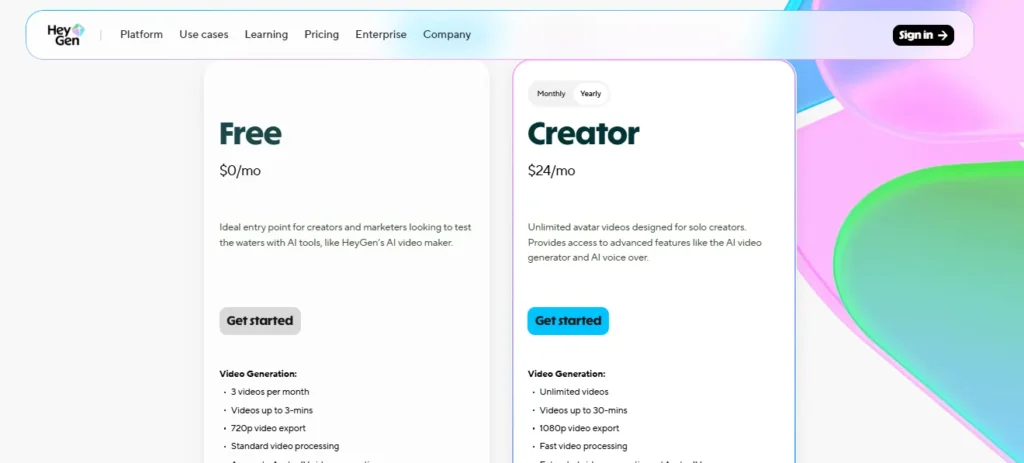
- Free Plan: It’s strictly for testing. You get 1 credit (3 videos max), watermarked, and limited to 3 minutes total.
- Creator Plan ($29/mo or $24/mo billed annually): This unlocks 30-minute videos, 1080p export, and faster processing. It’s significantly more expensive than OpenArt’s entry tier, but you are paying for the avatar tech, not just render time .
- Team Plan ($39/seat/mo): Adds collaboration tools, essential for agencies.
Which is cheaper for regular content production: credits vs subscriptions?
If you are experimenting, OpenArt is far cheaper. The annual discount (69% off) is massive compared to HeyGen’s ~17% annual savings.
However, if you are producing volume for a business (e.g., daily news updates), HeyGen becomes cheaper in terms of labor hours. The automation and “first-take” quality mean you spend less time fixing weird AI glitches.
Use Cases: Who Should Choose OpenArt and Who Should Choose HeyGen?
Best option for bloggers and publishers creating thumbnails, banners, and story-style clips
Bloggers should lean towards OpenArt. You need unique featured images, social media graphics, and maybe short, artistic video teasers. HeyGen is overkill (and the wrong tool) for static blog assets or Pinterest pins.
Best option for marketers producing explainer videos, ads, and localized campaigns
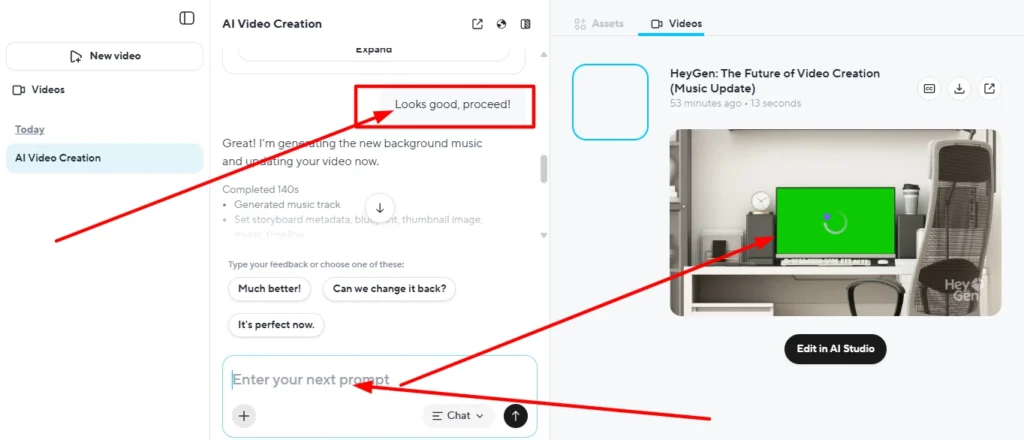
Marketers need HeyGen. When you’re running ads, you need high trust. A realistic human face explaining your product converts better than a stylized AI animation. The ability to localize that ad into 10 languages instantly is just the cherry on top.
Beginners’ workflow: minimal setup paths in OpenArt vs HeyGen
Ironically, HeyGen is easier for beginners. You type text, you get video. OpenArt requires you to learn about “prompts,” “seeds,” and “control nets.” It has a steeper learning curve, but a much higher ceiling for creativity.
OpenArt vs HeyGen for Faceless YouTube, TikTok, and Social Media
This is the battleground for the best AI video generator for YouTube.
Creating faceless reels, shorts, and meme-style videos with OpenArt tools
For “brain rot” content, history facts, or motivational shorts, OpenArt is king. You can generate weird, hyper-specific visuals that stop the scroll. The “faceless” audience doesn’t want a corporate avatar; they want visual stimulation, which OpenArt provides in spades.
Using HeyGen avatars for talking-head channels, tutorials, and personal branding
If you want to build a personal brand without showing your face (using a custom avatar of yourself), HeyGen is the only serious option. It’s perfect for tutorial channels where clarity and connection matter more than flashy visuals.
Which platform scales better for daily content and multi-platform posting?
HeyGen scales better for structured content. You can use templates to churn out videos. OpenArt scales better for creative content, where each video needs to look unique.
Quality, Realism, and Customization: Avatars, Visuals, and Voice
Realistic avatars, gestures, and expressions in HeyGen
HeyGen’s “Avatar IV” is the benchmark. It’s moving out of the “Uncanny Valley” and into “Is that real?” territory. The gestures are auto-generated based on the script context, which is a subtle but powerful feature.
Visual fidelity in OpenArt: styles, filters, upscaling, and camera angle control
OpenArt wins on aesthetic control. You can specify “cinematic lighting,” “35mm film grain,” or “anime style.” HeyGen is pretty much locked into “clean corporate video” or “studio lighting.” If you need artistic flair, OpenArt is non-negotiable.
Voiceovers, voice cloning, and audio tools in OpenArt vs HeyGen
Both offer voice cloning, but HeyGen’s integration is tighter. Because the voice drives the lip-syncing, the audio quality directly impacts the video quality. OpenArt’s audio tools are decent but feel secondary to the visuals.
Workflow, Collaboration, and Branding Features
How OpenArt’s suite fits into creative pipelines for agencies and solo creators
OpenArt is often one step in a chain. You generate assets there, then move to Premiere Pro or CapCut. It’s a specialized tool for asset creation.
HeyGen Studio editor, brand kits, templates, and team collaboration tools
HeyGen wants to be the entire chain. Their collaborative features allow teams to edit scripts and review videos together. The “Brand Kit” ensures every video uses your corporate colors and fonts automatically.
API and integrations: when to treat OpenArt or HeyGen as infrastructure, not just a tool
For developers, HeyGen’s API is robust. You can automate video generation programmatically (e.g., sending a personalized video to every new signup). OpenArt has API capabilities, but they are more focused on image generation pipelines.
Performance, Speed, and Reliability
Render times and model performance for OpenArt video and image generation
OpenArt can be slow, especially when using high-end models like Kling. You’re often in a queue. It’s the nature of generative art; complex renders take time.
HeyGen generation speed, 4K support, and large-scale production limits
HeyGen is optimized for throughput. Videos generate relatively quickly because the heavy lifting (rendering the 3D environment) isn’t happening—it’s just 2D manipulation of the avatar layer. They support 4K, which is essential for premium YouTube content.
Stability, uptime, and learning curve for beginners vs power users
HeyGen feels like a SaaS product—stable, reliable, predictable. OpenArt feels like a tech demo sometimes—cutting edge, exciting, but occasionally buggy or confusing with new features dropping constantly.
Security, Compliance, and Commercial Usage Rights
Content ownership and commercial usage rights in OpenArt
Generally, you own what you create on paid plans, but AI copyright is a gray area. OpenArt is transparent about this, but always check the specific model license (e.g., some Stable Diffusion models have different rules).
HeyGen security, GDPR, SOC 2, AI Act, and enterprise compliance
HeyGen is built for enterprise. They boast SOC 2 compliance, which is a requirement for big corporate clients. If you’re a bank or a hospital, you can use HeyGen. OpenArt might not pass your IT department’s security review.
Safe use of AI avatars and synthetic media in marketing and publishing
Both platforms have moderation policies to prevent deepfakes. HeyGen is strict about not generating celebrity avatars without consent.
People Also Ask: OpenArt vs HeyGen FAQs
Is OpenArt or HeyGen better for beginners with no editing experience?
HeyGen is easier. It’s text-to-video. OpenArt requires some “prompt engineering” skill to get good results.
Can OpenArt replace HeyGen for AI talking avatars and spokesperson videos?
Not really. OpenArt can make a character speak, but it lacks the professional polish and natural body language of a HeyGen avatar. It looks “animated,” not “filmed.”
Is HeyGen a free AI video generator, and what are the limitations?
No. The free plan is a trial. You cannot use it for serious production without paying.
Can I use OpenArt and HeyGen together in the same content workflow?
Absolutely. A pro strategy is to use OpenArt to generate unique backgrounds or B-roll visuals, and then import them into HeyGen to have your avatar present in front of them. Best of both worlds.
Which tool is better for multilingual videos and global campaigns?
HeyGen, without a doubt. The video translation feature is a killer app for global reach.
Are OpenArt and HeyGen good alternatives to traditional video production?
Yes, but for different things. HeyGen replaces the presenter and the studio. OpenArt replaces the illustrator and the animator.
Decision Guide: Which Tool Should You Choose?
OpenArt vs HeyGen for bloggers, publishers, beginners, and marketers
- Bloggers: OpenArt (Images/Creative Video).
- Marketers: HeyGen (Conversion/Sales Video).
- Beginners: HeyGen (Easier start), OpenArt (Cheaper start).
Checklist: questions to ask before committing to OpenArt, HeyGen, or both
- Do I need a human face? (Yes = HeyGen)
- Do I need to create fantasy or stylized visuals? (Yes = OpenArt)
- Is my budget under $30/month? (Yes = OpenArt)
- Do I need translation? (Yes = HeyGen)
Recommended tool stacks and upgrade paths as your content production scales
Start with OpenArt to build your visual library and get comfortable with AI. As you move into video marketing and need to scale production, add a HeyGen subscription for your “A-roll” talking head content. Using them together is the secret weapon of top content teams in 2026.