
Hey, my lovely audience! I’m Nisha from [aiblogfirst.com], and I’ve been using OpenArt AI almost every single day for the past six months — testing its tools, generating images, and genuinely exploring everything it offers.
One question keeps coming up from my daily readers: “Is there a real OpenArt AI coupon code that actually works?” And honestly, between expired promos and random discount sites, the whole search gets frustrating fast.
If the price has been holding you back from upgrading your OpenArt plan, you’re not alone — and you’re in the right place. I feel it’s my responsibility to bring my audience only verified, working deals.
So today, I’m sharing something I secured exclusively for you — an active OpenArt AI discount code that my readers can actually use at checkout. Stay with me.
The Best OpenArt AIpon Code for Our Readers (NISHA15)
Let’s not waste your time. You came here for a working OpenArt AI coupon code, and here it is:
Coupon Code: NISHA15
Valid for: Essential, Advanced, Infinite, and Wonder plans
I personally tested this code on my own OpenArt account, and it applied immediately at checkout — no gimmicks, no redirects, no hidden conditions.
This code is something I negotiated specifically for this blog’s audience. Whether you’re a solo creator just getting started or someone who runs a full-scale content business, NISHA15 gives you a direct 15% saving on whichever monthly plan fits your workflow.
Use it before it expires. Exclusive codes like thi don’t last forever.
How to Apply Your OpenArt AI Coupon Code (Step-by-Step)
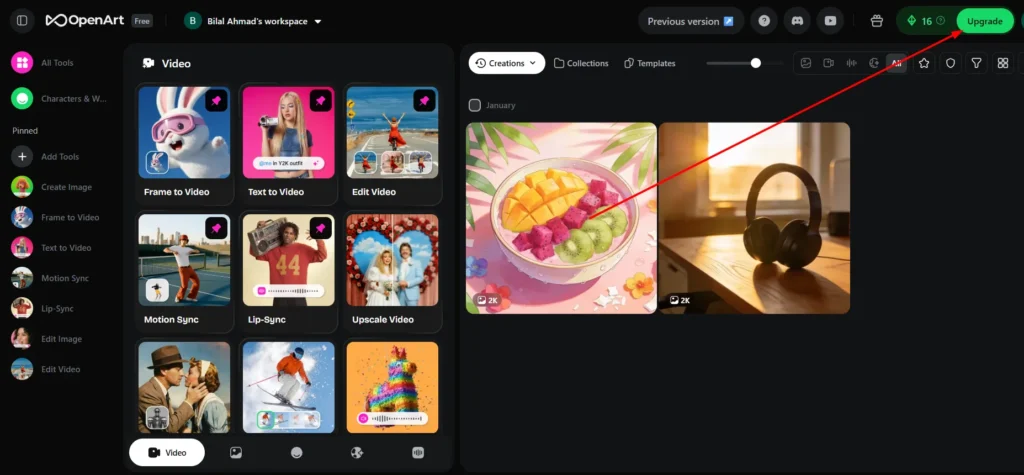
A lot of people get confused at checkout, so let me walk you through it quickly. It only takes about 30 seconds.
- Go to openart.ai and log into your account (or create a free one).
- Click “Upgrade” from your dashboard.
- Choose your preferred plan — Essential, Advanced, Infinite, or Wonder.
- Select Monthly billing (the NISHA15 code applies to monthly plans).
- On the checkout page, locate the “Promo Code” or “Coupon Code“ field.
- Type in NISHA15 exactly as shown.
- Hit Apply — you’ll see the 15% discount reflected immediately.
- Complete your payment.
That’s it. Simple, fast, and verified.
One thing to note: If you’re going for the Annual plan, OpenArt already offers up to 50% OFF automatically, which is an even bigger saving. The NISHA15 code is most valuable if you prefer monthly flexibility without committing long-term.
OpenArt AI Pricing Breakdown: How Much Will You Save With NISHA15?
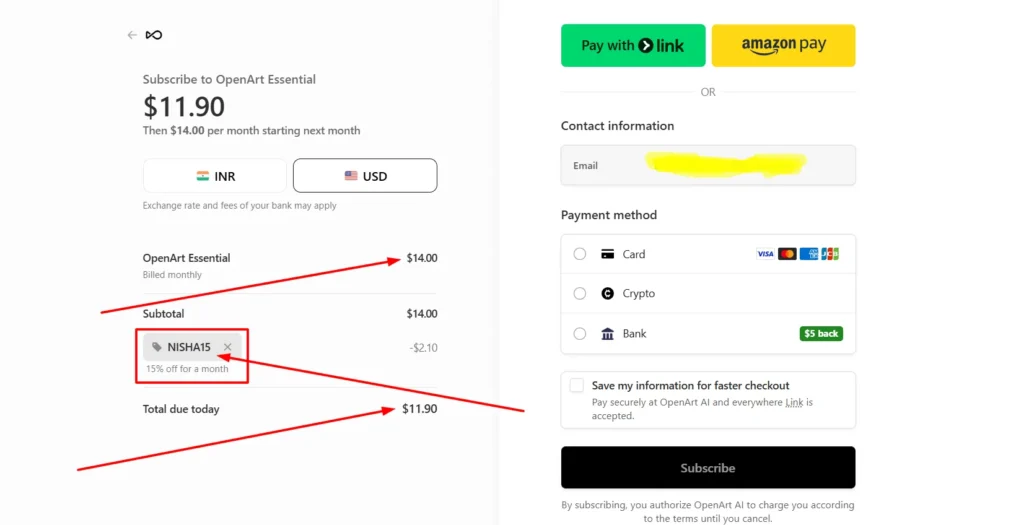
Before you apply any OpenArt AI discount code, it helps to understand what you’re actually paying for. OpenArt offers four main subscription tiers under the monthly billing option.
Essential vs. Advanced vs. Infinite Plans
Here’s a clear breakdown of what each plan includes and how much you save using our exclusive coupon code:
| Plan | Original Price | After NISHA15 (15% OFF) | Credits / Month | Best For |
|---|---|---|---|---|
| Essential | $14/seat/mo | ~$11.90/mo | 4,000 credits | Beginners, hobbyists |
| Advanced | $29/seat/mo | ~$24.65/mo | 12,000 credits | Freelancers, creators |
| Infinite | $56/seat/mo | ~$47.60/mo | 24,000 credits | Heavy users, agencies |
| Wonder | $240/seat/mo | ~$204/mo | 106,000 credits | Power users, studios |
The Infinite plan is currently the most popular among OpenArt users — and honestly, after using it myself, I understand why. The jump from 12,000 to 24,000 credits per month makes a real difference if you’re generating images and videos daily.
The Wonder plan is the best value per credit if you run a content team or produce high volumes of AI video and image content consistently. At over 106,000 credits a month, it essentially removes the ceiling on what you can create.
Monthly Billing vs. Annual Billing Savings
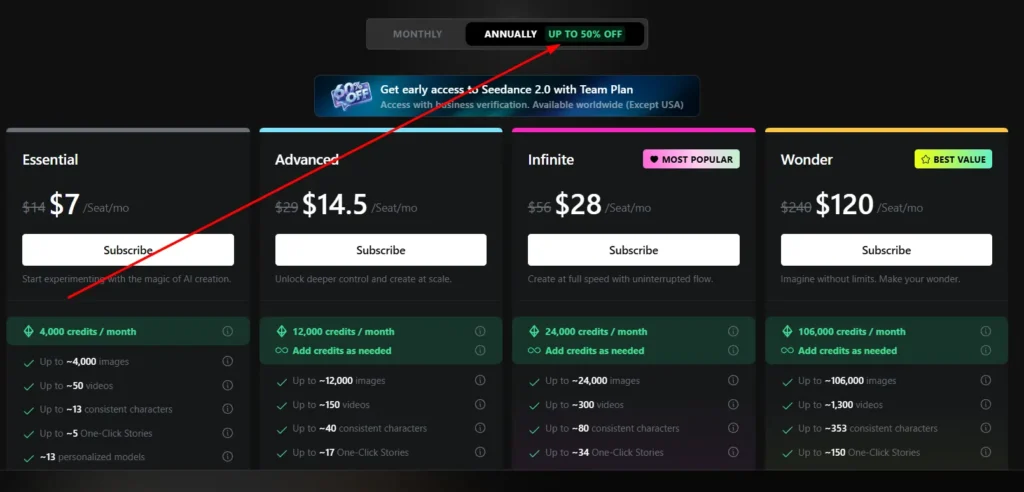
This is a question I get often: “Should I go monthly with your coupon code or just go annual?”
Here’s my honest take:
- Go Monthly with NISHA15 if you’re still testing OpenArt or not ready to commit. You save 15% right away, and you’re not locked in.
- Go Annual if you already know OpenArt works for your workflow. The annual discount goes up to 50% OFF, which significantly beats the 15% monthly saving.
For first-timers, I always recommend starting monthly, applying the NISHA15 code, spending a full month testing the features, and then switching to annual if you’re happy.
Does OpenArt AI Offer a Free Trial Before Upgrading?
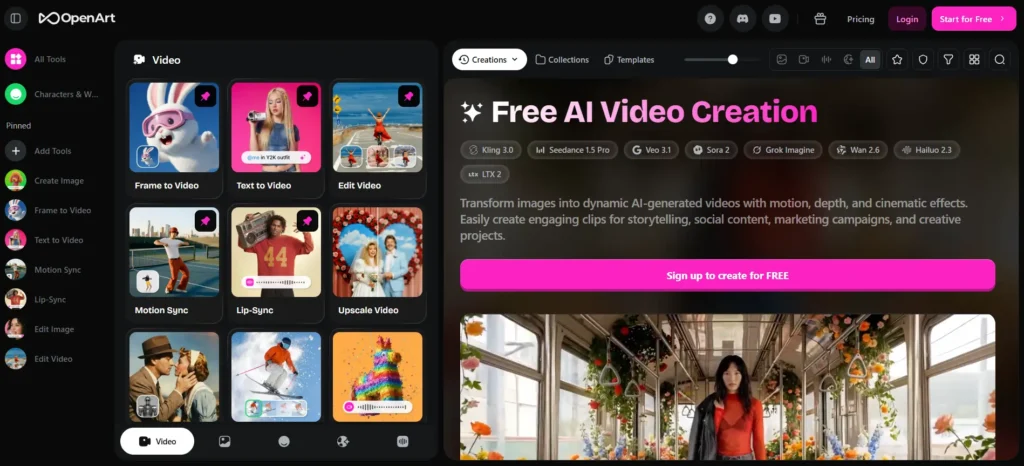
Yes — and this is one of the things I genuinely appreciate about OpenArt.
OpenArt offers a free plan that gives you access to the platform without a credit card. It’s not just a time-limited trial; it’s a permanent free tier where you can explore image generation, browse the model library, and get a feel for the interface.
The free plan has limited credits, but it’s enough to understand what the tool can and cannot do for your specific use case. Once you’ve tested it and you’re ready to scale up, that’s when applying the NISHA15 coupon code on a paid plan makes the most sense.
Some things the free plan does NOT include:
- Commercial use rights (important if you’re a business or content creator)
- Access to premium video models like Seedance 2.0 and Kling 3.0 Omni
- Higher parallel generations (so renders take longer)
- Consistent character creation beyond a small limit
If you’re serious about using OpenArt for anything professional — content creation, social media, affiliate blogs, YouTube thumbnails — the free plan will feel limiting pretty quickly.
Why Upgrade Using Our OpenArt AI Discount Code?
I want to be straightforward here. I’m not just sharing this OpenArt promo code to push a sale. After six months of daily use, here’s what genuinely impressed me about upgrading to a paid plan.
OpenArt Suite is not just an image generator. This is the part most coupon articles skip. When you upgrade, you’re getting access to a full creative ecosystem:
- Text to Video — Generate videos from written prompts using top models like Seedance 2.0
- Frame to Video — Turn a single image into a motion video
- Lip-Sync — Sync audio to characters in seconds
- Voice-Over Generator — Natural-sounding voiceovers from text input
- Image Editing Suite — AI-powered editing, upscaling, camera angle control
- One-Click Story Creation — Full story sequences with consistent characters
- Camera Angle Control — A feature very few AI tools offer at this price point
The Advanced plan at $29/mo (or ~$24.65 with NISHA15) gives you 12,000 credits, commercial use rights, and 16 parallel generations. For a content creator or affiliate marketer producing daily content, this honestly pays for itself fast.
And the newer models being added — Qwen Image 2, Nano Banana Pro, Kling 3.0 Omni — show that OpenArt’s development team is actively pushing updates. This is not a stagnant tool.
Frequently Asked Questions About OpenArt AI Promo Codes
Does the NISHA15 coupon code work on all OpenArt plans?
Yes. The NISHA15 code gives 15% OFF and applies to all monthly subscription plans — Essential, Advanced, Infinite, and Wonder.
Can I use the coupon code if I’m already an existing OpenArt user?
It’s best to try it on your next billing cycle or when upgrading your existing plan. Apply it at the subscription/upgrade checkout page.
Does OpenArt AI give free credits on the free plan?
Yes, the free plan includes a limited monthly credit allowance. It’s enough to test the platform, but not enough for regular content production.
Is the annual plan better than using the monthly coupon code?
If you plan to use OpenArt long-term, the annual plan (up to 50% OFF) is a better deal financially. For short-term or flexible use, the NISHA15 monthly discount is the smarter option.
Do OpenArt credits roll over to the next month?
Standard monthly credits do not roll over. However, if you purchase add-on credit packs separately, those have their own expiry terms — check OpenArt’s help center for current rollover policies.
What happens if I cancel my OpenArt subscription?
You keep access to your plan until the end of the current billing period. Your account reverts to the free tier after that.
Is the OpenArt Team Plan eligible for the NISHA15 discount?
The Team Plan is currently running its own early access promotion (up to 60% OFF for a limited time). Check if a coupon code field appears at the Team Plan checkout.
What is the best OpenArt AI plan for beginners?
The Essential plan at $14/mo (or ~$11.90 with NISHA15) is the perfect starting point — 4,000 credits, access to 100+ models, and one-click story creation included.
Final Thoughts From Nisha
Six months in, OpenArt AI is still part of my daily workflow — and I genuinely mean that.
If you’ve been waiting for the right moment to upgrade, this is it. Use code NISHA15 at checkout and grab your 15% OFF today before it expires.
I only share what I personally use and trust with my lovely audience. Your time, your money, and your creativity deserve nothing less.


