Let’s be honest: turning blog posts into video is usually a massive headache. It’s either expensive editors or hours wrestling with complex timelines. If you’re a blogger or marketer looking to scale, you’ve definitely seen the ads for automation tools promising to fix this.
In this no-nonsense Pictory AI reviews breakdown, I’m cutting through the marketing hype to see if this text to video generator actually produces quality content or just generic spam.
We will dig into the real Pictory AI pricing, compare Pictory vs InVideo head-to-head, and test its ability to convert a blog to video in minutes. Before you pull out your credit card, let’s see if this tool is actually the asset you need.
What Is Pictory AI and Who Is It For?

Understanding the AI video editor built for marketers and bloggers
If looking at a blank Premiere Pro timeline makes you want to close your laptop, Pictory is built for you. It isn’t trying to be Hollywood-grade software for filmmakers; it is a cloud-based AI video editor specifically designed for content creators who have the words but need the visuals.
A lot of Pictory.ai review articles miss this point, but the tool’s sweet spot is “faceless” content creation. It uses artificial intelligence to scan your script, find relevant stock footage from Storyblocks (which is integrated), and stitch it together into a timeline.
Ready to see how fast you can turn a script into a video? You don’t have to take my word for it—test the platform yourself with zero risk. Bonus: If you decide to upgrade, use code CABF20 to save 20% on your plan.
We see this tool working best for
- Bloggers who need to increase dwell time by embedding videos in their posts.
- Affiliate Marketers running faceless YouTube channels who need volume over perfection.
- Course Creators who need to turn lesson scripts into digestible modules quickly.
- Social Media Managers repurposing long webinars into short, snackable clips.
How the text to video technology streamlines content creation
The core promise here is speed. Traditional video editing is linear and manual—pick a clip, drag it, cut it. Pictory changes the workflow by allowing you to edit videos using text.
When you upload a script, the AI analyzes the keywords—like “digital marketing” or “mountain hiking”—and automatically pulls clips from its royalty-free visuals library to match those concepts. It’s not magic; sometimes it grabs a totally irrelevant clip that makes you laugh.
But compared to hunting for stock footage manually on Pexels or Shutterstock, the time savings are massive. You aren’t editing video; you’re essentially editing a document, and the video updates itself.
Key Features Breakdown: Does It Deliver on Promises?
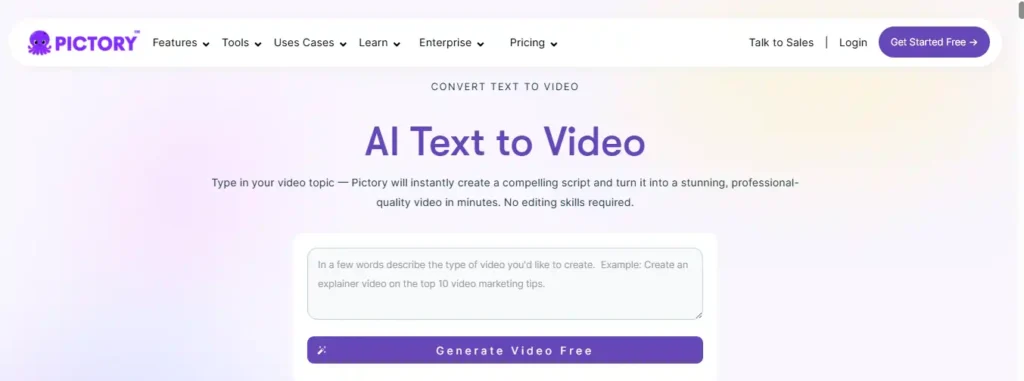
Script to Video: Creating faceless YouTube channels in minutes
This is the feature most people are here for. The script to video function is the workhorse of the platform. You paste your script, choose a video template (which mostly just determines the font style and transition vibe), and hit generate.
In our testing, the AI does a decent job of understanding context, but you will almost always need to do a manual pass. If your script says “The bank of the river,” the AI might show a financial bank. However, Pictory’s interface makes swapping these clips incredibly fast. You just click the “Visuals” tab, search for “river,” and click the clip you want. It snaps into place instantly.
For YouTube creators, this is how you pump out 3-4 videos a week without burning out.
Blog to Video: Repurposing articles for social media engagement
If you have a high-traffic blog post, leaving it as just text is leaving money on the table. The blog to video feature scrapes your URL, pulls the text, and attempts to summarize it into a video script.
I’ll be up front: this feature is hit-or-miss. The AI summarization can sometimes be a bit aggressive, cutting out nuance you might want to keep. We found it’s often better to manually curate the summary highlights within Pictory before letting it generate the video scenes. However, for turning a 2,000-word guide into a 60-second Instagram Reel or YouTube Short, it’s a powerful workflow accelerator.
Edit Videos Using Text: Cleaning up webinars without re-recording
This is arguably the most underrated feature. If you upload a “talking head” video—like a Zoom recording or a webinar—Pictory transcribes it. You can then edit the video by deleting text from the transcript.
Did you say “um” or “uh” fifty times? You can toggle a switch to remove all filler words automatically. Did you ramble for three minutes about an irrelevant topic? Highlight that paragraph in the text transcript and hit delete. The video automatically cuts that section out. It’s seamless and saves hours of scrubbing through timelines.
Exploring the royalty-free visuals library and realistic AI voices
Stock footage is expensive. A subscription to Storyblocks alone can cost as much as a Pictory subscription. The fact that Pictory includes millions of assets from Storyblocks and Getty Images is a huge value add for the Pictory AI pricing.
On the audio side, the realistic AI voices have improved significantly in 2026. While they still don’t quite match the emotional depth of a tool like ElevenLabs, they are more than sufficient for informational content. You can choose from various accents (US, UK, Australian, Indian) and speeds. If you prefer your own voice, you can record a voiceover directly in the app or upload a pre-recorded audio file, and Pictory will auto-sync it to the video scenes.
Pictory AI Pricing and Plans Explained
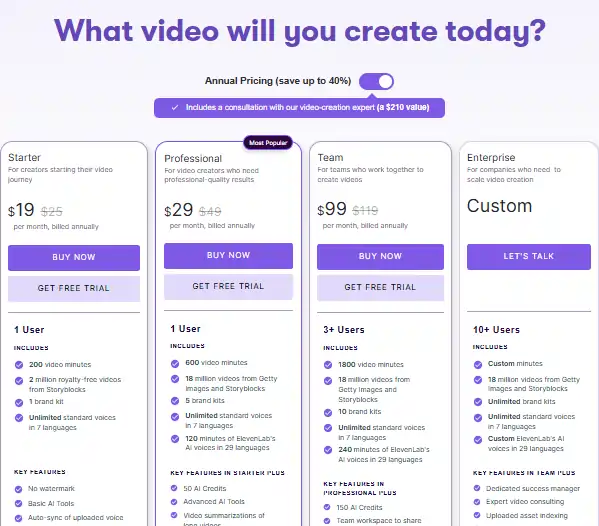
Breaking down the Starter, Professional, and Teams plan costs
Let’s talk money. Is Pictory AI worth it? That depends on your volume. Here is how the pricing tiers generally break down (prices subject to change, so always check the official site):
The Starter plan is decent if you are just dipping your toes in, but serious YouTubers will hit the limits quickly. The Professional plan unlocks the features that really matter, like higher resolution exports and the better AI voice tracks.
What is actually included in the Pictory AI free trial?
Many users ask about the Pictory AI free trial. Yes, there is one, and usually, it does not require a credit card to start.
Typically, the trial lets you create 3 video projects, each up to 10 minutes long. The catch? The videos will have a watermark. This is standard practice. The trial is strictly for you to test the interface and see if the workflow clicks for you. You cannot use the output commercially until you upgrade to a paid plan.
How to use a Pictory AI discount code for maximum savings

If you decide to upgrade, never pay full price. There are almost always coupon codes available. For example, using a code like CABF20 can get you 20% off the subscription, which adds up significantly on the annual plans.
Ready to automate your video production? Use the exclusive code CABF20 at checkout to lock in 20% OFF your subscription for life. Don’t pay full price when you can save.
Pictory vs InVideo: Which Tool Is Better for You?
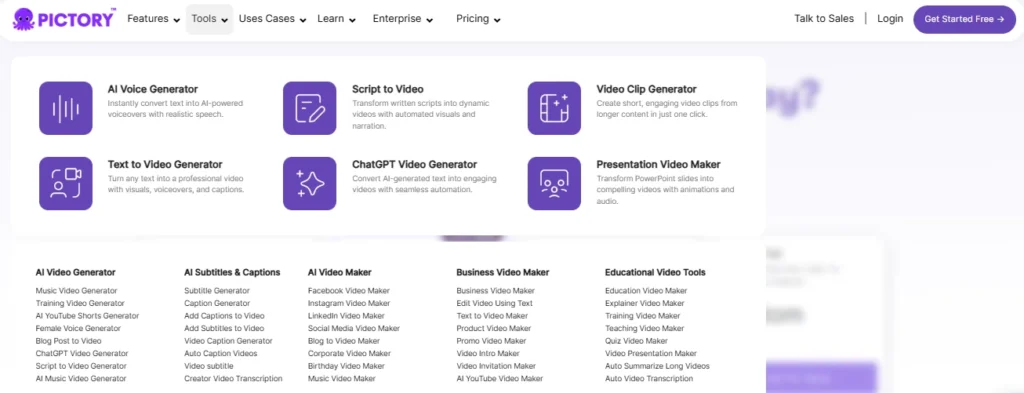
Comparing video templates and ease of use
The Pictory vs InVideo debate is the most common comparison we see. Both are giants in the AI video space, but they serve slightly different masters.
InVideo is more like a simplified Canva for video. It has thousands of flashy templates, allows for granular control over layers, and is better if you want to make high-energy ads with lots of text overlays and specific branding elements.
Pictory is more focused on automation and “content first.” It’s less about dragging layers around and more about the AI doing the heavy lifting based on your script.
Why you might choose Pictory over other AI video editors
Choose InVideo if:
- You want total creative control over every transition and element.
- You are making short, punchy ads for social media that need to look highly designed.
Choose Pictory if:
- You hate editing and just want the video done.
- You are focused on long-form content (YouTube videos, course modules).
- You want the best “edit by text” features for spoken-word video.
- You need a robust blog to video converter.
The Honest Pros and Cons of Pictory.ai
Where the automatic captioning and workflow shine
Pros:
- Automatic Captioning: Pictory generates captions automatically with very high accuracy. For social media (where 85% of video is watched without sound), this is non-negotiable.
- Ease of Use: The learning curve is practically non-existent. If you can write a document, you can make a video.
- Asset Library: Access to Storyblocks without an extra fee is a massive money saver.
- Cloud-Based: No software to download; it runs in your browser.
Limitations and bugs you should know before buying
Cons:
- AI Context Issues: As mentioned, the AI sometimes picks irrelevant visuals. You must review every video before publishing.
- Rendering Speed: Generating a 1080p video can sometimes take 10-15 minutes depending on server load. It’s not instant.
- Voice Monotony: While improved, some AI voices can still sound a bit robotic on longer scripts. Mixing in background music (which Pictory provides) helps mask this.
- No Mobile App: At the time of this review, serious editing really needs to be done on a desktop.
Final Verdict: Is Pictory AI Worth It for Your Business?
After putting this tool through the wringer for our Pictory AI reviews, the verdict is clear: Pictory is a productivity powerhouse, not a magic wand.
If you are looking for a tool that will create Oscar-winning cinematography with zero input, look elsewhere. But if you are a content marketer, blogger, or entrepreneur who needs to scale video production from “zero” to “daily” without hiring a team, Pictory is arguably the best investment you can make in 2026.
It solves the two biggest hurdles in video marketing: lack of footage and lack of editing skills. The Script to Video and Edit by Text features alone justify the monthly cost for anyone serious about repurposing content.
Recommendation: Start with the free trial. Upload an old blog post and see how fast you can turn it into a video. If it saves you more than 2 hours of work (and it will), it’s worth the upgrade.
Frequently Asked Questions (FAQ)
Can I monetize videos created with Pictory AI?
Yes. If you are on a paid plan (Starter, Professional, or Teams), you have full commercial rights to the videos you create, including the music and stock footage from Storyblocks. You can monetize these on YouTube without copyright strikes.
How do I cancel my Pictory subscription?
To cancel Pictory subscription, you typically go to your account settings > billing section. It’s a straightforward process, though we recommend checking if you can pause your plan first if you just need a break. Be sure to download all your projects before canceling, as you may lose access to your hosted videos .
Are there any free Pictory AI alternatives?
There are tools with free plans, but they often come with heavy restrictions (watermarks, limited export minutes). InVideo has a free tier, and tools like CapCut (desktop/mobile) are great for manual editing. However, for a true automated text to video generator that matches Pictory’s workflow for free, options are limited. Most serious Pictory AI alternatives like Synthesia or HeyGen are also paid tools primarily.
Is Pictory AI the Best Text to Video Generator for You?
Ultimately, Pictory AI isn’t going to replace a professional video team, but for bloggers and marketers, it completely solves the volume problem. I’ve tested enough tools to know that “perfect” automation is a myth, yet Pictory gets incredibly close by removing the technical grunt work of editing.
If your goal is to repurpose content and grow your visibility without burning out on complex timelines, this software is a genuine asset. Give the free trial a spin on your next blog post—you might be surprised at how fast you can actually hit publish.