Looking at Vidnoz AI’s pricing can feel overwhelming when you’re trying to figure out if it’s worth your investment. With multiple subscription plans ranging from free to premium tiers, understanding what each package offers—and whether the cost justifies the features—is crucial for content creators and businesses alike.
Vidnoz AI pricing starts with a generous free plan, but the real value lies in knowing which paid option delivers the best ROI for your video creation needs. Whether you’re comparing monthly versus yearly costs, evaluating avatar limits, or weighing Vidnoz against competitors like Synthesia, this breakdown reveals everything about Vidnoz cost structures, hidden limitations, and which plan actually matches your budget and goals.
Let’s decode the pricing tiers so you can make a confident, informed decision without overspending.
Vidnoz AI Pricing Plans at a Glance: Which Tier Fits Your Budget?
Vidnoz operates on a tiered subscription model. The structure is fairly standard for SaaS tools, but the inclusion of a usable free tier sets it apart. The paid plans remove the branding and unlock the high-definition assets that professional creators need.
How Much Does Vidnoz Cost? A Quick Summary Table
Here is the raw data on what you will pay. Note that these prices reflect the current rates as of early 2026.
| Feature | Free Plan | Starter Plan | Business Plan | Enterprise |
|---|---|---|---|---|
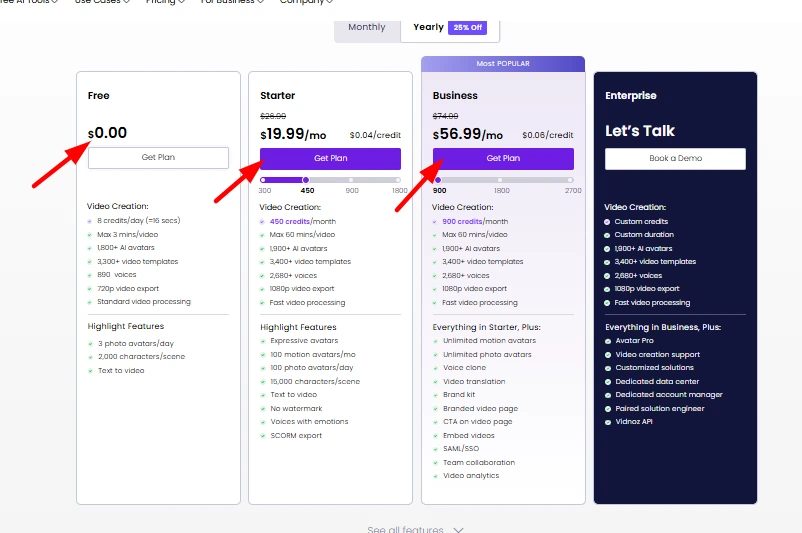
| Monthly Cost | $0 | $26.99 / mo | $74.99 / mo | Custom |
| Yearly Cost | $0 | $19.99 / mo | $56.99 / mo | Custom |
| Video Duration | ~1 min/day (16 secs/credit) | ~15 mins/mo (450 credits) | ~30 mins/mo (900 credits) | Custom |
| Quality | 720p (Watermarked) | 1080p (No Watermark) | 1080p (No Watermark) | 1080p+ |
| Avatars | 1,800+ | 1,900+ | 1,900+ (Unlimited Motion) | All Access |
| Best For | Testing & Hobbyists | Solo Creators & YouTubers | Agencies & Small Teams | Large Orgs |
Understanding the Vidnoz Monthly Subscription vs. Yearly Savings
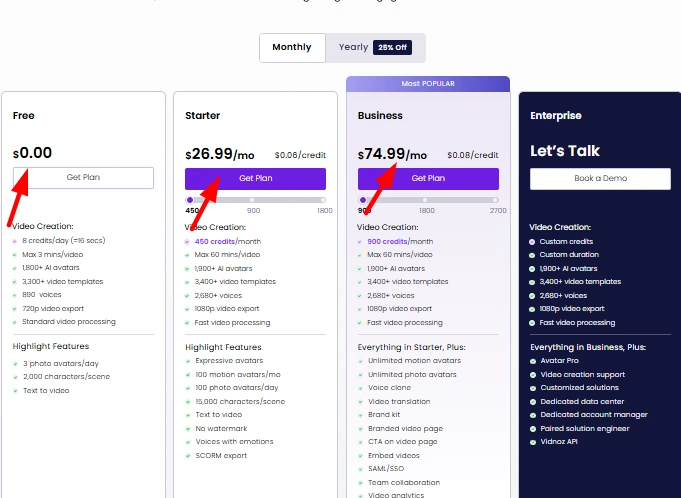
Like most SaaS platforms, Vidnoz wants you to commit. If you look at the Starter Plan, paying monthly sets you back $26.99. However, if you switch to annual billing, that drops to $19.99/month, billed as a lump sum.
My advice: If you are just running a one-off campaign or need a single video for a client, stick to the monthly plan. It costs a bit more upfront but saves you from being locked in. However, if you plan to integrate AI video into your weekly content calendar (for YouTube Shorts or TikTok), the yearly plan saves you about 25%, which is significant over 12 months.
Deep Dive into Vidnoz Subscription Plans & Features
The “devil is in the details,” and with AI tools, the devil is usually in the credit consumption limits. Let’s break down what you actually get.
Vidnoz Free Plan Limitations: Is It Good Enough for Beginners?
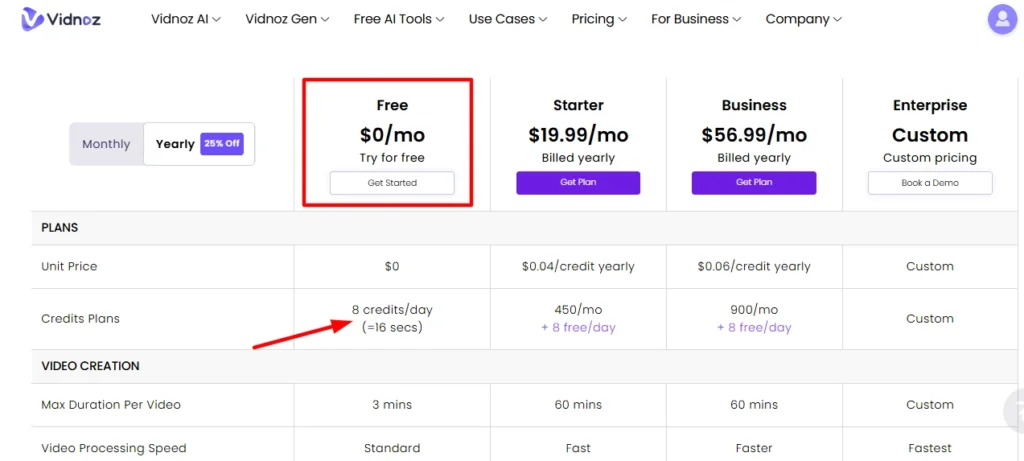
The Free Plan is a great sandbox, but it’s not for production. You get 8 credits per day, which Vidnoz equates to roughly 16 seconds of video. While you can export in 720p, your video will have a Vidnoz watermark, and you are capped at 3 minutes max duration per video.
Is it usable? Yes, for testing. I used it to see if the lip-syncing was accurate on the avatars. But for a professional brand channel? No. The watermark and resolution limits scream “amateur,” so you’ll eventually need to upgrade if you want to be taken seriously.
Vidnoz Starter Plan Price & Features for Solo Creators
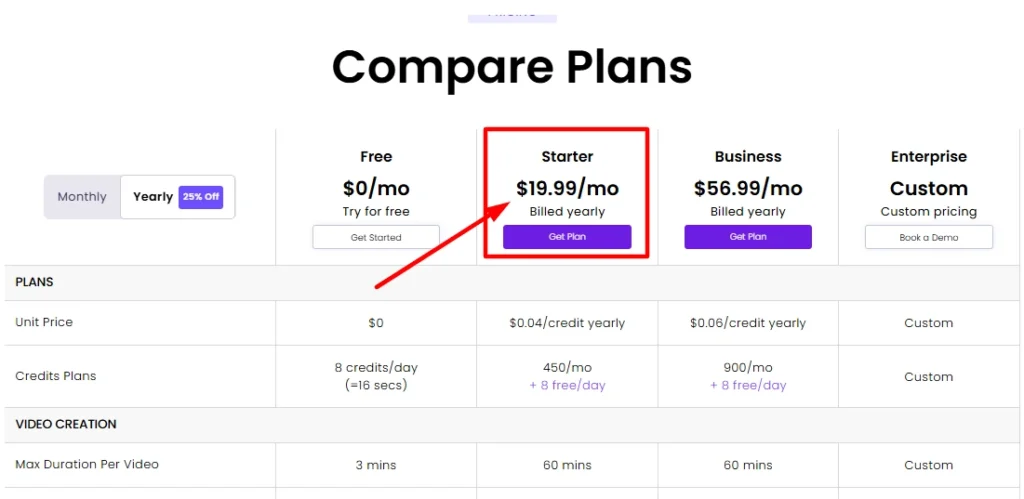
This is the “sweet spot” for most of my readers. At $19.99/month (yearly), you unlock 450 credits per month. In practical terms, since 1 credit is roughly 2 seconds, this gives you about 15 minutes of generated video per month.
You also get:
- 1080p Resolution: Essential for YouTube and LinkedIn.
- No Watermark: Your videos look 100% yours.
- 100 Motion Avatars: These are the avatars that move naturally, not just static heads.
For a solo blogger or a YouTuber making 2-3 short explainer videos a month, this plan is perfect. You gain access to 3,400+ templates, which speeds up your workflow significantly compared to starting from blank canvases.
Vidnoz Business Plan Cost for Growing Teams & Agencies
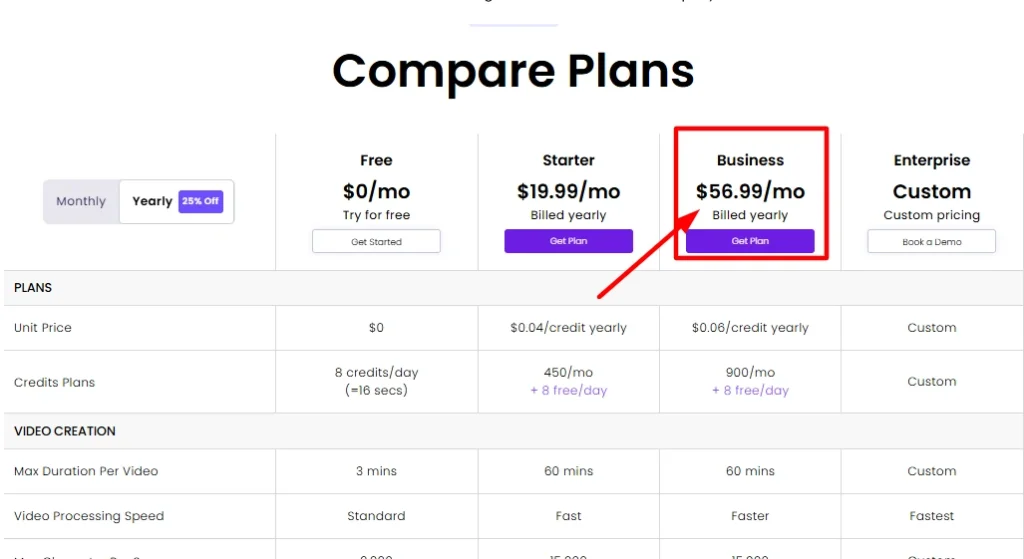
If you are running an agency or a content farm, the Business Plan at $56.99/month (yearly) is the logical step up. The credit limit doubles to 900 credits (approx. 30 mins), but the real value is in the features:
- Unlimited Motion Avatars: No caps on using the best-looking avatars.
- Voice Cloning: This is huge. You can clone your own voice so the avatar sounds like you, building better brand connection.
- Priority Processing: When servers are busy, your videos render first.
This plan also opens up Video Translation and Brand Kits, allowing you to upload your fonts and logos to keep every video consistent with your brand guidelines.
Vidnoz Enterprise Pricing: Custom Solutions for High Volume
For large organizations that need ISO 27001 security compliance or massive credit volumes (beyond 30 mins/month), you’ll need to talk to sales. The Enterprise tier offers dedicated account managers, API access for app integration, and customized avatar solutions. Unless you are generating hundreds of videos a month, you likely won’t need this tier.
Vidnoz Free vs. Paid: Is the Upgrade Worth the Investment?
I often get asked, “Can’t I just use the free version?” The honest answer is: only if you don’t care about branding.
Analyzing Video Minute Limits and Avatar Access
The difference between 1 minute/day (Free) and 15 minutes/month (Starter) is massive in terms of workflow. On the free plan, you are constantly hitting walls. You can’t batch create content. On the paid plans, you can sit down on a Sunday, script out 4 videos, and generate them all at once.
Also, the Avatar Pro features (custom digital twins) are paid add-ons. If you want an avatar that looks exactly like you, you are looking at a separate cost (approx. $299/year), which is standard across the industry for high-fidelity custom models.
The Real Cost of Vidnoz Watermark Removal & Priority Processing
Watermarks kill conversion rates. If you are using these videos for Facebook Ads or a landing page, a “Created by Vidnoz” logo tells your customer you didn’t invest in your marketing. Removing that watermark alone is worth the entry price of the Starter plan.
Additionally, Standard Processing (Free) can be slow during peak hours. Fast Processing (Starter/Business) ensures you aren’t waiting 20 minutes for a 30-second clip to render. Time is money.
Accessing Premium Voices & AI Tools on Paid Tiers
The free plan gives you access to ~890 voices. That sounds like a lot, but the good ones—the emotive, ultra-realistic voices—are often reserved for paid tiers (where you get 2,680+ voices). The paid plans also unlock “Emotions” for voices, allowing your avatar to sound excited, sad, or professional depending on the script.
Vidnoz Pricing Comparison: How It Stacks Up Against Competitors
You shouldn’t buy software in a vacuum. Here is how Vidnoz compares to the big players.
Vidnoz vs. Synthesia Pricing: Which Offers Better Value?
Synthesia is the 800-pound gorilla in the room. Their starter plan usually hovers around $22-$29/month for roughly 10 minutes of video. Vidnoz offers ~15 minutes for $19.99.
- Vidnoz: Cheaper entry point, more minutes.
- Synthesia: Slightly higher avatar fidelity in some edge cases, but much stricter minute caps.
For high-volume creators on a budget, Vidnoz wins on the price-per-minute metric.
Vidnoz AI vs. HeyGen Cost Analysis for 2026
HeyGen is fantastic but expensive. Their “Creator” plan starts around $24/month (billed yearly) for 15 credits (15 mins).
- Comparison: Vidnoz and HeyGen are neck-and-neck on price per minute ($19.99 vs ~$24), but Vidnoz provides a more generous asset library (templates/images) on the lower tier. HeyGen charges a premium for their “instant avatar” features that Vidnoz bundles more accessibly in their business tiers.
Cheapest AI Video Generator Alternatives for Tight Budgets
If Vidnoz is still out of budget, your options are limited. Tools like D-ID or Hour One exist, but they often lack the full video editing suite (text overlays, transitions) that Vidnoz includes. You might find cheaper “talking head” tools, but for a full video editor + avatar generator, Vidnoz is currently one of the most affordable all-in-one platforms.
Exclusive Deal: How to Save Money on Your Subscription
Everyone loves a discount. If you are ready to upgrade, do not pay full price.
Use Coupon Code AIiblogfirst20 for 20% OFF at Checkout
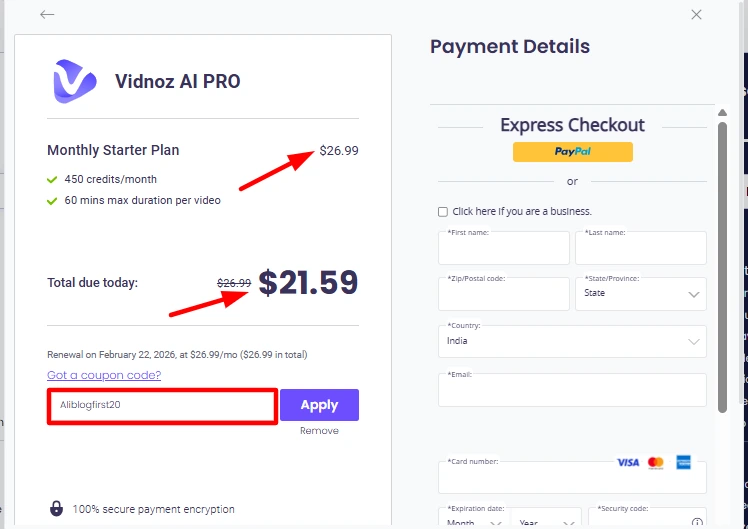
We have secured a deal for our readers. You can get 20% OFF your purchase by using the code AIiblogfirst20. This applies to the subscription plans, effectively dropping the Starter yearly price even lower.
Step-by-Step Guide to Applying Your Vidnoz Promo Code
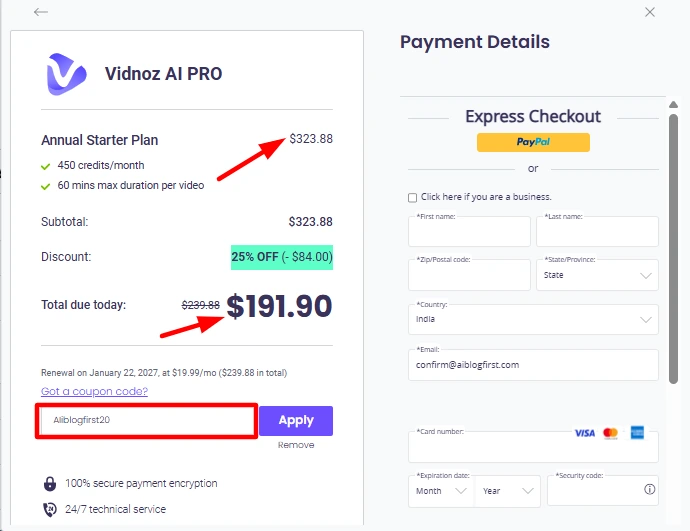
- Go to the Vidnoz Pricing Page.
- Select your plan (Starter or Business) and choose Yearly (for the biggest base discount).
- Click “Get Plan”.
- On the checkout page, look for the “Have a coupon?” text link.
- Enter AIiblogfirst20 and hit Apply.
- Watch the total drop!
Best Time to Buy: Black Friday & Seasonal Vidnoz Discounts
Historically, Vidnoz runs aggressive sales during Black Friday and Cyber Monday, sometimes offering up to 50% off or bundled lifetime deals on add-ons (like the Avatar Pro). However, if you need the tool now, the 20% code is your best bet outside of Q4 holidays.
Final Verdict: Which Vidnoz Pricing Plan Should You Choose?
After testing the platform extensively, here is my verdict:
- Stick to the Free Plan if you are just playing around or need to create internal mockups where watermarks don’t matter.
- Buy the Starter Plan ($19.99/mo yearly) if you are a blogger, affiliate marketer, or YouTuber. The 15 minutes of 1080p video is enough for 4-5 decent-length videos or 15+ Shorts, which is plenty to start monetizing your channel.
- Go for Business only if you need the Voice Cloning feature or have a team that needs to collaborate.
Ready to start creating? Don’t forget to claim your discount.
Frequently Asked Questions About Vidnoz AI Cost (PAA)
Does Vidnoz Offer a Lifetime Deal or One-Time Payment?
Can I Upgrade or Downgrade My Vidnoz Plan Anytime?
Yes. You can start on the Monthly Starter plan to test the waters and then upgrade to the Yearly Business plan once your channel starts growing. The system usually prorates the upgrade cost.
What Happens If I Unsubscribe? (Cancellation Policy)
Is There a Refund Policy for Vidnoz Subscription Plans?
Start Saving on Video Costs: My Final Recommendation
Ultimately, choosing the right Vidnoz plan comes down to whether you are just experimenting or building a legitimate content asset. From my experience, the Starter package offers the best balance of features and affordability for most creators, especially when you factor in the annual savings over competitors like Synthesia.
While the free tier is great for testing the waters, the watermark removal and HD exports in the paid plans are non-negotiable if you want to drive real engagement. If you are ready to scale your video production, grab that discount code and give it a shot. Drop a comment below if you are still unsure about which tier fits your specific workflow.