Hi, this is Nisha. Video content keeps growing every month, and turning blog posts or scripts into videos still feels confusing for many creators.
So many AI video tools promise fast results, but many reviews sound copied or exaggerated. Real experiences are hard to find online.
After using Pictory AI for six months on my own blog, I noticed patterns many guides skip — small details that matter for marketers, beginners, and busy creators trying to turn text into video content.
This piece looks closely at Pictory AI Review from a practical angle, covering text-to-video features, editing tools, and real usage experience — without rushing into conclusions too early.
What Is Pictory AI? (Overview)

Pictory AI is a text-to-video generator built for people who don’t want to touch a traditional editing timeline. You feed it a script, a blog URL, a PPT, or even an audio file, and it builds a full video around that input — visuals, captions, and voiceover included.
It’s not trying to replace Premiere Pro or Final Cut. It’s built for a different job: turning written or spoken content into publish-ready video, fast. Marketers repurposing blog posts, YouTubers making short-form clips, and teams building training videos all use it for roughly the same reason — speed over precision.
Over 20,000 companies reportedly use the platform, and it holds a 4.7/5 rating on G2, which is respectable for a category that’s gotten crowded over the last two years.
Save 20% on Pictory AI Today
Use code CABF20 at checkout to get 20% off your Pictory AI subscription plan instantly — limited time offer.
How Pictory AI Works — Text to Video, URL to Video, and More
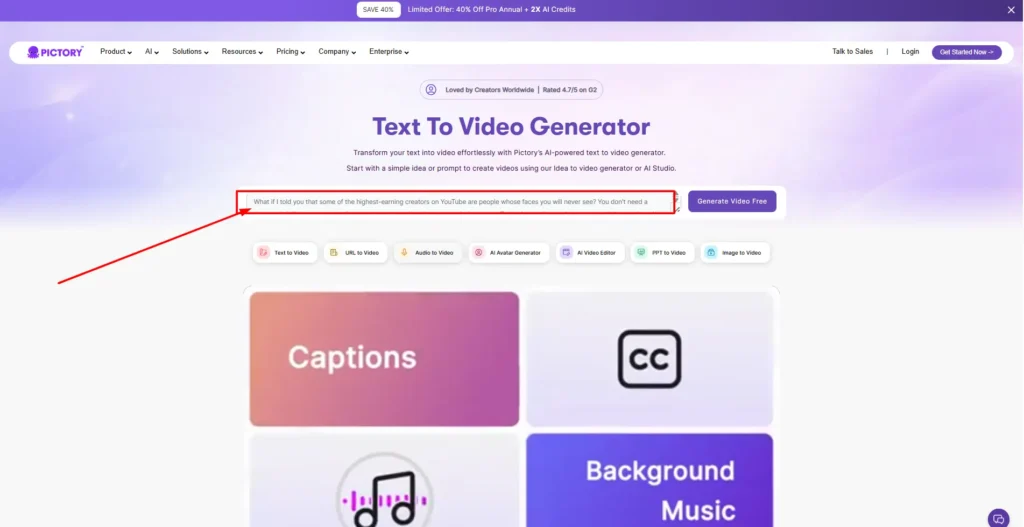
Here’s the part most reviews rush past. Pictory doesn’t just do “text to video.” It has several distinct workflows, and picking the right one matters more than people expect.
- Text to Video – paste a script or article, get a scene-by-scene video draft.
- URL to Video – drop in a blog link and Pictory pulls the content automatically.
- PPT to Video – converts slide decks into narrated video presentations.
- Audio to Video – turns podcast or voice recordings into video content.
- Image to Video – animates a single image using AI motion models.
- AI Video Editor – edits existing footage by editing the transcript text.
Once you pick a workflow, Pictory generates a storyboard. You’re not starting from a blank canvas — you’re refining something the AI already drafted, which is where most of the time savings actually come from.
Pictory AI Key Features Explained
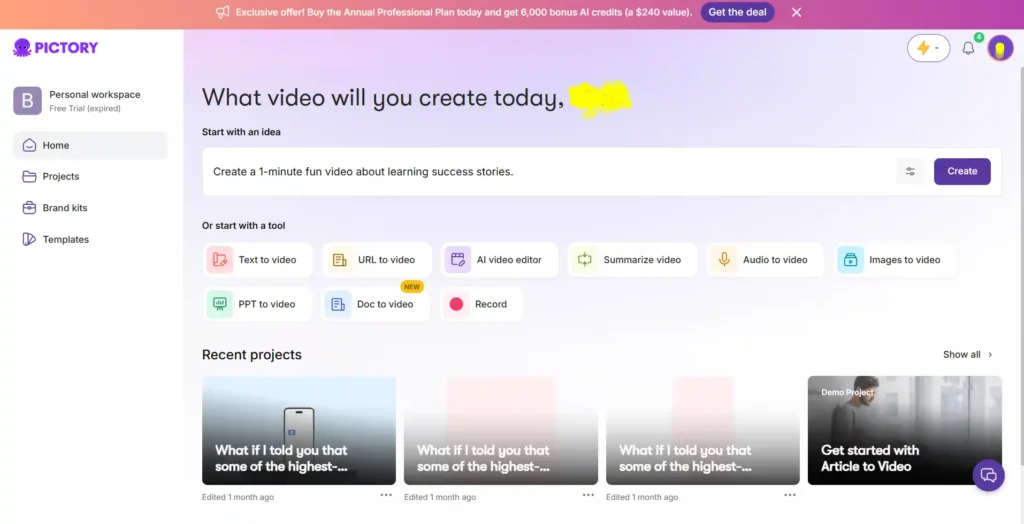
AI Script Generator
If you’re staring at a blank page, this tool turns a rough idea into a structured video script in seconds. It’s not going to write your final copy, but it gives you a usable starting point, which is genuinely helpful on days when writer’s block hits.
AI Studio (Text to Image & Image to Video)
This is Pictory’s generative layer. Instead of relying only on stock footage, you can generate custom images or short video clips from a text prompt using models like Veo 3.1, Pixverse, and Flux. It’s a newer addition, and it noticeably closes the gap between Pictory and tools built purely around AI-generated visuals.
AI Avatars in Pictory
Digital presenters that narrate your script on screen. Useful if you want a “face” for your brand without filming yourself. The avatar library has expanded, though it’s still not as deep as avatar-first platforms.
AI Voice Generator (Powered by ElevenLabs)
Standard AI voices are included on every plan, but the ElevenLabs voices — the more natural-sounding ones — are capped by minutes depending on your tier. Starter gets 60 minutes a year, Professional jumps to 120, and Team goes up to 240.
Auto Captions and Subtitles
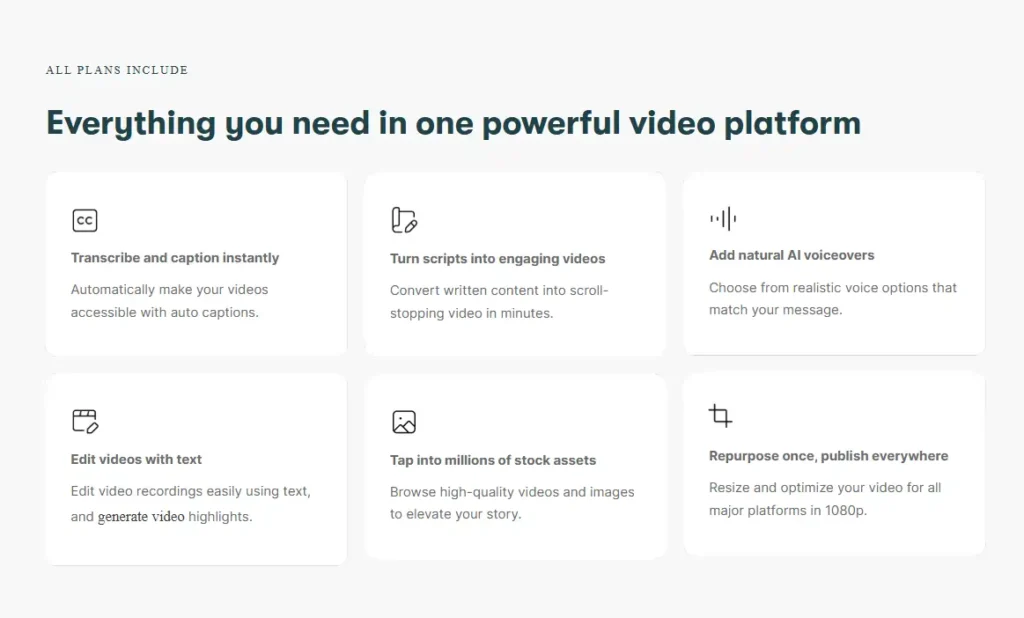
Captions generate automatically and can be exported in SRT, VTT, or plain text. For social content, this alone saves a real chunk of editing time.
Brand Kit and Customization
You can lock in your logo, brand colors, and fonts so every video looks consistent without manually re-adjusting each project.
Stock Media Library (Getty Images & Storyblocks)
Starter plans get access to 5 million assets; Professional and Team unlock 18 million, including Getty Images. For anyone making frequent content, this difference is bigger than it sounds — Starter’s library runs out of “fresh” options faster than expected.
Pictory AI Pricing Breakdown (Starter, Professional, Team, Enterprise)
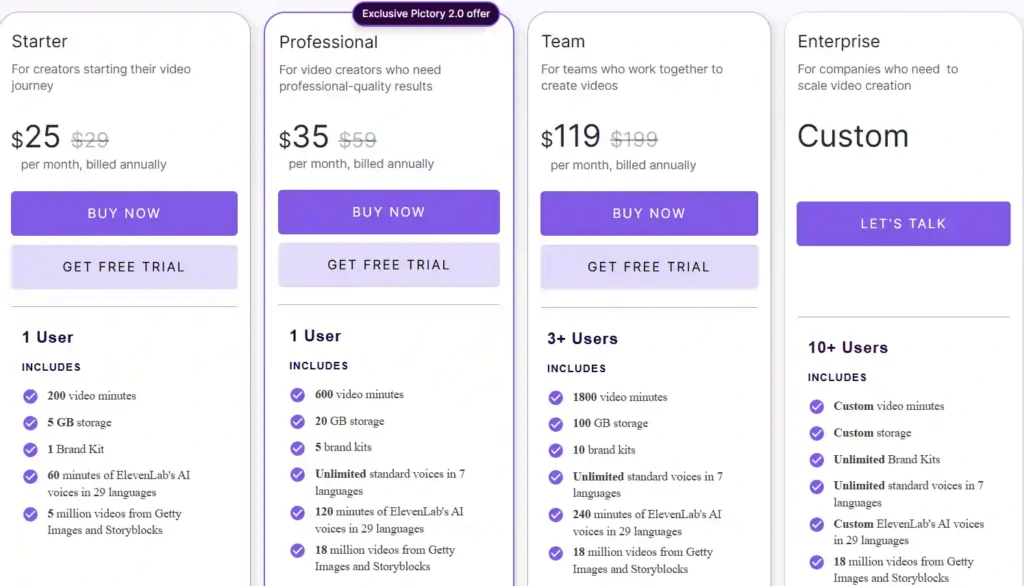
Pricing is where most Pictory AI reviews get vague. Here’s the actual annual-billing breakdown as of 2026:
| Plan | Price/Month (Annual) | Video Minutes/Year | Storage | Brand Kits | ElevenLabs Voice Minutes |
|---|---|---|---|---|---|
| Starter | $25 | 2,400 | 5 GB | 1 | 60 min |
| Professional | $35 | 7,200 | 20 GB | 5 | 120 min |
| Team | $119 | 21,600 | 100 GB | 10 | 240 min |
| Enterprise | Custom | Custom | Custom | Unlimited | Custom |
A few things worth flagging that aren’t always obvious on the pricing page:
- Starter is capped at 5-minute maximum video length, while Professional and Team allow up to 30 minutes.
- AI Credits (used for generative images, avatars, and AI Studio videos) are separate from video minutes and run out faster than people expect if you’re using avatars heavily.
- Monthly billing costs noticeably more than annual — Starter jumps from $25 to $29, Professional from $35 to $59.
Pictory AI Free Trial — What You Actually Get
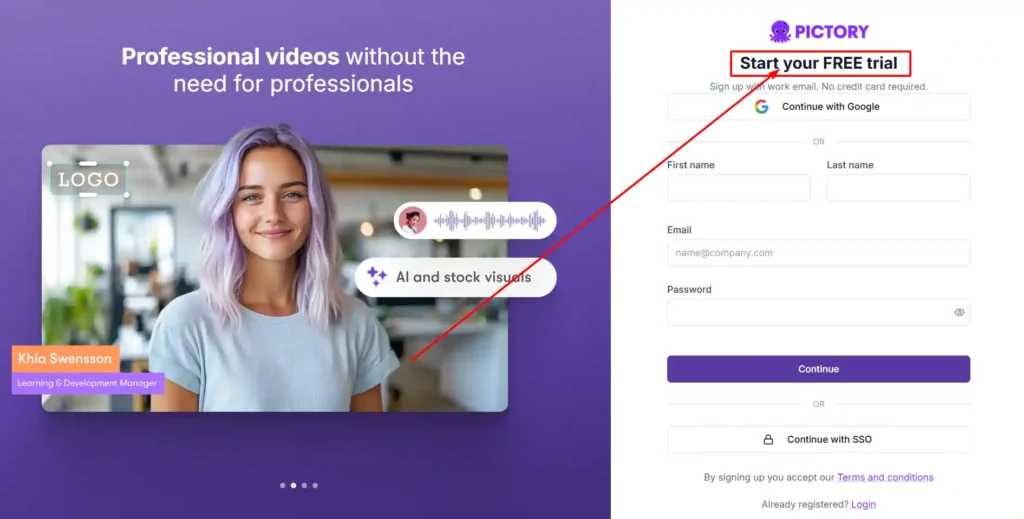
Pictory offers a 14-day free trial with no credit card required. During the trial, you’re working with limited video minutes (around 15) and a maximum video length of 5 minutes, which is enough to test the workflow but not enough to judge output quality at scale.
My honest take: the trial is fine for checking if the interface makes sense to you. It’s not enough to fairly test voice quality, avatar realism, or how the tool handles longer scripts. Budget for at least one paid month if you’re making a real decision.
Pictory AI Pros and Cons
Pros
- Genuinely fast turnaround from script to draft video.
- Auto captions save real editing time.
- Large stock library on Professional and above.
- AI Studio adds generative visuals without leaving the platform.
- SOC 2 and GDPR compliant, which matters for business use.
Cons
- Starter plan’s 5-minute video cap feels restrictive fast.
- Voice cloning and custom avatars are Professional-tier features, not available on Starter.
- AI Credits and video minutes are tracked separately, which gets confusing.
- Visual style still leans template-driven compared to fully generative competitors.
Who Should Use Pictory AI? (Creators, Marketers, Educators, Teams)
Pictory fits best for people repurposing existing content rather than building videos from scratch creatively.
- Marketers turning blog posts into promotional clips
- Educators converting lesson scripts or slides into narrated lessons
- YouTubers and social creators making short-form content from longer material
- Small teams that need consistent branded video without hiring an editor
If your priority is highly cinematic, hand-crafted visuals, Pictory probably isn’t the right primary tool — it’s built for volume and speed, not artistic control.
Pictory AI Use Cases
Marketing Videos with Pictory AI
Ad creatives, product explainers, and campaign clips can be built from a simple prompt or existing product copy, cutting down the need for a dedicated video team on every small campaign.
Educational and Training Videos
Internal training and onboarding content benefits from Pictory’s structure — narration, visuals, and pacing get handled automatically, which matters when you’re producing dozens of modules.
Social Media Content Creation
Auto-resizing for vertical, square, and horizontal formats means one script can become content for YouTube, TikTok, and Instagram without rebuilding the video three times.
Pictory AI Real User Reviews (G2, Capterra, Feefo)
Across G2, Capterra, and Feefo, common themes show up repeatedly in user feedback: faster production time, an easier learning curve for beginners, and strong value for teams making frequent branded content. Several reviewers specifically mention the storyboard editor and auto-captioning as the features they rely on most.
The criticism that surfaces most often relates to the visual style feeling template-based on lower tiers, and a learning curve around understanding AI Credits versus video minutes.
Pictory AI vs Competitors
| Platform | Best For | Key Difference vs Pictory |
|---|---|---|
| InVideo | Template-heavy social videos | More templates, less script-to-video automation |
| Descript | Podcast and video editing by transcript | Stronger audio editing, weaker text-to-video generation |
| Steve AI | Animated explainer videos | Focuses on animation/cartoon style, not blog repurposing |
| Veed | Quick social edits and captions | Lighter feature set, less suited for long-form scripts |
Pictory’s real edge is the breadth of input types it accepts — script, URL, PPT, audio, and images all feed into the same workflow, which most competitors don’t match in one platform.
Pictory vs InVideo
InVideo leans more on templates and manual customization. Pictory automates more of the scene-building process, which suits people who want speed over granular design control.
Pictory vs Descript
Descript is stronger for podcast-style editing where you’re trimming existing audio/video by editing text. Pictory is built more for generating new video from written content.
Pictory vs Steve AI
Steve AI focuses heavily on animated and cartoon-style explainer videos. Pictory sticks to a more realistic, stock-footage-based visual style.
Pictory vs Veed
Veed is lighter and faster for quick caption-and-trim jobs. Pictory handles longer, more structured video projects better.
Pictory AI Limitations You Should Know
- Avatar library, while growing, is still smaller than dedicated avatar platforms
- No fully custom AI-generated video scenes on Starter — you’re relying on stock footage unless you upgrade
- Storage limits (5GB on Starter) fill up faster than expected once you’re producing regularly
- No permanent free plan — once the trial ends, you need a paid subscription to keep creating
Pictory AI Alternatives Worth Considering
If avatars and generative video are your main priority, it’s worth comparing Pictory against avatar-first platforms before committing to an annual plan. You can also explore our guide on AI video editing alternatives for a side-by-side breakdown of pricing and feature depth across the category.
Pictory AI FAQs
Is Pictory AI actually worth the money?
For anyone regularly repurposing written content into video, the time saved on editing and captioning tends to justify the Professional tier. Starter is fine for testing but limiting for real production.
Does Pictory AI have a free plan?
No permanent free plan exists — there’s a 14-day free trial with limited minutes and no credit card required.
What is Pictory AI used for?
Converting scripts, blog posts, presentations, audio, and images into edited, publish-ready videos.
Is Pictory AI good for YouTube videos?
Yes, particularly for shorts and repurposed long-form content, though the 5-minute cap on Starter limits longer uploads.
What is the difference between Pictory and InVideo?
Pictory automates scene-building from text more heavily; InVideo relies more on manual template customization.
Does Pictory offer a discount for annual billing?
Yes, annual billing saves roughly 20–40% compared to monthly plans across all tiers.
Can Pictory AI generate videos from a blog post?
Yes, through the URL to Video workflow, which pulls content directly from a webpage link.
Is there a better alternative to Pictory AI?
It depends on the use case — avatar-heavy or fully generative video needs may be better served elsewhere, while blog-to-video repurposing is where Pictory holds a clear edge.
How many videos can I make on Pictory’s free trial?
The trial includes around 15 video minutes total, capped at 5-minute video length.
Does Pictory AI have hidden costs or add-on fees?
AI Credits and premium voice minutes are tracked separately from video minutes, which can catch new users off guard if usage isn’t monitored.
Final Verdict — Is Pictory AI Worth It in 2026?
Pictory AI does what it promises: it turns written and spoken content into video without needing editing skills. The Professional plan is where the platform starts to feel genuinely capable, while Starter works best as a testing ground rather than a long-term production plan.
Whether it’s “worth it” really depends on how often you’re producing video and how much you value speed over full creative control. For repurposing content at volume, it holds up. For fully custom, cinematic output, it’s not the strongest option on the market right now.