Hey lovely readers, it’s Nisha! If you’ve been using Pictory AI like I have for the past 6 months, you’ve probably hit that moment where the pricing page just stares back at you, and you’re not sure what to click.
You open Pictory’s pricing page, ready to subscribe, and then it happens. Monthly or annual? The numbers look different every time you check, and one option seems to save more, but it’s not clear how much, or if it’s even the right plan for how you actually use the tool. Creators ask this constantly, and so do marketers and small business owners trying to budget properly.
Pictory AI annual vs monthly plans isn’t just about price tags. It’s about video minutes, renewal terms, and what happens if your needs change halfway through the year. Before you pick a billing cycle, there are a few details most people miss, and they can quietly affect your total cost.
Pictory AI Coupon Code: Save 20% Instantly
Use code CABF20 at checkout to get 20% off any Pictory AI plan, including annual subscriptions.
What Is Pictory AI and How Do Its Plans Work?

Pictory is an AI video generator that turns scripts, blog posts, and URLs into finished videos with captions, voiceovers, and stock footage built in. It’s mostly aimed at people who need to publish video regularly but don’t have a production team behind them — solo creators, marketing teams, course builders, that kind of crowd.
Every plan runs on the same core idea: you get a monthly allotment of video export minutes, storage, AI credits, and access to stock libraries, and the allotment grows as you move up tiers.
Pictory AI Pricing Structure Explained
Pricing is billed two ways — monthly or annually — and the annual option is priced lower per month in exchange for paying the full year upfront. That part’s standard for SaaS tools. What trips people up with Pictory specifically is that the company also runs limited-time promotional pricing on top of its regular annual rate, so the number you see can shift depending on when you land on the page.
Starter, Professional, Team, and Enterprise Plans Overview
There are four tiers:
- Starter — built for individual creators just getting going.
- Professional — the most commonly recommended plan, with custom avatars and voice cloning.
- Team — for 3+ users working from a shared workspace.
- Enterprise — custom pricing, SSO, dedicated support, for 10+ seat organizations.
Pictory AI Annual vs Monthly Plans: Full Price Comparison
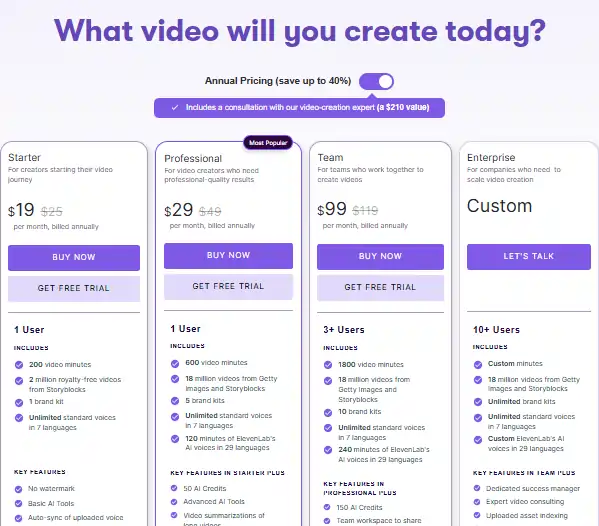
Here’s the standard list pricing, billed annually versus billed monthly, based on Pictory’s published rates:
| Plan | Monthly Billing | Annual Billing (per month) | Annual Billing (per year) |
|---|---|---|---|
| Starter | $29/month | $29/month | $348/year |
| Professional | $59/month | $59/month | $708/year |
| Team | $199/month | $199/month | $2,388/year |
Wait — that table looks odd, right? That’s because Pictory’s “annual” rate and “monthly” rate are listed at the same per-month number on their standard pricing table. The real annual savings shows up through Pictory’s running promotion, which is where the confusion usually starts.
Pictory Starter Plan: Annual vs Monthly Cost
At the time of writing, Pictory is running a promotional annual rate of $25/month for Starter (down from the $29 base rate), billed annually at roughly $300/year. The standard monthly plan, when available, runs at the same $29/month rate without a long-term commitment.
Pictory Professional Plan: Annual vs Monthly Cost
This is the plan most solo creators and marketers land on. The promotional annual rate currently sits at $35/month ($420/year), against a standard monthly-equivalent rate of $59/month ($708/year if paid month to month for a full year).
Pictory Team Plan: Annual vs Monthly Cost
Team’s promotional annual rate is $119/month ($1,428/year), compared to $199/month on standard monthly billing ($2,388/year).
How Much Do You Save With Pictory’s Annual Plan?
Going by the current promotional pricing, here’s the gap:
| Plan | Monthly Cost (×12) | Promo Annual Cost | Approx. Savings |
|---|---|---|---|
| Starter | $348 | $300 | ~14% |
| Professional | $708 | $420 | ~41% |
| Team | $2,388 | $1,428 | ~40% |
A quick honest note here: promotional pricing changes. I’ve seen Pictory’s discount labeled anywhere from 20% to 40% off depending on when a page was published. Always check the live pricing page before you buy — don’t take any single article’s percentage as gospel, mine included.
What’s Included in Each Pictory AI Plan
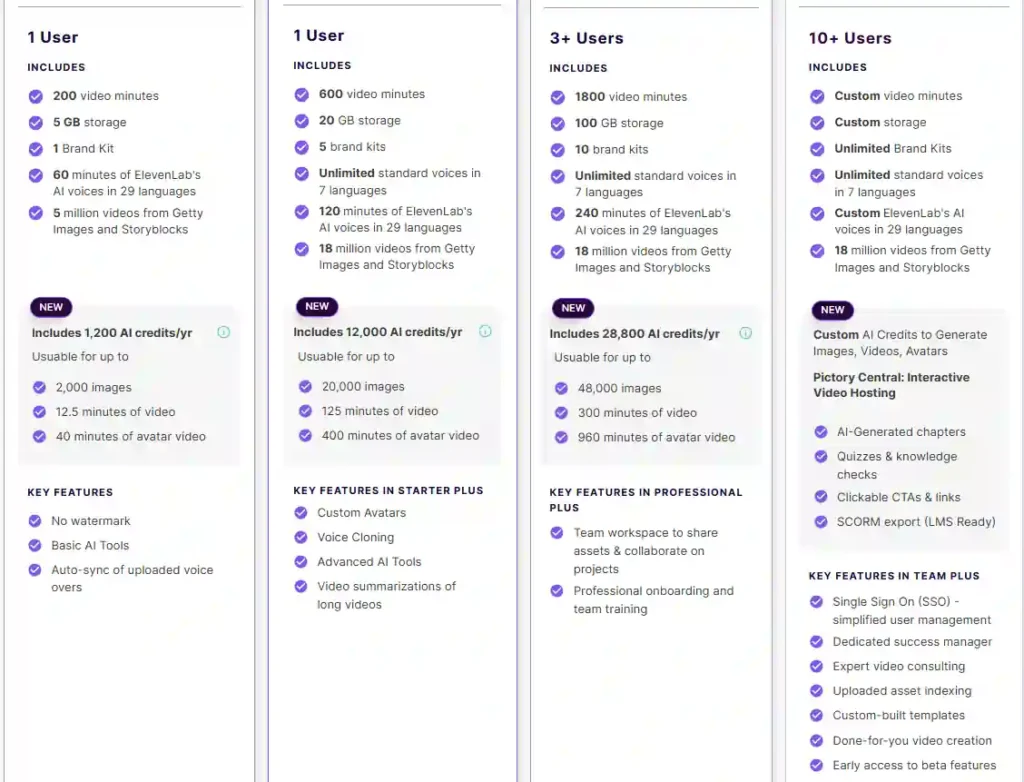
Price only tells half the story. The real difference between tiers is usage capacity.
Video Minutes and Storage Limits by Plan
- Starter: 200 video minutes/month, 5 GB storage.
- Professional: 600 video minutes/month, 20 GB storage.
- Team: 1,800 video minutes/month, 100 GB storage.
If you’re publishing a couple of short-form videos a week, Starter probably covers you. If you’re producing longer YouTube content or working across multiple client accounts, Professional is usually where people land.
AI Credits: Images, Video, and Avatar Generation
Each plan includes a yearly pool of AI credits for generating images, AI video clips, and avatar videos. Professional includes roughly 12,000 AI credits per year on the annual plan — enough for around 20,000 images or a few hundred minutes of avatar video, depending how you split usage.
ElevenLabs AI Voiceovers and Voice Cloning Access
Starter gets 60 minutes of ElevenLabs AI voice generation monthly. Professional and Team bump that to 120 and 240 minutes, and only Professional and above unlock voice cloning — useful if you want a consistent narrator voice across a whole video series.
Getty Images and Storyblocks Stock Library Access
Starter taps into about 5 million stock assets. Professional and Team open access to the full 18-million-asset library across Getty Images and Storyblocks, which matters if you’re making client-facing or brand-sensitive content.
Brand Kits and Team Collaboration Features
Starter allows 1 brand kit. Professional allows 5. Team allows 10, plus a shared team workspace — relevant only if multiple people are publishing under one account.
Pictory AI Annual Plan Benefits Beyond the Price
The annual plan isn’t just cheaper per month — it bundles in a few extras that monthly subscribers don’t get.
Free Video-Creation Expert Consultation ($210 Value)
Annual subscribers get a one-on-one consultation with a Pictory video strategist, which is a nice addition if you’re new to video production and want a second opinion on your workflow before you commit a year of content to it.
Priority Support and Onboarding for Annual Subscribers
Professional and Team annual plans also unlock the YouTube Mastery and Video Marketing courses — bonus training that’s locked out entirely on monthly billing.
Pictory AI Monthly Plan: When It Makes More Sense
Annual isn’t automatically the smarter choice for everyone. Monthly billing has a real place.
Best For Short-Term Projects or Testing the Platform
If you have a single campaign, a seasonal project, or you’re just not sure Pictory fits your workflow yet, paying monthly limits your downside. You’re not locking in a year of spend on a tool you’ve used for three weeks.
Flexibility to Cancel Anytime Without Long-Term Commitment
Pictory doesn’t offer refunds on either billing cycle — that part’s worth repeating because people assume otherwise. But monthly plans let you simply stop paying going forward, while annual plans hold you to the full year regardless of how much you actually use the platform.
Pictory AI Free Trial: Try Before You Commit
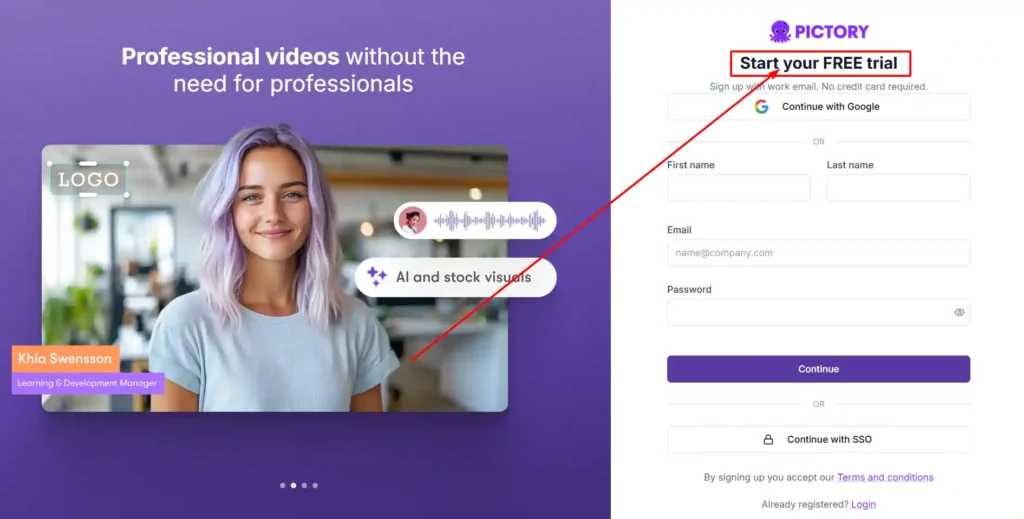
Before you commit to either cycle, there’s a middle step worth taking.
What’s Included in the 14-Day Free Trial
The free trial includes 3 video projects and 15 video minutes, enough to test the actual editing workflow, voiceover sync, and stock library quality before any money changes hands.
How to Switch From Free Trial to Annual or Monthly Plan
Upgrading is a straightforward toggle on the pricing page between monthly and annual billing, then selecting a plan tier. No separate signup is needed — your trial account carries over.
Pictory AI Annual vs Monthly: Which Plan Should You Choose?

This depends mostly on how predictable your video output is.
Best Plan for Beginners and Solo Creators
If you’re newer to video and unsure how much you’ll actually produce monthly, start with the monthly Starter plan. You can always upgrade to annual once you know your usage pattern.
Best Plan for Marketers and Content Agencies
Marketers running consistent campaigns typically get the most value from Professional on annual billing — the AI credit volume and stock library access tend to justify the year-long commitment if you’re publishing weekly.
Best Plan for Teams and Businesses
For 3+ person teams producing video regularly, Team’s annual rate works out significantly cheaper than paying month to month, and the shared workspace alone is worth the structure.
Pictory AI Refund Policy and Billing FAQs
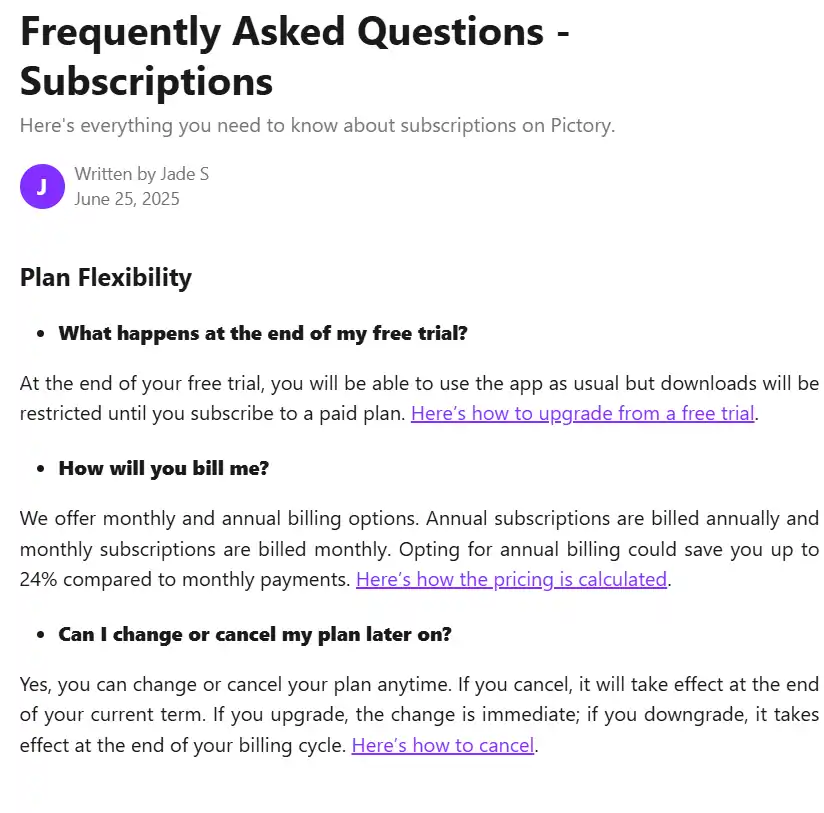
Does Pictory Offer Refunds on Annual Plans?
No. Pictory doesn’t offer refunds on either monthly or annual subscriptions. You can cancel anytime to stop future renewals, but you won’t get money back for the current billing period.
Do Unused Video Minutes Roll Over?
No. Your usage quota resets on the first of each month regardless of how much you used the month before.
What Happens to Your Videos If You Cancel?
You keep every video you’ve already downloaded. But anything still stored in your Pictory account gets permanently deleted once you cancel, so download your projects before you close the subscription.
Frequently Asked Questions About Pictory AI Annual vs Monthly Plans
Is the Pictory Annual Plan Worth It?
If you’re producing video consistently across the year, the annual plan’s per-month rate is meaningfully lower, plus you unlock bonus courses and a strategy consultation. If your usage is unpredictable, monthly avoids locking in spend you might not use.
Can I Switch From Monthly to Annual Later?
Yes — you can upgrade your billing cycle at any point from your account dashboard.
Does Pictory Have a Non-Profit Discount?
Yes. Non-profits can request a discount directly through Pictory’s in-app support chat.
Final Verdict: Pictory AI Annual vs Monthly Plans
Neither billing cycle is objectively “better” — it depends on whether your video output is steady enough to justify a year-long commitment. If you already know Pictory fits your workflow and you’ll be publishing regularly, annual billing is the lower-cost path.
If you’re still testing the waters, start monthly, or better yet, run the 14-day free trial first and let actual usage guide the decision.