Hello my sweet audience! I’m Nisha from AIBlogFirst, and I have been using Pictory AI for the last six months. I know you visit our blog daily for updates like the OpenArt AI coupon code. My responsibility is to respect your time and only share AI tools that bring real success to your daily life.
Upgrading video software subscriptions often feels confusing. Committing to a yearly billing cycle can seem like a blind gamble, especially when hidden feature limits exist. You might wonder if paying upfront actually saves money or simply traps you.
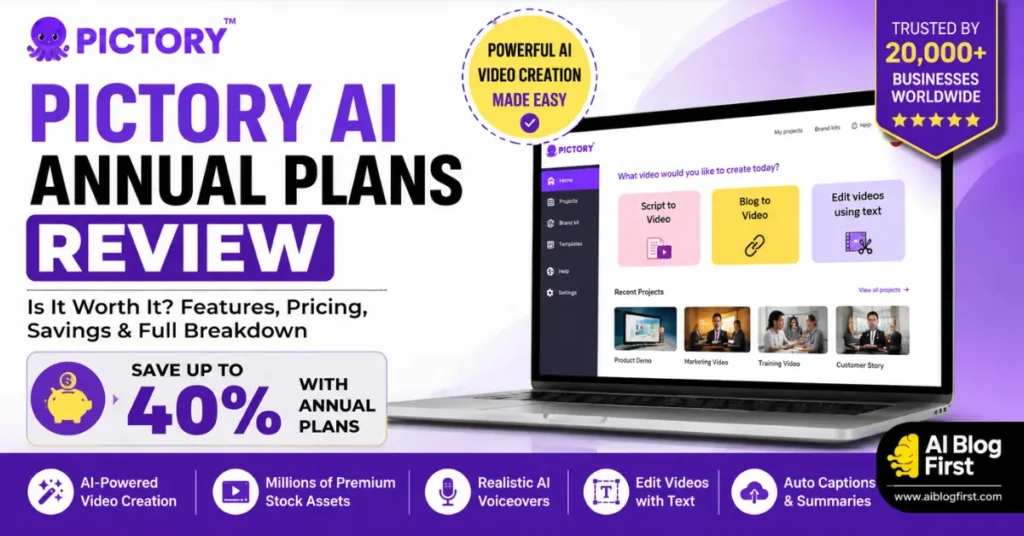
To give you clarity, today I have a special Pictory annual plans review. Let’s explore whether those yearly rates genuinely benefit your content workflow.
Why Switching to a Yearly Plan Saves You Up to 40%
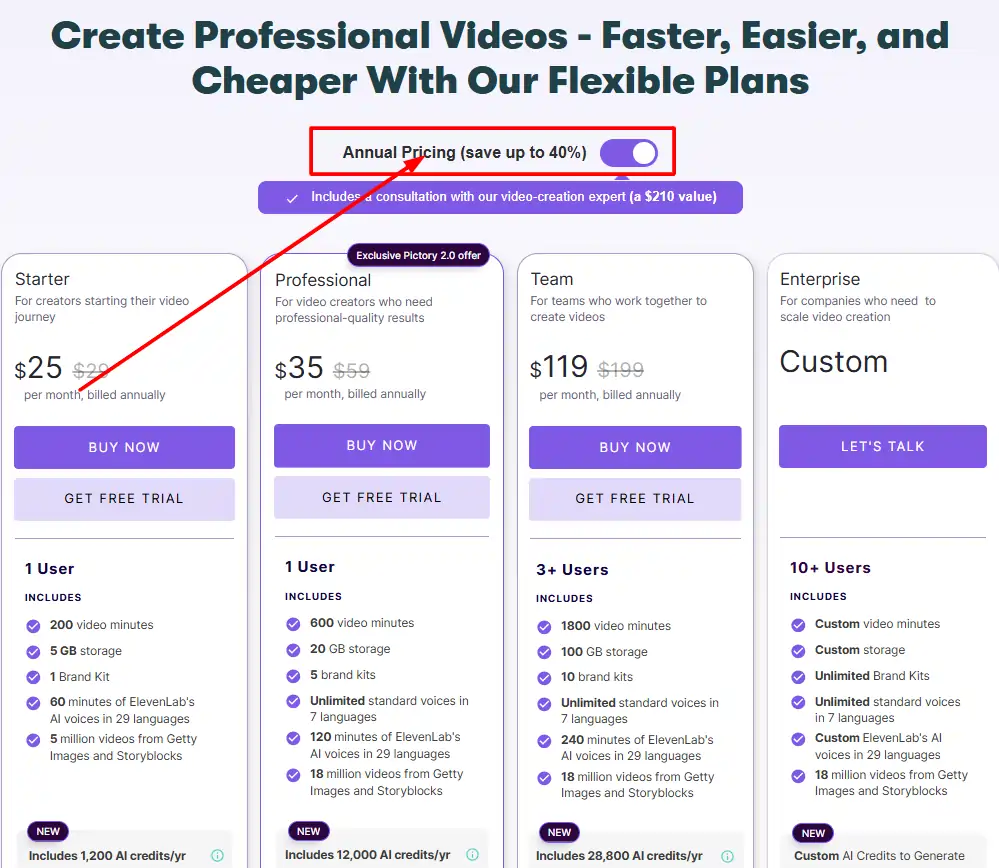
Let’s cut to the chase—the most compelling reason to look at the annual pricing is the long-term discount. When you buy into a month-to-month subscription, you are paying a premium for flexibility. By switching to an annual billing cycle, Pictory knocks off a significant chunk of the price, allowing you to save up to 40% across their standard tiers.
If you are a serious content creator or agency making videos every single week, that 40% discount isn’t just pocket change. It can be redirected into buying better microphones, running ads, or paying for other AI tools like OpenArt.
CABF20 Coupon for Pictory AI
Get 20% off any Pictory AI plan — exclusive discount code for AIBlogFirst readers today.
Pictory Annual Plans Review: Detailed Breakdown of Every Tier
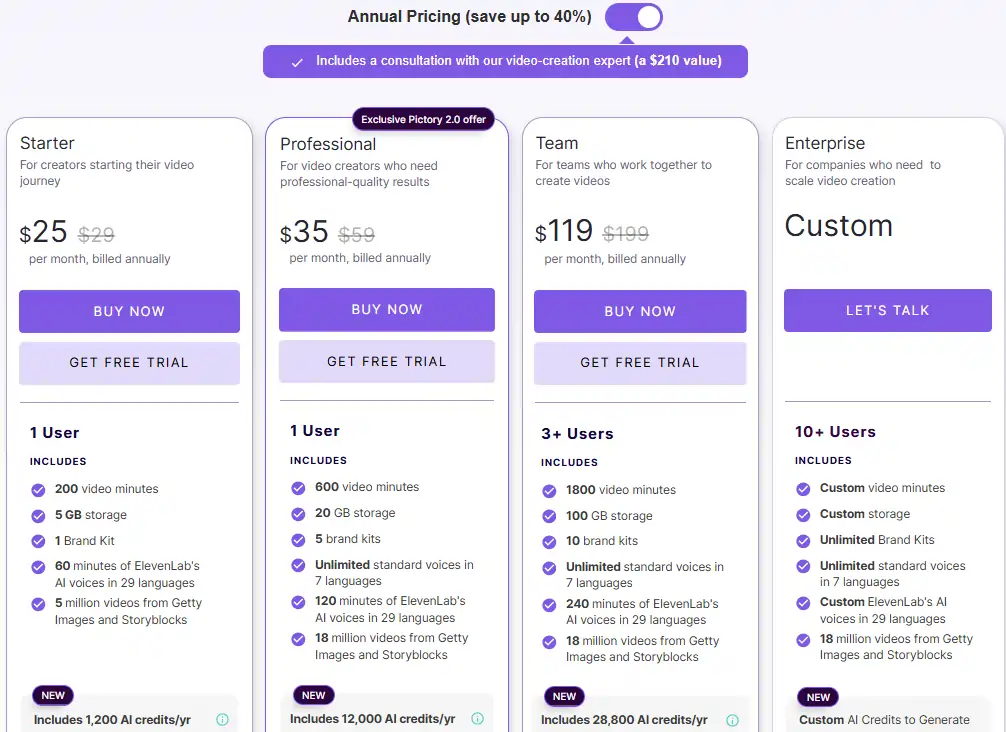
Choosing the right plan means understanding exactly what you get for your upfront investment. Here is how the annual tiers break down for different user needs.
Starter Plan Annual Review: Best for New Creators ($25/month)
The Starter plan, billed annually at $300 (which breaks down to $25 per month), is built for beginners. If you are just starting a faceless YouTube channel or turning occasional blog posts into video shorts, this is your entry point.
You get 200 video minutes per month, 1 brand kit, and access to 5 million stock assets from Storyblocks and Getty Images. The catch? You are limited to 720p and 1080p exports and only get 60 minutes of the hyper-realistic ElevenLabs AI voices per month. It’s a solid, affordable choice, but heavy users will hit these caps quickly.
Professional Plan Annual Review: The Sweet Spot for YouTubers ($35/month)
Billed annually at $420 ($35 per month), the Professional plan is where Pictory really opens up. This is the tier I personally recommend for anyone treating their content like a business.
You jump up to 600 video minutes per month and unlock 120 minutes of ElevenLabs voices. More importantly, you get access to 18 million premium stock videos and the crucial voice cloning feature. If you want your AI videos to sound exactly like you without recording fresh audio every time, this annual upgrade is a necessity.
Team Plan Annual Review: For Collaborative Agencies ($119/month)
At $1,428 per year ($119/month), the Team plan is specifically for marketing teams and mid-sized agencies. You get 3+ user seats, 1,800 video minutes, and 240 minutes of ElevenLabs voices.
What makes the annual Team plan worth the heavy price tag? The collaboration features. You get a dedicated team workspace to share assets, plus professional onboarding. If you are running multiple clients and need your editors and writers working inside the same ecosystem, this plan removes the friction of file sharing.
Enterprise Plan: Custom Annual Solutions for Big Brands
For massive agencies processing thousands of minutes of video, Pictory offers custom Enterprise pricing. This tier brings in Single Sign-On (SSO), dedicated account managers, and custom-built templates. Since pricing is tailored, you have to contact their sales team, but if you need to automate video creation across a massive organization, the customized limits are invaluable.
What Exclusive Features Do the Pictory Annual Plans Unlock?
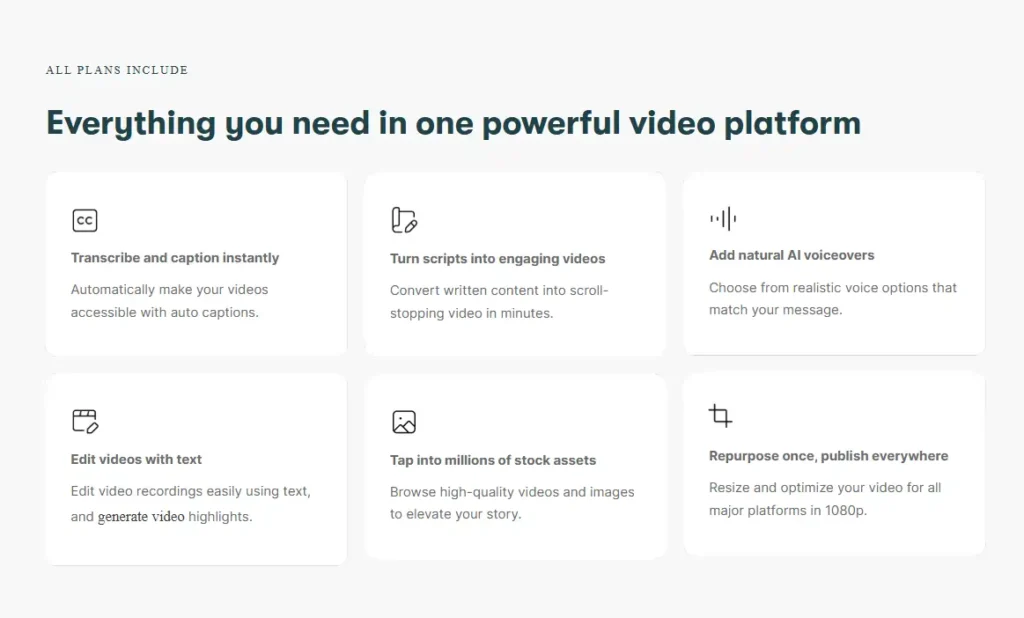
It’s not just about video minutes. The latest updates to Pictory have introduced several advanced AI tools that make the higher-tier annual plans highly attractive.
Generative AI Credits for Images, Videos, and Avatars
Pictory now includes a set amount of AI credits yearly (1,200 on Starter, 12,000 on Pro, and 28,800 on Teams). These are massive for creating custom B-roll when the stock library doesn’t have exactly what you need. You can generate completely unique images and short video clips directly inside the editor.
Hyper-Realistic ElevenLabs Voices and Voice Cloning
The integration with ElevenLabs means you no longer have to pay for a separate voiceover tool. The Starter plan gives you 60 minutes of these premium voices, while Pro doubles it to 120. Furthermore, the Pro and Team plans allow you to create custom voice clones, meaning the AI can speak in your exact tone and cadence.
Unrestricted Access to Getty Images & Storyblocks
Visual quality makes or breaks audience retention. While the Starter plan gives you a respectable 5 million assets, the Professional and Team plans unlock a massive 18 million assets from both Getty Images and Storyblocks. This drastic increase in variety helps prevent your videos from looking like every other AI-generated channel on the internet.
Pictory Monthly vs. Annual Billing: Which Is Better for You?
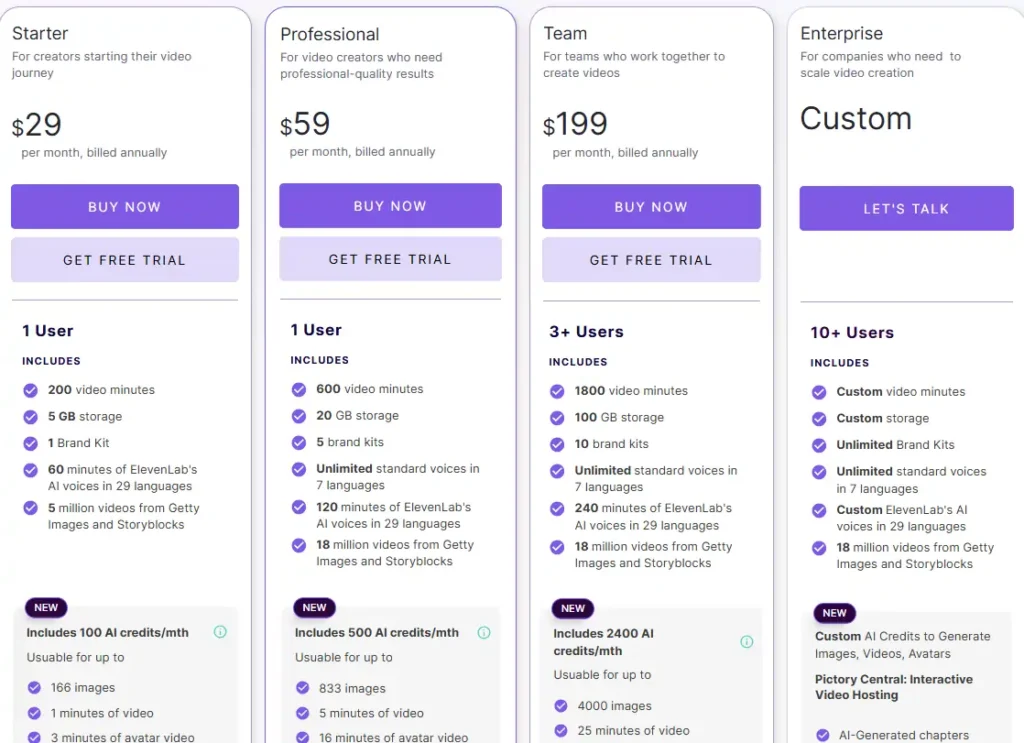
The math usually heavily favors annual billing, but it depends entirely on your cash flow and content schedule.
Video Minutes and Storage Limits Compared
Whether you pay monthly or annually, your monthly allowances (like your 600 video minutes on the Pro plan) reset every 30 days. The storage, however, is a hard cap. The Starter plan gives you 5GB, Pro gives you 20GB, and Teams gives you 100GB. If you consistently create long-form documentary content, you might be forced to upgrade to the Pro plan simply to hold your larger file sizes.
Do Unused Video Minutes Roll Over?
A common point of frustration for creators is the “use it or lose it” model. Unfortunately, your unused video minutes in Pictory do not roll over to the next month. If you have 600 minutes on the Pro plan and only use 200, the remaining 400 vanish when the new month starts. This makes it crucial to pick the annual plan that accurately reflects your real-world output.
How Does the Pictory Annual Plan Compare to Alternatives?
Before you lock yourself into a 12-month contract, it is smart to see how Pictory stacks up against the competition.
Pictory vs. InVideo AI Pricing
InVideo AI is highly aggressive with its pricing and features a very strong prompt-to-video capability. While their annual plans are competitively priced, Pictory generally holds the edge for users who specifically want to turn long-form text (like blog posts) into video.
Pictory vs. Steve AI Subscriptions
Steve AI is a solid alternative, particularly if you want to create animated videos rather than just stock footage compilations. However, when comparing their annual structures, Pictory’s integration of ElevenLabs voices and Getty Images gives it a more premium feel for professional YouTube and corporate content.
Pictory vs. Descript Annual Plans
Descript approaches video editing differently—it focuses heavily on editing video via text transcripts. While Descript is incredible for podcast editing, Pictory’s annual plans are far superior if your goal is generating entirely new videos from scripts or URLs with automatic B-roll generation.
Get Your Pictory Coupon Code & 14-Day Free Trial

If you are ready to upgrade your video workflow and lock in those annual savings, I’ve secured an exclusive discount for the AIBlogFirst community.
CABF20
Get 20% off every Pictory AI plan — monthly and annual. Use code CABF20 at checkout and start creating professional videos for less.
Step-by-Step Guide to Applying Your Discount on Annual Plans
- Click the button above to head to the Pictory pricing page.
- Toggle the billing option from “Monthly” to “Annual.”
- Select the Starter, Professional, or Teams plan.
- At checkout, enter CABF20 into the promo code box.
- Your total will instantly drop by an additional 20%, stacking on top of the annual discount!
(Looking to save on image generation too? Don’t forget to grab our OpenArt NISHA15 discount code!)
Frequently Asked Questions About Pictory Annual Subscriptions
Can I Upgrade from Monthly to an Annual Plan?
Yes. If you start on a monthly plan to test the waters, you can easily upgrade to an annual subscription later inside your account dashboard to lock in the 40% discount.
How Are Video Minutes Calculated in the Annual Plan?
Even on an annual plan, your video minutes are distributed monthly. For example, the Professional plan gives you 600 minutes every month, not 7,200 minutes upfront for the whole year.
What Happens to My Videos If I Cancel My Annual Subscription?
If you cancel your annual plan, your account will remain active until the end of your current 12-month billing cycle. After that, your account reverts to a free status. You will still have access to your previously rendered and downloaded videos, but you will lose access to premium features and your unrendered project files may eventually be deleted to save server space.
Is the Pictory Annual Plan Right for You?
If you consistently turn blog posts into videos or need to generate faceless YouTube content without hitting monthly limits, the 40% savings on a Pictory annual plan are absolutely worth it.
It is the smartest way to scale your content production while keeping your software costs predictable. Ready to streamline your video creation process? Don’t forget to apply our exclusive code at checkout to maximize your savings.