You spend an hour generating images on OpenArt, and they still don’t look right for Instagram. The colors feel off. The composition doesn’t fit the feed. And the prompt you typed? Too vague to get anything useful.
This happens to a lot of creators — not because OpenArt is hard, but because prompting for Instagram is genuinely different from prompting for other platforms.
I’m Nisha, and I’ve been using OpenArt daily for over a year. I’ve tested dozens of prompt styles specifically for Instagram posts — aesthetic feeds, reels covers, carousels, and more.
What actually works might surprise you. And today, I’m sharing all of it.
What Are OpenArt Prompts for Instagram Posts and Why Do They Matter in 2026?

An OpenArt prompt is the text instruction you give the AI to generate an image. Think of it as describing a photo to someone who has never seen it — the more specific you are, the closer the result matches what you actually want.
For Instagram specifically, prompts matter more than most creators realize. Instagram is a visual-first platform. Your image either earns a stop-scroll moment or it doesn’t. No caption or hashtag strategy fixes a weak visual.
In 2026, AI-generated content has become completely normal on Instagram. Brands, solo creators, and small businesses all use it. The difference between content that performs and content that flops often comes down to one thing: the quality of the prompt behind the image.
Save 15 Percent On OpenArt With Code NISHA15
Unlock premium AI image generation features on OpenArt while saving 15% on your subscription using our exclusive promo code.
How OpenArt Works for Instagram Post Creation (Quick Overview)
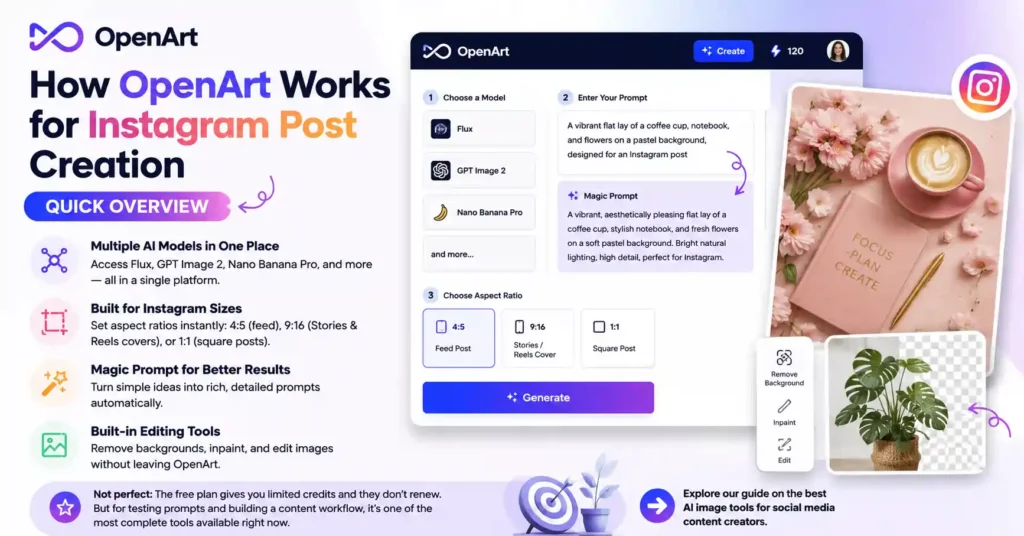
OpenArt is a browser-based AI image platform. You don’t need to download anything or know how to code. You type a prompt, choose a model, and generate.
What makes it useful for Instagram creators specifically:
- It supports multiple AI models in one place — Flux, GPT Image 2, Nano Banana Pro, and more
- You can set the aspect ratio directly (4:5 for Instagram feed, 9:16 for Stories and Reels covers, 1:1 for square posts)
- The Magic Prompt feature expands your basic idea into a richer, more detailed prompt automatically
- Image editing tools like background removal and inpainting are built in — no need to export to Photoshop
It’s not perfect. The free plan gives you limited credits and they don’t renew. But for testing prompts and building a content workflow, it’s genuinely one of the more complete tools available right now.
→ You can also explore our guide on the best AI image tools for social media content creators.
Best OpenArt Prompts for Instagram Posts by Category
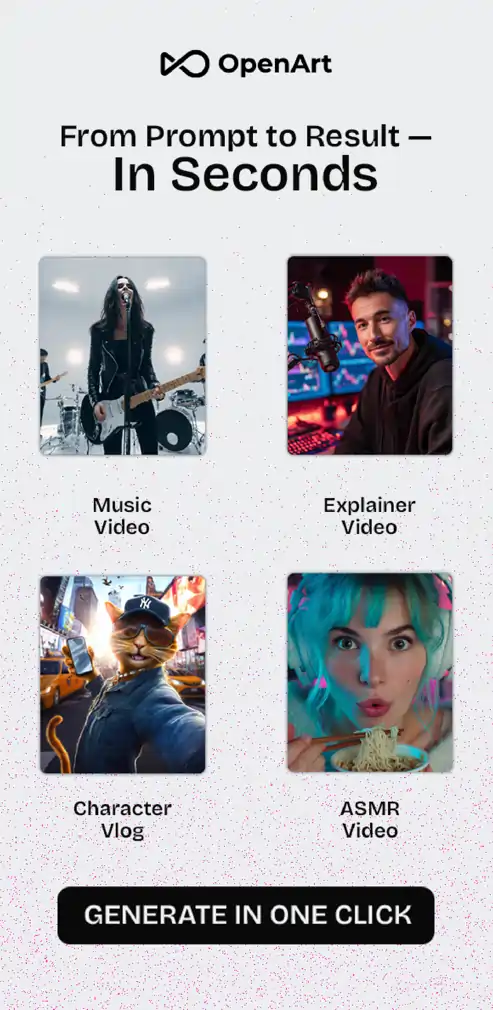
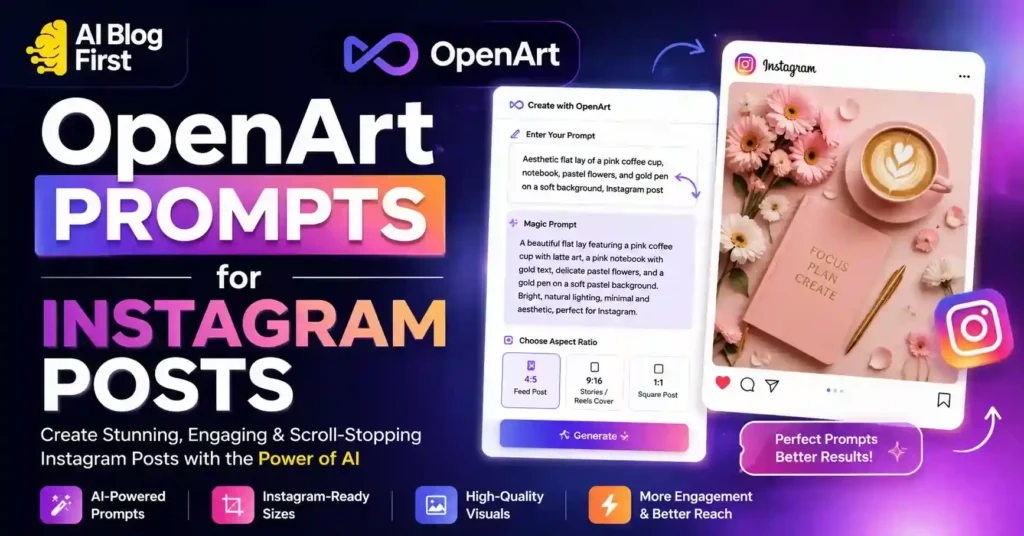
This is the section most creators actually need. Below are real, tested prompt frameworks organized by Instagram content type. Copy them, adjust the details, and generate.
OpenArt Prompts for Instagram Aesthetic Feed Posts
Aesthetic feed posts need consistency in color temperature, mood, and composition. Vague prompts produce random results here.
Prompt example:
Minimalist flat lay, white marble surface, pastel pink coffee cup, dried flowers and open journal, soft morning light from the left, muted warm tones, 4:5 aspect ratio, editorial lifestyle photography style
Key elements to always include: surface or background, lighting direction, color palette, mood, and aspect ratio.
OpenArt Prompts for Instagram Reels Cover Images
Reels covers need to be eye-catching at a small size since they appear as thumbnails. High contrast and a clear focal point matter.
Prompt example:
Bold fashion portrait, young woman in oversized orange blazer, urban rooftop background at golden hour, dramatic lighting, sharp focus on face, cinematic color grading, 9:16 vertical, editorial magazine style
OpenArt Prompts for Instagram Carousel Posts
Carousels work best when images share a visual style. Generate multiple images with the same core prompt — just swap the subject or scene.
Prompt example (base):
Product flatlay on dark textured surface, single hero item centered, moody studio lighting, deep shadows, rich jewel tones, square 1:1 format, commercial product photography style
Swap the product, keep everything else identical across your carousel slides.
OpenArt Prompts for Instagram Fashion and Lifestyle Posts
Prompt example:
Street style portrait, woman in neutral beige trench coat, autumn city street background, bokeh blur, warm afternoon light, film grain texture, candid editorial feel, 4:5 aspect ratio
OpenArt Prompts for Instagram Food and Product Posts
Prompt example:
Overhead flat lay of homemade pasta on rustic wooden board, fresh basil leaves and olive oil drizzle, warm natural light, shallow depth of field, food magazine editorial style, square format
OpenArt Prompts for Instagram Travel and Nature Posts
Prompt example:
Panoramic mountain sunrise, wildflowers in foreground, mist in valleys, golden hour light, hyper-detailed landscape photography, wide cinematic composition, cool blue and gold color palette
OpenArt Prompts for Instagram Quotes and Text-Based Posts
When you need a background for a quote graphic, the prompt needs to be simple enough not to distract from the text you’ll add later.
Prompt example:
Abstract soft watercolor background, blended pastel blue and cream tones, no text, no faces, smooth gradient texture, square 1:1 format, calm and minimal aesthetic
How to Write Better OpenArt Prompts for Instagram Posts (Step-by-Step)
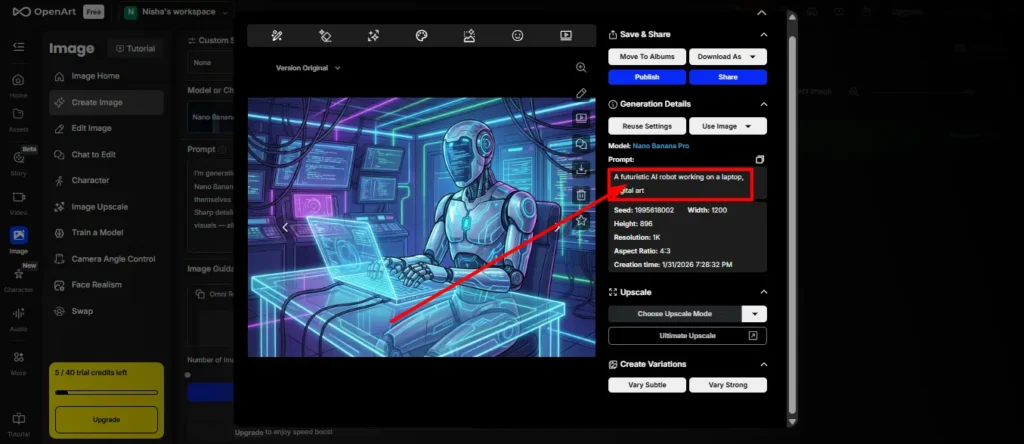
If you want to move beyond copy-paste and start writing your own prompts, this is the framework I use every time.
Step 1 — Start with a Clear Subject for Your Instagram Post
Don’t start with mood or style. Start with what’s actually in the image.
Bad: “beautiful aesthetic photo” Good: “young woman holding iced coffee, sitting at a café window table”
One clear subject gives the AI something concrete to build around.
Step 2 — Add Style, Mood, and Lighting to Your OpenArt Prompt
After your subject, layer in the visual atmosphere. Lighting is the single biggest factor in whether an AI image looks professional or flat.
Useful lighting terms: golden hour, soft window light, dramatic side lighting, studio softbox, blue hour, overcast diffused light.
Style references also help: editorial, cinematic, film grain, Vogue-style, commercial photography, moody dark academia.
Step 3 — Set the Right Aspect Ratio for Instagram on OpenArt
This is the step most beginners skip — and it causes avoidable cropping issues.
| Instagram Format | Aspect Ratio | Use Case |
|---|---|---|
| Feed Post (portrait) | 4:5 | Main feed content |
| Square Post | 1:1 | Grid-friendly posts |
| Stories / Reels Cover | 9:16 | Vertical video covers |
| Landscape Post | 1.91:1 | Scenery / banners |
Always set your ratio before generating. Cropping an image after the fact almost never works cleanly.
Step 4 — Use the Magic Prompt Feature on OpenArt
If you’re not sure how to expand your prompt, use OpenArt’s built-in Magic Prompt tool. You type a basic idea, and it rewrites it into a detailed, structured prompt automatically.
It’s not flawless — sometimes it over-complicates things — but it’s a solid starting point when you’re stuck.
Step 5 — Pick the Right AI Model for Your Instagram Content
Different models produce very different results. Choosing the wrong one wastes credits.
OpenArt Prompts for Instagram Posts: Which AI Model Should You Use?
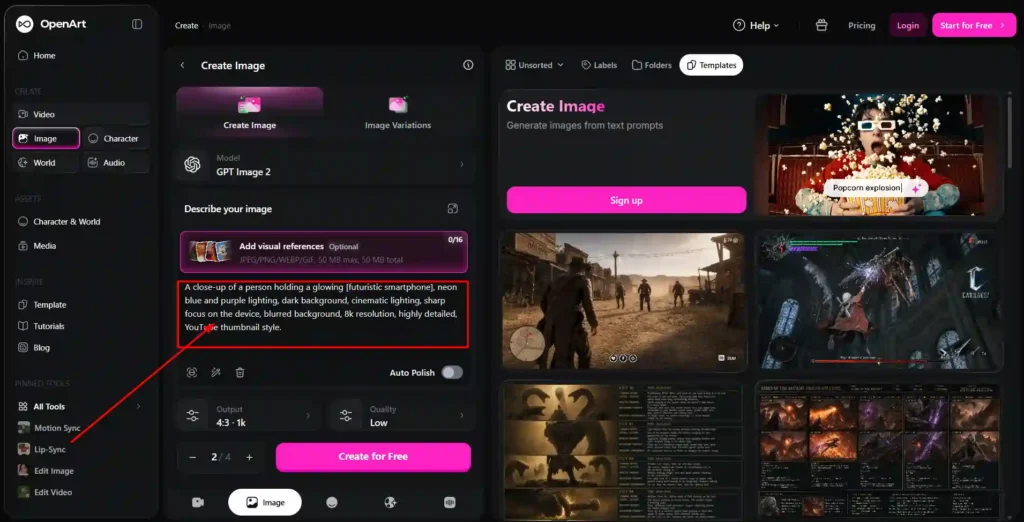
Flux Model — Best for Photorealistic Instagram Posts
Flux handles skin tones, fabric textures, and natural lighting with more accuracy than most models. If your content is lifestyle, fashion, or portrait-heavy, start here.
GPT Image 2 — Best for Text-Heavy Instagram Posts
If your Instagram post needs readable text inside the image — a product label, a sign, a quote overlay baked into the visual — GPT Image 2 handles this far better than other models. Most AI models struggle with text rendering. This one doesn’t.
Nano Banana Pro — Best for Fast Instagram Content Generation
When you need volume — a week’s worth of Instagram content in one session — Nano Banana Pro generates quickly without sacrificing too much quality. Good for batch content workflows.
OpenArt vs Midjourney for Instagram Posts — Which One Wins?
This is one of the most common questions from creators switching between tools.
| Feature | OpenArt | Midjourney |
|---|---|---|
| Free plan | ✅ Yes (limited credits) | ❌ No free tier |
| Aspect ratio control | ✅ Built-in | ✅ Available |
| Multiple AI models | ✅ 100+ models | ❌ Midjourney only |
| Instagram-ready formats | ✅ Yes | ✅ Yes |
| Image editing tools | ✅ Built-in suite | ❌ External tools needed |
| Ease of use | ✅ Browser-based, simple | ⚠️ Web app, steeper learning curve |
| Image quality ceiling | ⚠️ Model-dependent | ✅ Consistently high |
Verdict: For Instagram creators who want flexibility, editing tools, and a lower starting cost, OpenArt has a real edge. If pure image quality is your only priority and budget isn’t a concern, Midjourney still produces some of the sharpest results.
→ You can also explore our full comparison of AI image generators for social media.
OpenArt vs Canva AI for Instagram Post Images — Key Differences
Canva’s AI tools are built for non-designers who want quick templates. OpenArt is built for creators who want original AI-generated images from scratch.
If you’re creating branded graphics with text, logos, and templates — Canva wins. If you want truly original, photorealistic, or artistic images for your Instagram feed — OpenArt wins.
They actually work well together. Generate the image on OpenArt, then bring it into Canva to add text and branding.
OpenArt Pricing for Instagram Content Creators (2026)
Is the OpenArt Free Plan Enough for Instagram Posts?
Honestly? For testing, yes. For consistent content creation, no.
The free plan gives you 40 one-time trial credits. That runs out fast when you’re experimenting with different prompts and models. You can earn a small bonus by joining their Discord, but it’s not a sustainable workflow for anyone posting regularly.
Which OpenArt Paid Plan Is Best for Instagram Creators?
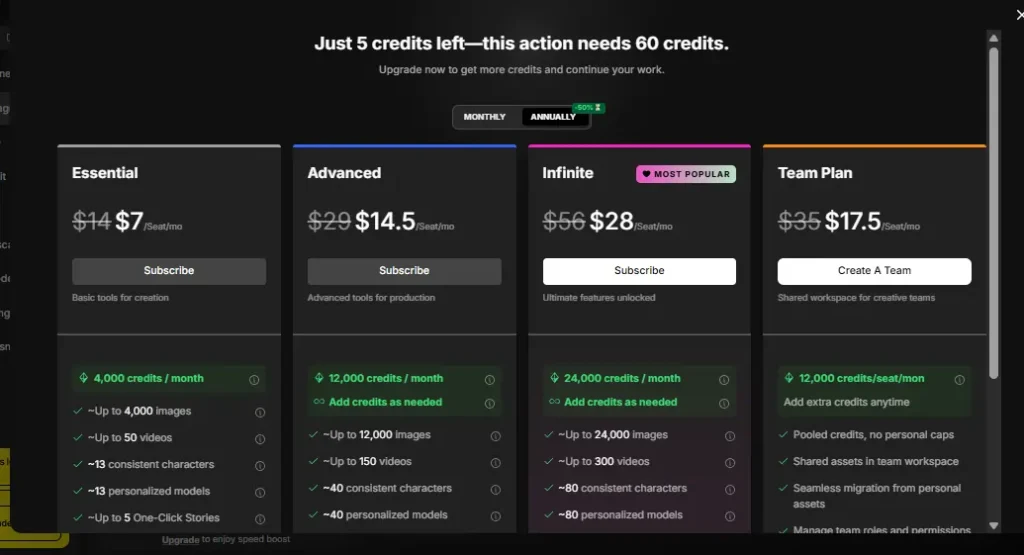
| Plan | Monthly Price | Annual Price | Credits/Month | Best For |
|---|---|---|---|---|
| Essential | $14/mo | $7/mo | 4,000 | Casual creators, 1–2 posts/day |
| Advanced | $29/mo | $14.50/mo | 12,000 | Active creators, daily posting |
| Infinite | $56/mo | $28/mo | 24,000 | Agencies, high-volume creators |
For most individual Instagram creators posting 5–7 times per week, the Essential plan at $7/month (annual) covers it comfortably.
OpenArt Annual Plan — 50% Off Deal Explained
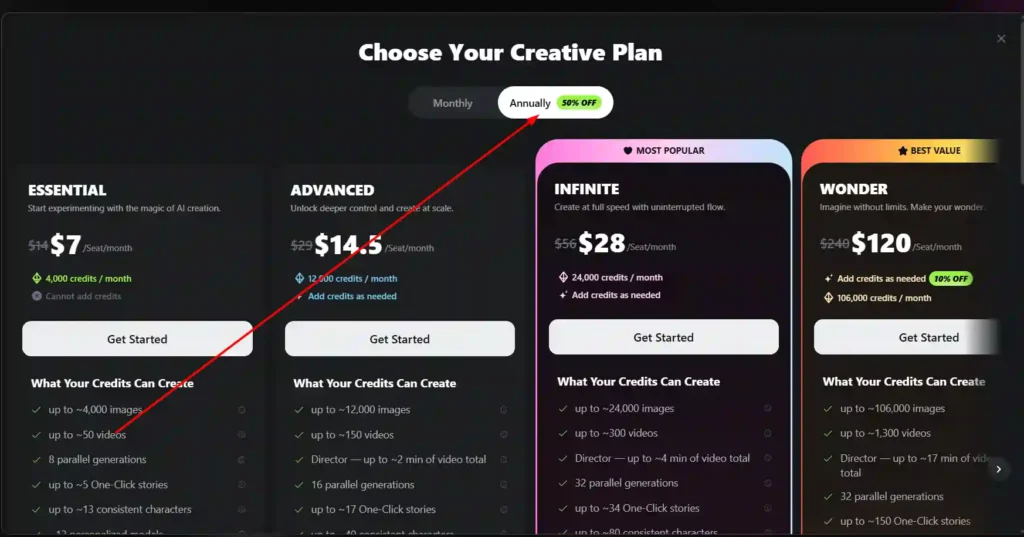
OpenArt currently offers 50% off all plans when you pay annually. The Essential plan drops from $14/month to $7/month. That’s $84/year versus $168/year — a meaningful saving if you’re committed to using it consistently.
The tradeoff is that annual plans are typically non-refundable, so test the free tier first before committing.
OpenArt Prompts for Instagram Posts — Common Mistakes to Avoid
After a year of daily use, these are the mistakes I see most often — and made myself early on:
- Being too vague — “beautiful photo of a woman” gives the AI nothing to work with. Specify clothes, setting, lighting, mood.
- Ignoring aspect ratio — Always set 4:5 or 9:16 before generating. Fix it first, not after.
- Using too many styles at once — Asking for “cinematic, anime, watercolor, photorealistic” in one prompt confuses the model. Pick one visual direction.
- Not using Magic Prompt — If you’re stuck, let the tool expand your basic idea. It often adds details you wouldn’t think to include.
- Sticking to one model — Different models have very different strengths. Spend 15 minutes testing the same prompt across Flux, GPT Image 2, and Nano Banana Pro. You’ll immediately see which fits your content style.
Tips to Make Your OpenArt-Generated Instagram Posts Go Viral
Generating a good image is step one. Getting it to perform on Instagram is another challenge entirely.
- Pair AI images with authentic captions — audiences connect with real stories, even when the visual is AI-generated.
- Use 4:5 ratio consistently — it takes up more screen space in the feed and naturally earns more attention.
- Add subtle text overlays in Canva — a clean one-line hook on an AI-generated background outperforms a plain image nearly every time.
- Post at peak times for your audience — even the best visual underperforms at 3am.
- Create visual consistency across posts — use the same lighting style and color palette in all your OpenArt prompts so your feed looks cohesive.
Can You Use OpenArt Images Commercially on Instagram?
This is worth understanding before you grow a following around AI-generated content.
The free plan does not include commercial use rights. If you’re monetizing your Instagram — through brand deals, product sales, or affiliate income — you need at least the Advanced plan, which includes commercial use rights.
For personal accounts with no monetization, the free or Essential plan is fine. When in doubt, check OpenArt’s current terms directly, as platform policies do get updated.
Frequently Asked Questions About OpenArt Prompts for Instagram Posts
What is the best aspect ratio on OpenArt for Instagram posts?
Use 4:5 for feed posts, 1:1 for square posts, and 9:16 for Stories and Reels covers. Always set the ratio before generating — not after.
How do I make my OpenArt prompts more detailed for Instagram?
Follow the five-part formula: Subject → Style → Composition → Lighting → Modifiers. The Magic Prompt tool can also expand a basic idea automatically.
Is OpenArt free to use for Instagram content creation?
Yes, there is a free plan with 40 one-time trial credits. For regular Instagram posting, a paid plan starting at $7/month (annual) is more practical.
Does OpenArt offer a promo code or discount for creators?
OpenArt currently offers 50% off all annual plans. Check their homepage for any active promo codes or seasonal offers before subscribing.
How many Instagram images can I generate per month on OpenArt?
The Essential plan allows approximately 4,000 images per month. The Advanced plan covers roughly 12,000. Most individual creators never hit the Essential plan limit.
Final Thoughts on Using OpenArt Prompts for Instagram Posts in 2026
OpenArt is genuinely one of the more complete tools available for Instagram creators right now — not because it’s perfect, but because it combines image generation, editing, and multiple AI models in one place without requiring any technical skill.
The prompts in this guide are a starting point. The real skill comes from experimenting, adjusting, and finding the visual style that fits your specific Instagram presence.
Start with one category. Test a few prompts. Notice what works. Then build from there.
That’s how consistent, high-quality AI content on Instagram actually gets made — not in one session, but through a habit of small improvements over time.
→ Explore our other guides on AI content creation tools for social media creators.