

OpenArt is running a Black Friday offer: 20% off the first month of a monthly plan with the coupon code BF2026. If you’ve been waiting for a lower price on an AI image generator, this is a good time to look.
Here you’ll find how the OpenArt Black Friday discount code works, who can use it, and where to enter it at checkout. The offer covers the first month of a monthly plan, so it helps to know exactly what that means before you subscribe.
Offer terms and plan details can change. We’ll also point out what to check on OpenArt’s checkout page before you pay, so you can decide whether the deal fits the way you create.
OpenArt Black Friday Discount Code: Offer Details at a Glance
- Coupon code: BF2026.
- Discount: 20% off.
- Applies to: the first month of a monthly plan.
- After the first month: your plan renews at its regular monthly price.
- Where to enter it: the coupon field at OpenArt checkout.
The discount is a one-time saving on your first monthly payment. It is not a permanent 20% reduction.
Get 20% Off Your First OpenArt Month
Use code BF2026 at checkout to save 20% on your first month of any OpenArt monthly plan.
How to Use the OpenArt Black Friday Discount Code BF2026 at Checkout
Choose a monthly plan, open checkout, and enter BF2026 in the coupon field. The 20% is taken off your subtotal, and your total updates right away.
Step-by-Step: Applying the OpenArt Black Friday Discount Code
- Go to OpenArt’s pricing page and select Monthly billing.
- Choose your plan: Starter, Plus, Pro, or Wonder.
- Click Get Started to open checkout.
- Enter BF2026 in the coupon field and apply it.
- Check the line that reads “20% off for a month.“
- Enter your billing address, which is when tax is calculated.
- Review “Total due today” and complete your purchase.
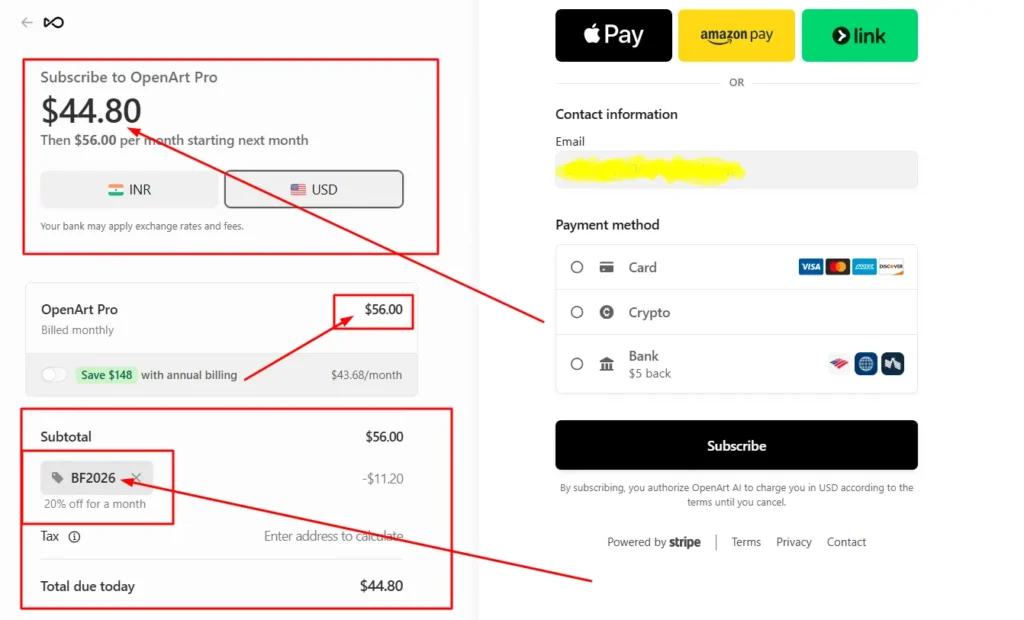
Here is a real checkout screen for the Pro plan on monthly billing:
| Checkout line | Amount |
|---|---|
| OpenArt Pro, billed monthly (subtotal) | $56.00 |
| BF2026, 20% off for a month | -$11.20 |
| Tax | Calculated after you enter your address |
| Total due today | $44.80 |
| Then, starting next month | $56.00 per month |
The checkout page states the renewal price clearly: $44.80 today, then $56.00 per month.
OpenArt Black Friday Discount Code vs. the Annual Plan Sale: Which Saves More?
BF2026 is built for monthly billing. If you want to pay month to month and keep your commitment small, this is the code to use.
The same Pro checkout also shows an annual billing option at $43.68 per month, which it says saves $148 compared with paying monthly. Annual billing means paying for a full year up front, so it only makes sense if you’re sure you’ll keep using OpenArt.
For the Pro plan, here is how the first year compares:
| Option | First-year cost |
|---|---|
| Monthly with BF2026 (first month $44.80, then 11 × $56.00) | $660.80 |
| Annual billing at $43.68 per month | about $524.16 |
If you’re testing OpenArt, the monthly plan with BF2026 gives you a lower first payment and the freedom to stop. If you already know you’ll use it all year, annual billing costs less overall.
OpenArt Pricing With the Black Friday Discount Code: Plans Compared
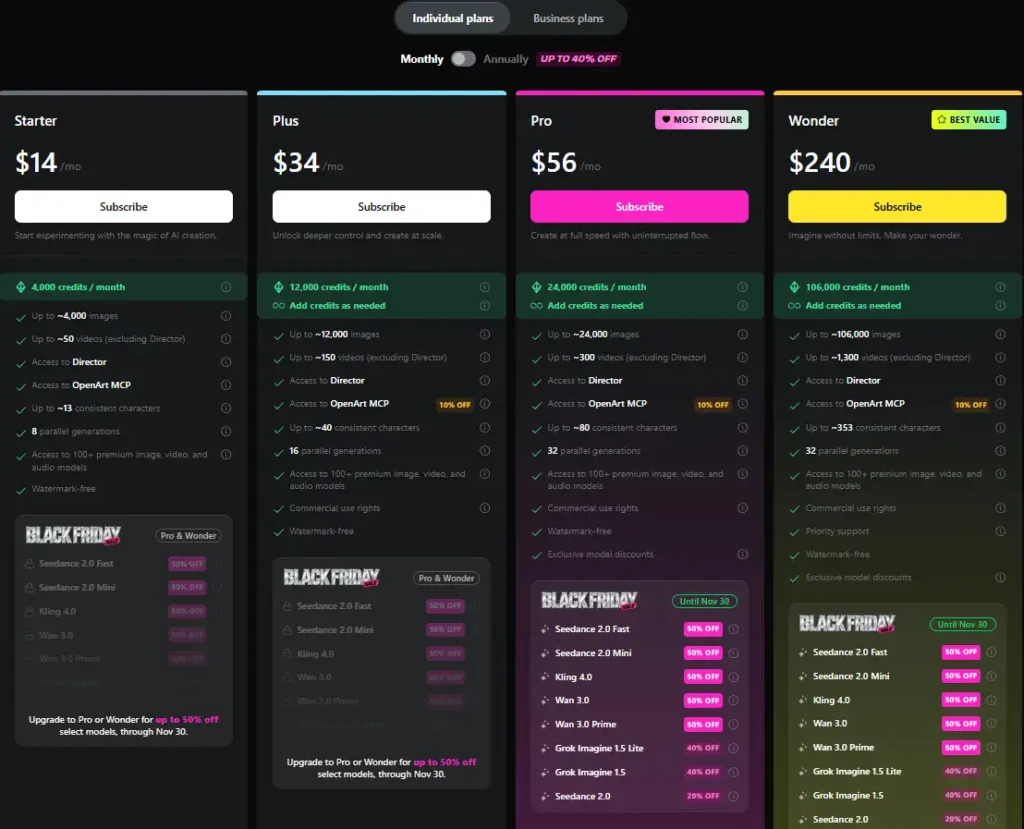
Here is what 20% off saves you on each monthly plan, using OpenArt’s monthly prices:
| Plan | Regular monthly price | First month with BF2026 | You save | Monthly credits |
|---|---|---|---|---|
| Starter | $14.00 | $11.20 | $2.80 | 4,000 |
| Plus | $34.00 | $27.20 | $6.80 | 12,000 |
| Pro | $56.00 | $44.80 | $11.20 | 24,000 |
| Wonder | $240.00 | $192.00 | $48.00 | 106,000 |
Prices are before tax. The saving applies once, to your first month.
Starter and Plus Plans With the OpenArt Black Friday Discount Code
Starter ($14/month) includes 4,000 credits a month, access to Director, 100+ premium image, video, and audio models, and watermark-free output. With BF2026 you pay $11.20 for the first month and save $2.80. It’s a low-cost way to try the platform.
Plus ($34/month) includes 12,000 credits a month, up to about 40 consistent characters, 16 parallel generations, and commercial use rights. With BF2026 you pay $27.20 for the first month and save $6.80. If you plan to use your work for clients or brand content, note that commercial use rights start at this plan.
Pro and Wonder Plans With the OpenArt Black Friday Discount Code
Pro ($56/month) is labeled “Most Popular” and includes 24,000 credits a month, up to about 80 consistent characters, 32 parallel generations, and commercial use rights. With BF2026 you pay $44.80 for the first month, a $11.20 saving.
Wonder ($240/month) is labeled “Best Value” and includes 106,000 credits a month, priority support, and commercial use rights. Because the discount is a percentage, it saves the most here: $48.00, so your first month costs $192.00.
Is the OpenArt Black Friday Discount Code Worth It?
It’s worth using if you already planned to subscribe to a monthly plan. The code costs nothing extra, and the saving appears at checkout before you pay.
It suits you if:
- You want to try OpenArt without committing to a full year.
- You create images, video, or characters regularly and need more credits than a free start offers.
- You’re choosing between Starter, Plus, Pro, and Wonder and want a lower first payment.
Keep in mind:
- The saving is for one month only. On Starter it’s $2.80, so the plan you pick matters more than the discount.
- Your plan renews at the full price after the first month.
- If you know you’ll stay a full year, annual billing may cost less overall.
Pick the plan based on the credits and features you need, and treat the code as a bonus.
OpenArt Black Friday Discount Code Terms and Conditions (US, UK & Worldwide)
- Billing type: The code applies to monthly plans. Make sure Monthly is selected before you open checkout.
- Renewal price: Your plan renews at the regular price starting next month, as the checkout page states.
- Tax: Tax is calculated after you enter your billing address. Your final total can differ from the table above.
- Currency: The checkout prices displayed during our review were in US dollars (USD). Readers in the UK and other countries should check the final OpenArt checkout page after entering their billing address, as applicable taxes and the final payable amount may vary by location.
- Spelling: Enter the code exactly as BF2026.
OpenArt Black Friday Discount Code FAQs
Does the OpenArt Black Friday Discount Code Work on Annual Plans?
The BF2026 offer is 20% off the first month of a monthly plan. It is designed for monthly billing. Annual billing is a separate option at checkout.
Is There an OpenArt Free Trial Before Using the Discount Code?
OpenArt offers a Start for Free option on its site, so you can create an account before paying. The BF2026 code applies when you subscribe to a paid monthly plan.
What If the OpenArt Black Friday Discount Code Is Not Working?
Try these steps:
Confirm you selected Monthly billing, not annual.
Re-type BF2026 in capital letters with no extra spaces.
Refresh the checkout page and apply the code again.
If it still fails, contact OpenArt support through its Help Center.
Can I Cancel After Using the OpenArt Black Friday Discount Code?
You can manage your subscription from your OpenArt account. Since the plan renews at the full price after the first month, cancel before your renewal date if you only want the discounted month.
Get the OpenArt Black Friday Discount Code Before the Sale Ends
BF2026 gives you 20% off your first month on a monthly OpenArt plan, saving $2.80 on Starter, $6.80 on Plus, $11.20 on Pro, and $48.00 on Wonder. After that month, the regular price applies.
Choose the plan that matches the credits and features you need, select Monthly billing, and enter BF2026 at checkout. Check that the 20% line appears in your order summary before you pay.