If you’ve been experimenting with AI art generators lately, you’ve probably hit that inevitable wall: the “out of credits” notification. It’s frustrating when you’re in the middle of a creative workflow, and suddenly the platform asks for your credit card. Navigating OpenArt AI pricing can feel a bit like decoding a complex menu—there are credits, turbo points, parallel generations, and different tiers that look similar at first glance.
I’ve spent months testing these tools, and frankly, OpenArt’s pricing structure is one of the most aggressive I’ve seen in 2026, especially if you commit to a yearly plan. Whether you are a hobbyist just wanting to make cool avatars or a marketing agency needing thousands of assets, understanding the fine print between the “Essential” and “Wonder” plans is crucial to not overspending.
Here is the no-fluff breakdown of what you actually get for your money.
OpenArt AI Cost Overview: Is It Free or Paid?
Let’s answer the big question first: Can you use OpenArt for free? Yes, but with significant caveats. Unlike some competitors that refresh daily credits, OpenArt has shifted towards a model that heavily incentivizes paid subscriptions.
Understanding the OpenArt Free Trial & Credit Limits
When you sign up, you aren’t getting a recurring daily allowance. You currently get 40 one-time trial credits. That’s enough to test the waters—maybe generate 10-20 images depending on your settings—but it’s not a long-term solution. You also get access to basic features like 4 parallel generations, which is decent for a free tier. However, keep in mind that all your creations are public. If you need privacy or serious volume, the free tier is just a demo.
Quick Summary: Which Subscription Tier Fits Your Budget?
If you are ready to pay, the value proposition changes drastically based on how you pay. OpenArt offers a massive 50% discount if you pay annually.
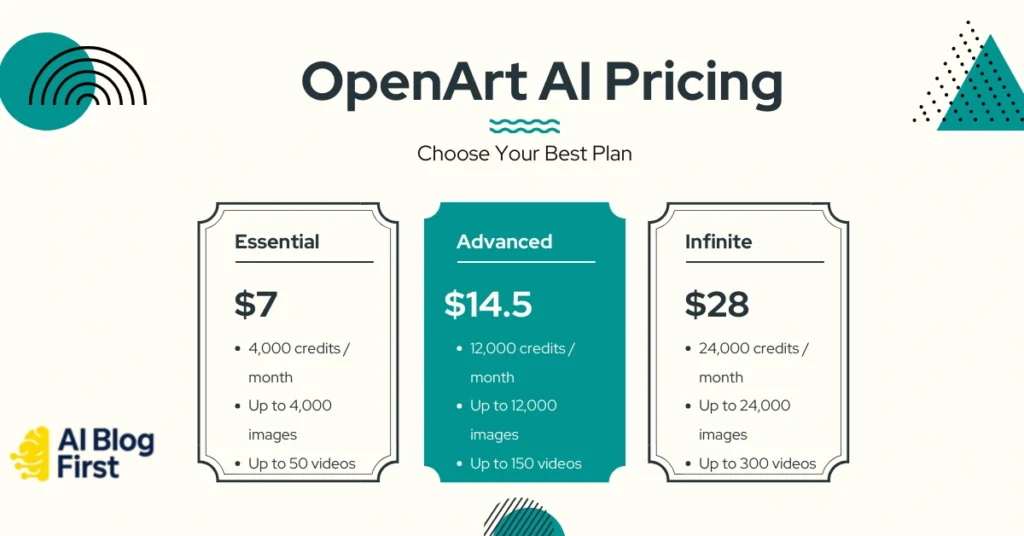
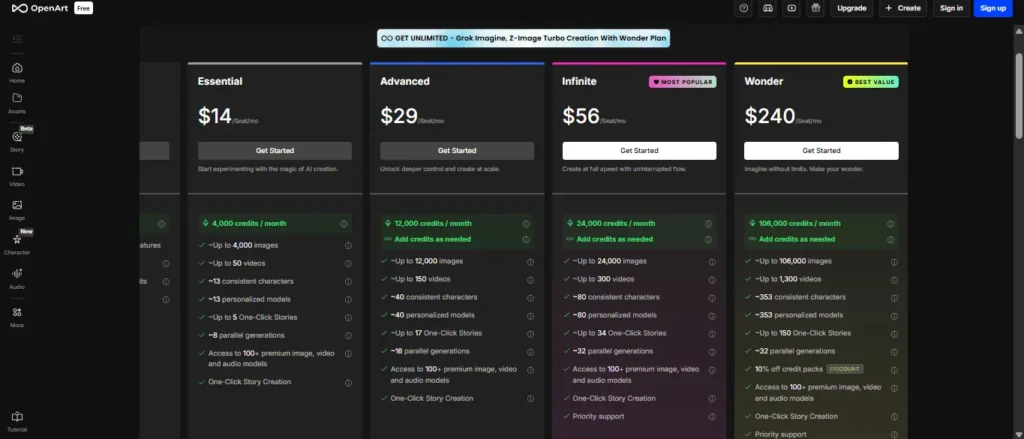
| Plan Level | Monthly Cost | Annual Cost (Per Month) | Best For |
|---|---|---|---|
| Free | $0 | $0 | Testing features |
| Essential | $14 | $7 | Beginners / Hobbyists |
| Advanced | $29 | $14.50 | Content Creators |
| Infinite | $56 | $28 | Power Users (Most Popular) |
| Wonder | $240 | $120 | Agencies / Heavy Volume |
Detailed Breakdown of OpenArt Pricing Plans
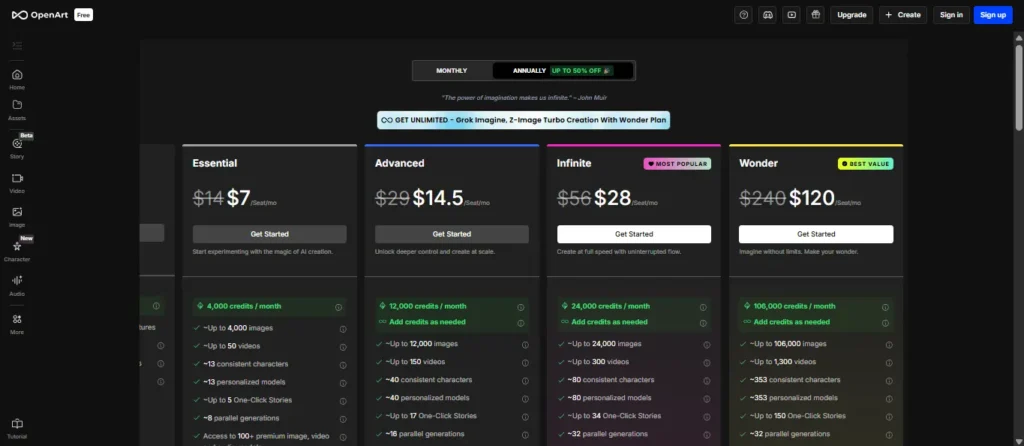
The OpenArt pricing plans are structured around “credits per month.” Unlike unlimited plans on some other platforms, you are buying a specific allowance. Here is what that looks like in practice.
Essential Plan ($7/mo): Best Entry Point for Beginners
At $7/month (billed annually), this is a steal for casual users. You get 4,000 credits per month. In my experience, 4,000 credits is plenty if you are just generating standard images for blog posts or social media.
- Key perks: You unlock privacy (your art isn’t public), 8 parallel generations, and access to 100+ premium models.
- Limitations: You are capped at ~50 videos and roughly 13 custom models. If you’re just making static images, you likely won’t hit these limits.
Advanced Plan ($14.50/mo): Scaling Up for Content Creators
If you are a blogger or manage a couple of social accounts, the Essential plan might feel tight. The Advanced plan bumps you to 12,000 credits for just a few dollars more.
- Why upgrade? The parallel generations jump to 16. This is a huge time-saver. Instead of waiting for one batch to finish, you can run multiple prompts simultaneously. You also get allowance for ~150 videos, which is essential if you are pivoting to AI video content for TikTok or Reels.
Infinite Plan ($28/mo): Why It Is the Most Popular Choice
This is the sweet spot for most serious users. For $28/month (annual), you get 24,000 credits.
- The “Infinite” Misnomer: Despite the name, it’s not technically “unlimited” credits, but 24k is effectively infinite for a single user. You’d have to be generating hundreds of images a day to burn through this.
- Power features: You get 32 parallel generations and can train up to 80 personalized models. If you are building consistent brand assets or characters, this is the plan I usually recommend.
Wonder Plan ($120/mo): Unlocking Unlimited Generations & Turbo Mode
This is the heavy hitter. At $120/month (annual), the Wonder plan is built for studios.
- The Big Sell: You get 106,000 credits, but the real value is the Unlimited use of select models (Grok Imagine, Z-Image Turbo). If you are using those specific tools, you stop worrying about credit counting entirely. It also includes priority support, which is vital when you’re working on a deadline.
Decoding the OpenArt Credit System & Feature Limits
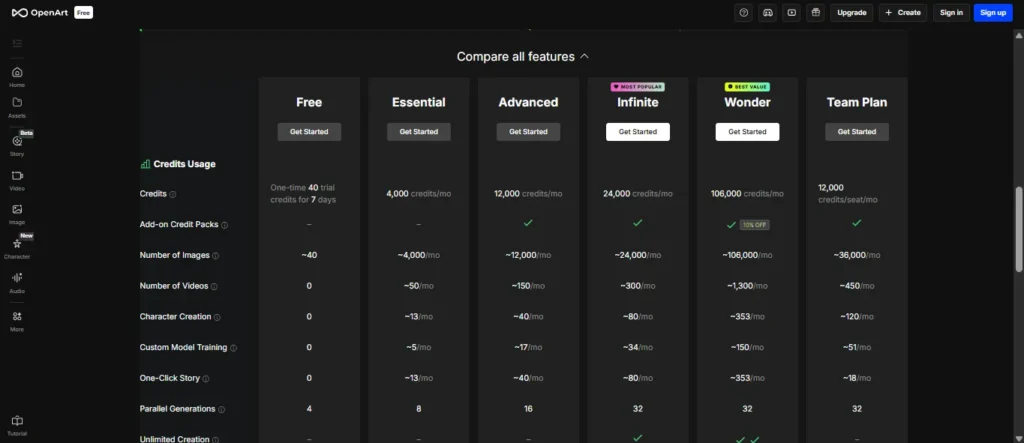
The hardest part about OpenArt subscription costs is figuring out how credits translate to actual work. One credit does not always equal one image.
How Many Credits Do You Really Need Per Month?
Standard image generation usually costs cheap credits, but high-res upscaling or complex workflows cost more.
- 4,000 credits (Essential) = Approx. 4,000 standard images.
- 12,000 credits (Advanced) = Approx. 12,000 standard images.
Most users overestimate what they need. Start with Essential; you can always upgrade.
Cost for Premium Features: Consistent Characters & Custom Models
This is where OpenArt shines but also where it costs you. Training a custom model (e.g., teaching the AI your face or a specific product style) burns credits. The Essential plan only allows for 13 personalized models. If you need to train models for different clients, you will be forced into the Advanced or Infinite tiers quickly.
Parallel Generations: Paying for Speed and Workflow Efficiency
Time is money. The difference between 8 parallel generations (Essential) and 32 parallel generations (Infinite/Wonder) is massive when you are iterating on a prompt. If you are sitting there waiting for images to render, you are losing productivity. For commercial intent, I always suggest aiming for at least 16 parallel gens.
One-Click Stories & Video Generation Allowances
OpenArt isn’t just static images anymore. The plans now include specific caps for “One-Click Stories.”
- Essential: ~5 stories/mo.
- Infinite: ~34 stories/mo.
If you are using this for automated storytelling or YouTube shorts, the Essential plan will bottleneck you immediately.
OpenArt Annual Discount vs. Monthly Subscription Cost
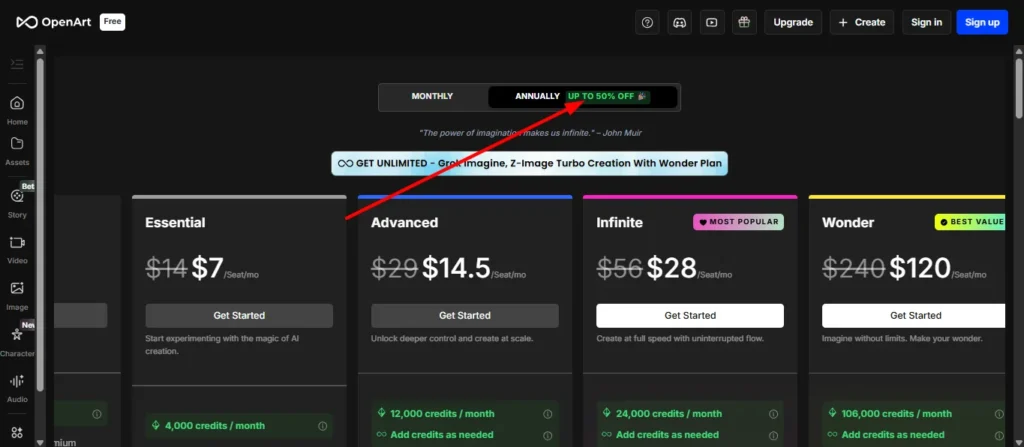
Here is the honest truth: The monthly pricing is painful.
Calculating the 50% Savings on Yearly Billing
OpenArt uses a very aggressive anchor pricing strategy.
- Infinite Plan Monthly: $56/mo
- Infinite Plan Yearly: $28/mo
That is a $336 difference over a year. If you can afford the upfront cost, the OpenArt annual discount is practically mandatory. Paying month-to-month essentially means you are paying double for the same service.
Are There Hidden Costs or Add-On Credit Packs?
Yes. If you run out of credits, you don’t have to upgrade your entire plan. You can buy Add-on Credit Packs.
- Wonder Plan Bonus: If you are on the Wonder plan, you get 10% off these packs.
- Extra Credit Subscription: There is also a flexible $15/month add-on for just extra credits if you don’t want a full tier upgrade.
OpenArt Team Plan Pricing for Agencies and Marketers
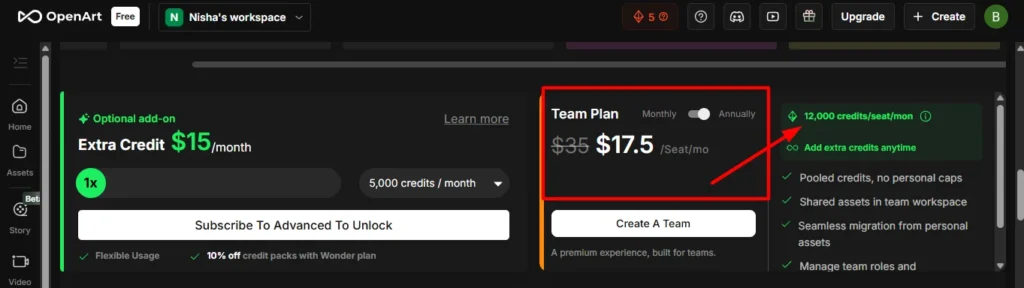
If you have more than one person logging in, stop sharing a password and look at the Team Plan.
Benefits of Pooled Credits and Shared Workspaces
At $17.50/seat/mo (annual), this plan introduces pooled credits. This means if one designer is heavy on video generation and another is light on usage, they draw from the same bucket (12,000 credits per seat). It prevents wasted credits from idle accounts.
Per-Seat Cost Efficiency for Professional Teams
You get shared assets in a team workspace. For agencies, this justifies the cost immediately because you aren’t emailing files back and forth. You also get priority support, which is a nice safety net.
OpenArt vs. Competitors: Price & Value Comparison
How does OpenArt AI cost stack up against the big names?
OpenArt vs. Leonardo AI Pricing: Who Offers More Free Credits?
Leonardo AI is often cited as the direct rival. Leonardo has a more generous daily free allowance (150 credits/day resets daily). However, for paid power users, OpenArt’s Infinite plan ($28) generally offers a higher raw volume of generations compared to Leonardo’s equivalent tiers, especially with the 32 parallel generations feature.
Cost Per Image Analysis: OpenArt vs. Midjourney
Midjourney is strictly paid (starting at $10/mo). Midjourney’s quality is legendary, but its workflow is stuck in Discord (mostly). OpenArt offers a web UI and specific tools like “Consistent Characters” that Midjourney users struggle to replicate without complex prompting. If you need control over consistent characters, OpenArt offers better value per dollar than fighting with Midjourney seeds.
Frequently Asked Questions About OpenArt Subscription Costs
Do unused OpenArt credits roll over to the next month?
Generally, subscription credits reset monthly. However, purchased add-on credit packs often have different expiration rules. Always check the current terms in your billing dashboard, but assume your monthly plan credits are “use it or lose it.”
Do unused OpenArt credits roll over to the next month?
Generally, subscription credits reset monthly. However, purchased add-on credit packs often have different expiration rules. Always check the current terms in your billing dashboard, but assume your monthly plan credits are “use it or lose it.”
Can I cancel or downgrade my OpenArt plan anytime?
Yes, you can cancel anytime. However, since the annual plan is paid upfront, you typically don’t get a pro-rated refund for unused months—you just keep access until the year ends.
Is the Wonder Plan worth it for the Grok Imagine feature?
Only if you are a heavy user. The “Unlimited use of select models” is the key. If you are generating thousands of images for a large project, the Wonder plan is actually cheaper than buying credit packs on lower tiers.
How does the “Extra Credit” add-on pricing work?
For $15/month, you can add a flexible usage buffer. This is great for fluctuating workloads where you might need a few thousand extra credits one month but not the next.
Final Verdict: Is OpenArt Worth the Investment?
Ultimately, choosing the right OpenArt plan comes down to your actual production volume. If you’re just tinkering, stick to the free trial and Essential plan—they’re more than enough for casual experimentation. But if you’re serious about building consistent assets or generating video at scale, that 50% annual discount on the Infinite plan is frankly too good to ignore.
Don’t overspend on the Wonder tier unless you’re running an agency. My advice? Start small, test the workflow, and upgrade only when you hit your credit limit. Have you tried their consistent character tool yet? Let me know in the comments if it lived up to the hype.