Every content creator hits the same wall: you need stunning visuals and scroll-stopping videos, but most tools force you to pick one lane. OpenArt AI vs Pictory AI isn’t just another comparison—it’s the answer to whether you should invest in an AI image generator or an AI video maker for your content strategy.
OpenArt excels at custom model training and AI art generation, while Pictory transforms blog posts into professional videos automatically. If you’re a blogger, marketer, or publisher trying to scale visual content creation without hiring a design team, understanding which AI-powered video creation tool or AI image generation platform fits your workflow could save you hundreds of hours and thousands of dollars.
This detailed comparison breaks down pricing, features, use cases, and real performance data so you can choose the best AI content creation tool for 2026 without second-guessing your decision.
The Core Difference: AI Image Generator vs AI Video Maker
When we talk to clients about scaling content, the first confusion is always about “generation” versus “production.” This is where the battle of OpenArt vs Pictory comparison begins. They aren’t just competitors; they are fundamentally different engines built for different stages of your creative pipeline.
Understanding OpenArt: An Advanced AI Image Generation Platform
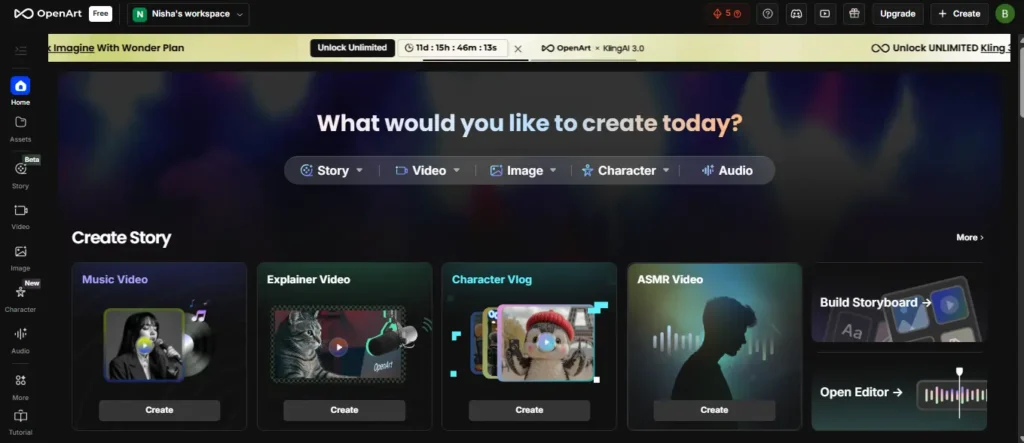
OpenArt started as a powerhouse for static visuals but has aggressively expanded. Based on their 2026 feature set, it’s primarily a “generative” engine. It doesn’t just find images; it dreams them up pixel by pixel.
- Core Strength: Control. With features like “Train a Model” and “Character Consistency” (up to 353 consistent characters on the Wonder plan), it’s built for creators who need specific, branded aesthetics.
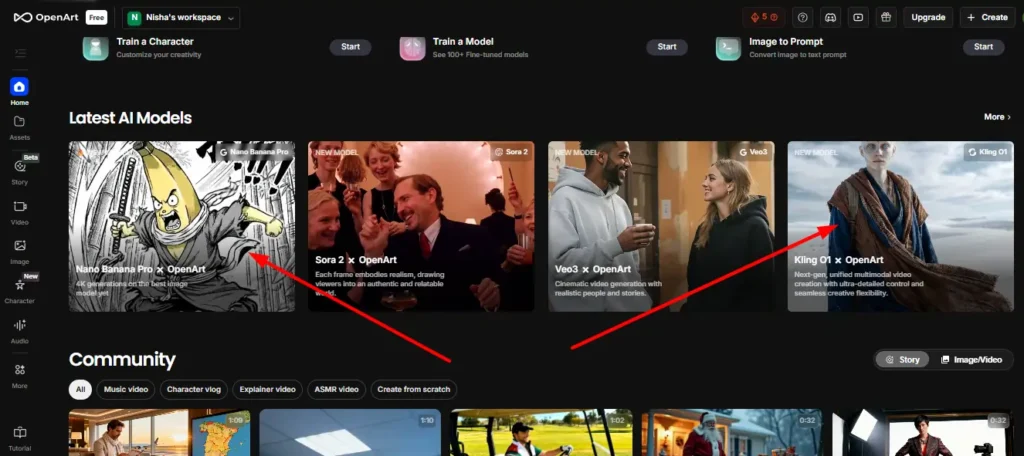
- New Capabilities: It’s not just images anymore. OpenArt now integrates generative video models like Sora 2, Veo3, and Kling O1. However, unlike Pictory, these are “prompt-to-video” generative clips—creating a 5-second cinematic shot from scratch rather than assembling a 5-minute marketing video from stock footage.
Understanding Pictory: The Leading Text to Video AI Tool

Pictory is a “production” engine. It is the ultimate text to video AI tool for marketers who have a message but lack the footage. It doesn’t generate new pixels from scratch (mostly); it retrieves relevant stock assets and stitches them together.
- Core Strength: Repurposing. Its “Blog to Video” and “Script to Video” features are designed to take existing text and turn it into a watchable format.
- Automation: It automates the boring stuff: finding b-roll, adding subtitles, and syncing voiceovers. If OpenArt is the artist painting a canvas, Pictory is the editor assembling a documentary.
Don’t pay full price. Use exclusive code CABF20 at checkout to save 20% on any monthly or annual plan forever.
Why Visual Content Creation AI Matters for Modern Marketers
In 2026, Google’s algorithm and social feeds penalize “wall of text” content. You need mixed media.
- Engagement: Pages with video keep users on-site 2-3x longer (a huge SEO signal).
- Speed: Manually editing a video takes 4 hours. Pictory does it in 10 minutes. Manually drawing a header image takes days. OpenArt does it in 30 seconds.
- Cost: Subscribing to both is still cheaper than hiring one freelancer for a day.
OpenArt vs Pictory Comparison: Feature-by-Feature Breakdown
Let’s get into the weeds. I’ve tested both dashboards extensively. Here is the AI image generator vs AI video maker feature showdown.
Creation Capabilities: AI Art Models and Styles vs. Automated Video Production
OpenArt acts as a hub for the world’s best generative models. You aren’t stuck with one algorithm. You can access Nano Banana Pro for images or Kling O1 for video generation. It allows for “Motion-Sync Video” and “Lip-Sync Video,” meaning you can animate static characters. It’s perfect for creative storytelling where reality is optional.
Pictory, conversely, is grounded in reality. It scans your text and pulls from a massive library of millions of royalty-free stock clips and images (Getty, Storyblocks, etc.). It’s not trying to hallucinate a “cyberpunk cat“; it’s trying to find a high-quality clip of a “business meeting” to match your blog post.
Customization: Custom Model Training AI vs. AI Video Editing Software
This is a huge differentiator.
- OpenArt (The Trainer): You can upload 10-20 photos of your product or mascot and “Train a Model.” This ensures that every image you generate looks like your brand. You can’t do this in Pictory.
- Pictory (The Editor): Customization here means “Branding.” You upload your logo, fonts, and intro/outro segments. Pictory ensures every video follows your corporate style guide, but it doesn’t “learn” your visual style in the same way OpenArt does.
Workflow Speed: AI Storyboard Generator vs. Rapid Blog to Video Converter
If you have a URL and need a video in 5 minutes, Pictory wins, hands down.
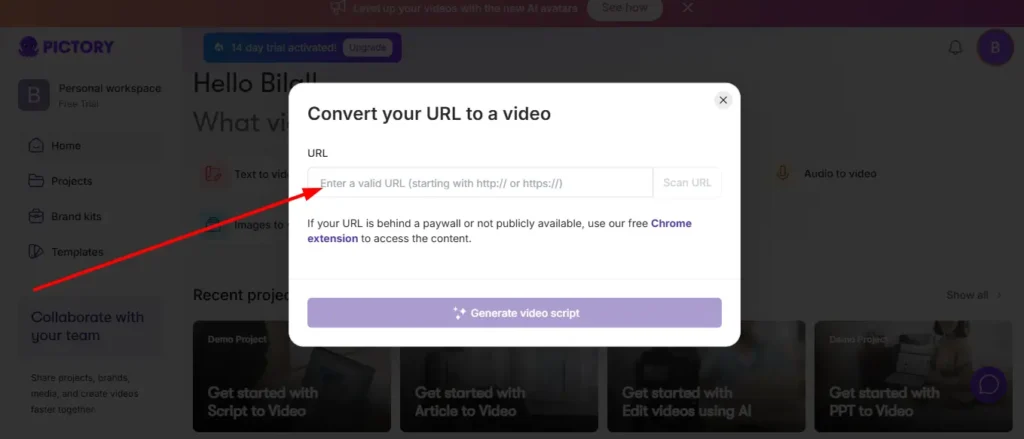
- Paste URL.
- AI summarizes the text.
- AI picks visuals.
- You hit export.
It’s a linear, fast, industrial workflow.
OpenArt is an iterative, creative sandbox. You might spend 20 minutes tweaking a prompt, adjusting the “ControlNet” settings, or upscaling the resolution. It’s faster than Photoshop, but it’s not the “one-click-done” assembly line that Pictory offers for long-form content.
Content Output: Static High-Res Visuals vs. AI Powered Video Creation
| Feature | OpenArt AI | Pictory AI |
|---|---|---|
| Primary Output | High-Res Images (4K), Generative Clips | Full Marketing Videos (1080p) |
| Source Material | Text Prompts + Reference Images | Scripts, Blog URLs, Recordings |
| Audio | Basic Audio generation | Full AI Voiceovers (ElevenLabs), Music Library |
| Best For | Thumbnails, NFTs, Concept Art, Short Clips | YouTube Videos, Social Shorts, Explainers |
Best AI Content Creation Tools 2026: Ideal Use Cases
Choosing between OpenArt AI vs Pictory AI depends entirely on who you are.
For Bloggers: Transforming Articles with Content Marketing Video Tools
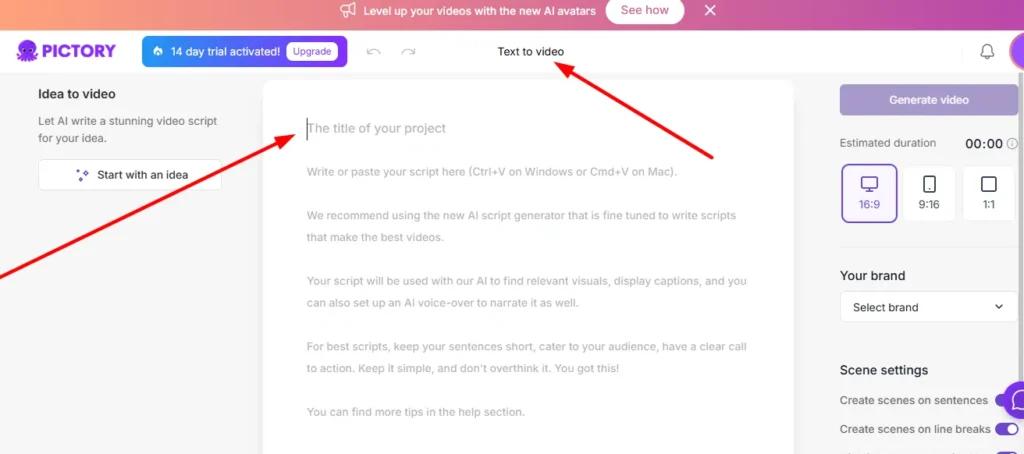
Winner: Pictory.
If you have 50 blog posts collecting dust, Pictory can turn them into 50 YouTube videos or 200 Instagram Reels in a week. The “Blog to Video” feature is practically built for SEOs who want to capture YouTube traffic without filming themselves. OpenArt can help you make the thumbnail for that video, but it can’t make the video itself effectively.
For Artists & Designers: Leveraging OpenArt for Concept Art and Assets
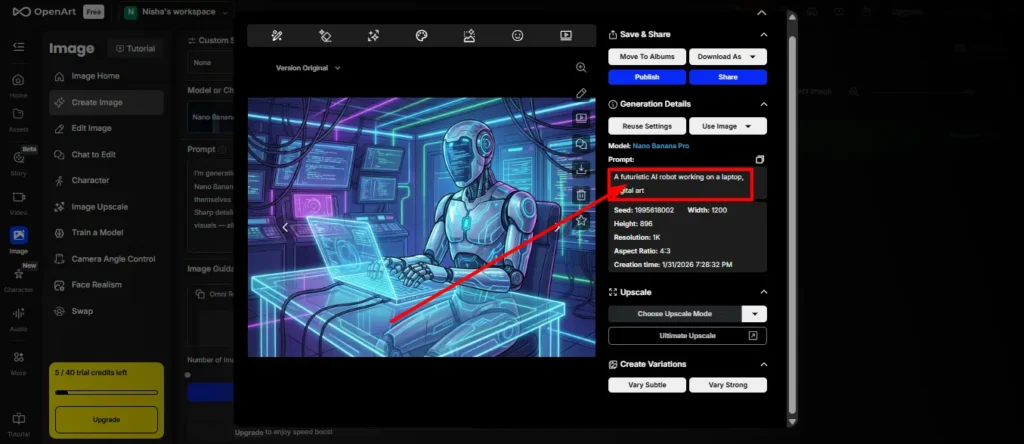
Winner: OpenArt.
Designers don’t need stock footage; they need assets. OpenArt’s “Image Upscale” and “Sketch to Image” features allow designers to rapid-prototype ideas. If you need a specific vector-style illustration for a website header, OpenArt generates it royalty-free. Pictory has no utility here.
For Social Media Managers: The Ultimate Social Media Video Generator
Winner: Tie (It depends on the platform).
- TikTok/Reels: If you want viral, trippy, AI-generated visuals (like the “Harry Potter but Balenciaga” trend), you need OpenArt (specifically the Sora/Kling models).
- LinkedIn/Facebook: If you need professional updates, corporate announcements, or summarized news clips with captions, you need Pictory. Its “Auto Caption Videos” feature is a lifesaver for silent scrolling.
For Publishers: Scaling Production with AI Video Generator Comparison Data
Winner: Pictory.
For high-volume publishers, consistency is key. Pictory’s “Teams” plan allows for shared assets and brand kits. You can have a junior editor churn out 10 videos a day that all look on-brand. OpenArt is too experimental for this level of standardized production.
Pricing Wars: OpenArt AI Pricing vs Pictory AI Features and Pricing
When comparing the cost of these tools, it’s crucial to look beyond the monthly fee and understand what you are actually buying: compute power versus media assets.
OpenArt Cost Structure: Credits, Subscriptions, and Free Tiers
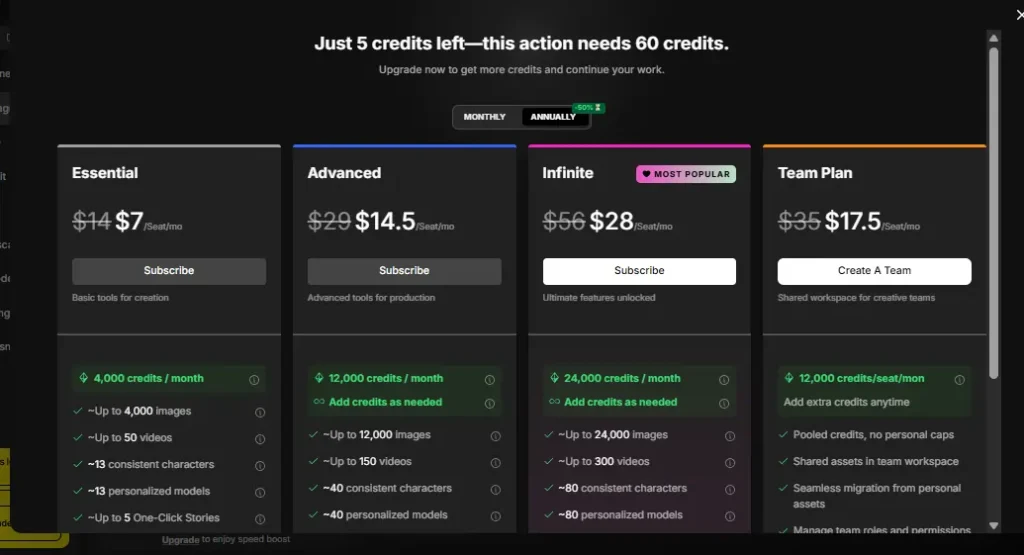
OpenArt uses a flexible “credit” system. You pay for the processing power needed to generate new pixels.
- Free: 40 one-time credits. Enough to generate about 40 standard images.
- Starter ($7/seat/mo): 4,000 credits/month. Includes 4 parallel generations and access to 100+ premium models.
- Advanced ($14.50/seat/mo): 12,000 credits/month. Unlocks higher limits (150 videos) and 16 parallel generations.
- Infinite ($28/seat/mo): 24,000 credits/month. Best for power users who need up to 300 videos and 32 parallel generations.
- Wonder ($120/seat/mo): A massive 106,000 credits/month, capable of generating up to 1,300 videos.
Pictory Pricing Plans: Standard, Premium, and Enterprise Value
Pictory’s pricing is structured around video volume and access to their massive stock library. All annual plans include a 40% discount.
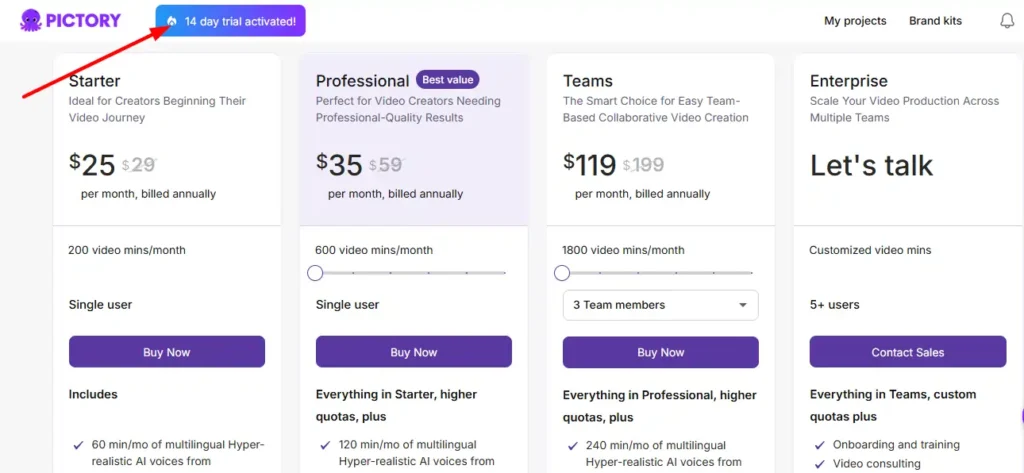
- Starter ($29/mo billed annually): Ideal for beginners.
- Includes: 200 video minutes per month.
- Assets: 5 million stock videos from Storyblocks and Getty Images.
- AI Voice: 60 minutes of ElevenLabs’ ultra-realistic AI voices.
- Features: 1 Brand Kit, auto-sync voiceovers, and no watermarks.
- Professional ($59/mo billed annually): The sweet spot for most creators (labelled “Most Popular”).
- Includes: 600 video minutes per month and 20GB of storage.
- Assets: Expanded library of 18 million premium videos from Getty Images and Storyblocks.
- AI Voice: 120 minutes of ElevenLabs voices + unlimited standard voices.
- Bonus: 500 AI credits for generative images/videos and 5 Brand Kits for managing multiple clients or channels.
- Team ($199/mo billed annually): For agencies and collaborative teams.
- Includes: 1800 video minutes, 3+ users, and 100GB storage.
- Collaboration: Dedicated team workspace for sharing assets.
- Bonus: 2400 AI credits and 240 minutes of ElevenLabs voices.
Save up to $40/year on the Professional plan. Copy code CABF20 and paste it at checkout to lock in your lifetime discount.
ROI Analysis: Which Tool Offers Better Value for Beginners?
If you are a beginner, Pictory’s Professional plan offers the clearest path to ROI. Accessing 18 million Getty Images clips independently would cost hundreds of dollars a month. Pictory bundles this asset library with the editing software, making it a “battery-included” solution for video marketing. OpenArt is cheaper to start ($7 vs $29), but it requires more creative skill to turn those raw images into a monetizable product.
AI Art Generator Comparison vs AI Video Generator Comparison: The Verdict
Ease of Use: User Interface and Learning Curve
Pictory is intuitive. Its interface looks like a simplified video editor or a slide deck builder. If you can use PowerPoint, you can use Pictory.
OpenArt is complex. The interface is packed with sliders: “CFG Scale,” “Steps,” “Seed,” “Negative Prompts.” It’s powerful, but intimidating for a novice who just wants a picture of a dog.
Integration: How These Tools Fit Into Your SEO Strategy
- Pictory integrates with your content. It takes your text and repurposes it. It has a Chrome extension to turn any page into a video.
- OpenArt integrates with your branding. It creates the raw materials (logos, characters, backgrounds) that you use elsewhere.
Quality Control: Consistency in Branding and Style
OpenArt wins on consistency if you use the “Train a Model” feature. You can force the AI to always use your specific color palette and character face.
Pictory ensures consistency through templates. Your font and logo will always be in the right place, but the stock footage itself will vary depending on what the AI finds in the library.
Frequently Asked Questions (PAA)
What is the main difference between OpenArt AI and Pictory AI?
OpenArt AI is primarily a generative tool for creating images and short video clips from scratch using prompts. Pictory AI is a video editing and repurposing tool that uses stock footage and AI automation to turn text/scripts into full-length marketing videos.
Can OpenArt AI generate videos like Pictory?
No, not in the same way. OpenArt uses models like Sora 2 and Kling to generate short, silent, cinematic clips (3-10 seconds) from prompts. It does not add voiceovers, subtitles, or stitch clips together into a narrative sequence like Pictory does.
Is Pictory the best tool for converting text to video?
For marketing and blogging purposes, yes. Pictory is widely considered the industry leader for blog to video conversion because of its ability to automatically summarize text, match it with stock footage, and add AI voiceovers and captions in minutes.
Which tool is better for YouTube automation and Faceless Channels?
Pictory AI is superior for faceless channels. It handles the heavy lifting of finding footage and narration. OpenArt is useful for creating unique thumbnails or specific b-roll clips that you can’t find in stock libraries, but you would still need an editor to assemble the video.
Final Thoughts: Should You Choose OpenArt or Pictory?
In the OpenArt AI vs Pictory AI debate, the answer isn’t “one or the other”—it’s often “both,” but for different reasons.
Choose OpenArt AI if:
- You need original, custom visuals that don’t exist in stock libraries.
- You want to create consistent characters or brand mascots.
- You are an artist or designer looking to speed up concepting.
- You want to experiment with cutting-edge generative video (Sora/Kling).
Choose Pictory AI if:
- You are a marketer, blogger, or SEO focused on traffic and engagement.
- You need to repurpose text content into video at scale.
- You want a tool that handles editing, captions, and voiceovers automatically.
- You need professional, polished videos for social media or corporate use.
For most website owners reading this, Pictory AI will likely have a more immediate impact on your traffic metrics by turning your written words into watchable content. However, keep OpenArt in your back pocket for when you need that one perfect, custom image that no stock photo site can provide.