Best OpenArt Prompts for YouTube Thumbnails That Actually Get Clicks (2026)
Hello, my lovely audience! I’m Nisha from AIBlogFirst.com, and I’ve been using OpenArt actively for the past 6 months — testing, prompting, and sharing everything I discover with you.
You already know how frustrating it feels when your YouTube thumbnail gets ignored. You spend hours editing a video, you design a thumbnail, but the clicks just don’t come. Most creators don’t realize the real problem isn’t the design — it’s the prompt behind the AI generation.
OpenArt has quietly become one of the most powerful tools for YouTube creators who want scroll-stopping thumbnails without hiring an expensive designer. But getting the right OpenArt prompts for YouTube thumbnails takes more than guessing.
In this guide, I’ve compiled the exact copy-paste AI prompts for viral thumbnails that actually work across different niches. Plus, as a thank you to my daily readers, I’ve secured an exclusive deal. You can use the OpenArt coupon code for content creators NISHA15 to get 15% OFF your plan. Let’s get into it!
Save 15% On OpenArt AI With Code NISHA15
Unlock premium AI features and create stunning YouTube thumbnails effortlessly. Apply code NISHA15 to get 15% off!
Why Most YouTube Thumbnails Fail (And How OpenArt Fixes It)
The Real Reason Your Thumbnails Are Getting Ignored
Most YouTube thumbnails fail because they lack contrast, clear focal points, and emotional resonance. If your thumbnail is cluttered, viewers scrolling on their phones will simply gloss over it. YouTube click through rate optimization relies on split-second decisions. If a user can’t understand what your video is about in less than two seconds, they keep scrolling.
Traditional design tools often lead to generic, flat layouts unless you have years of graphic design experience. Creators often struggle to manually cut out backgrounds, adjust lighting, and match colors.
How AI Prompts Change the Thumbnail Game
This is where an AI thumbnail generator steps in. By using specific descriptive text, you bypass the manual labor of graphic design. OpenArt allows you to generate high-contrast, cinematic visuals that instantly grab attention. Instead of hunting for stock photos, you can generate an expressive face, a dynamic background, or a hyper-realistic 3D object tailored exactly to your video’s topic.
What Is OpenArt AI and Why Creators Love It for Thumbnails

Key Features That Make OpenArt Great for YouTube Thumbnails
OpenArt is a complete AI creator studio that integrates multiple top-tier AI models into one dashboard. For thumbnail creators, the platform offers specific features that solve traditional AI generation problems:
- GPT Image 2.0: This is arguably the best AI image generator for readable text. If you want text directly integrated into the image, this model handles text rendering beautifully.
- Image Compositing AI: You can upload an image of yourself and use OpenArt to seamlessly blend your face into newly generated environments.
- Nano Banana Pro: A highly efficient model inside OpenArt perfect for rapid, vibrant image generation.
- Custom AI Character Consistency: You can train the AI to remember your specific character or face, ensuring your channel branding remains consistent across hundreds of videos.
Is OpenArt Free? Plans, Pricing & Free Trial Explained
Yes, OpenArt AI free trial credits are available for new users. When you sign up, you receive 40 one-time trial credits valid for 7 days, allowing you to test premium features without a credit card. You can even join their Discord for an extra 50 trial credits. This is perfect if you want to test how to use OpenArt for YouTube thumbnails before committing to a paid plan.
How to Use OpenArt for YouTube Thumbnails (Step-by-Step)
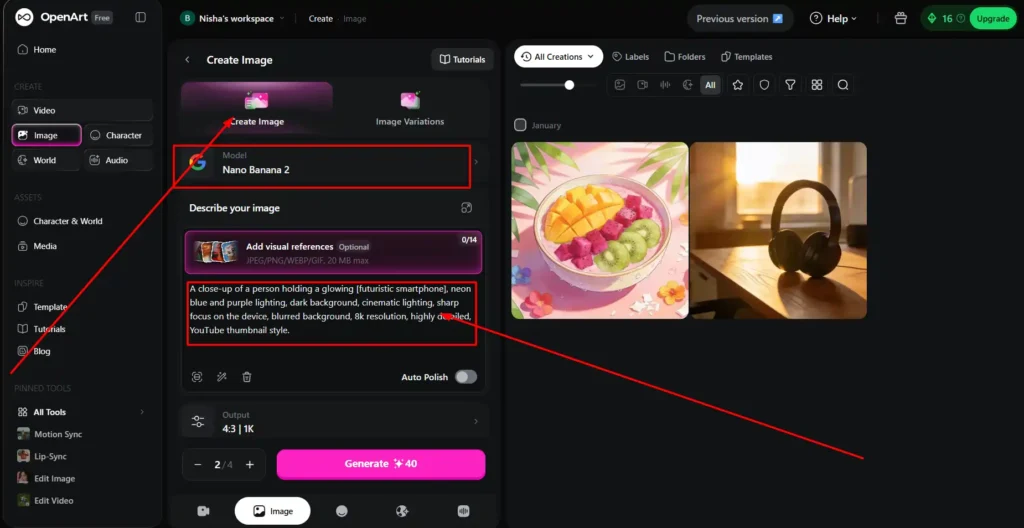
Setting Up Your Workspace in OpenArt
Starting an OpenArt AI thumbnail maker tutorial is straightforward. Head to the OpenArt dashboard and select Create Image.
- Make sure to set your aspect ratio to 16:9, which perfectly matches the 1280×720 dimensions required for YouTube.
- Choose your preferred model. If you need hyper-realism, select standard image models. If you need typography, choose GPT Image 2.0.
How to Write Effective Prompts for Thumbnails
Writing high CTR YouTube thumbnail prompts in OpenArt requires a specific structure. Do not just type “a man looking at a car.” You need to dictate the lighting, the camera angle, and the emotion. Always include terms like vibrant colors, high contrast, depth of field, and sharp focus to make the subject pop against the background.
Choosing the Right Model and Style Settings
Your model choice dictates the vibe. For a gaming channel, you might want a 3D render style. For a finance channel, hyper-realistic photography works best. OpenArt lets you easily toggle these styles. → You can also explore our guide on the best AI image tools for a deeper dive into model comparisons.
Best OpenArt Prompts for YouTube Thumbnails (By Niche)
Here is a curated list of prompt templates. Simply replace the bracketed words with your specific topics.
OpenArt Prompts for Tech & AI YouTube Thumbnails
Tech viewers love sleek, futuristic, and glowing elements.
Prompt: A close-up of a person holding a glowing [futuristic smartphone], neon blue and purple lighting, dark background, cinematic lighting, sharp focus on the device, blurred background, 8k resolution, highly detailed, YouTube thumbnail style.
OpenArt Prompts for Finance & Business Channels
Finance thumbnails need to convey shock, wealth, or urgent trends.
Prompt: A businessman with a shocked expression pointing at a massive glowing green upward arrow, flying gold coins in the background, dramatic studio lighting, high contrast, professional photography, hyper-realistic, depth of field.
OpenArt Prompts for Gaming Thumbnails
Gaming thumbnails thrive on intense action and vivid colors.
Prompt: A split screen before after layout of a [Minecraft/Roblox] landscape. Left side is dark and ruined, right side is glowing and magical. Vibrant colors, 3D render, unreal engine 5 style, highly engaging, dynamic angle.
OpenArt Prompts for Lifestyle & Vlog Channels
Vlog thumbnails need to feel bright, airy, and inviting.
Prompt: A bright and aesthetic morning routine setup, a steaming cup of coffee on a wooden desk, sunlight streaming through a window, soft lighting, cozy atmosphere, pastel color palette, shallow depth of field, vlog thumbnail style.
OpenArt Prompts for Motivational & Educational Videos
These require a serious, cinematic, and authoritative tone.
Prompt: A cinematic portrait of a person standing on a mountain peak looking at a glowing horizon, dark and moody sky, golden hour lighting, silhouette style, inspirational, ultra-detailed, 8k, rule of thirds ai composition.
OpenArt Prompts for Reaction Face & Emotion-Driven Thumbnails
Knowing how to make reaction face thumbnails in OpenArt is a superpower for creators.
Prompt: An exaggerated expressive face of a young [man/woman] gasping in shock, hands on cheeks, wide eyes, vibrant yellow background, pop art influence, extreme high contrast, studio ring light reflection in eyes, expressive face AI generation.
High-CTR Thumbnail Prompt Formula (Copy & Paste Ready)
The 5-Part Prompt Structure That Works Every Time
To create your own viral video thumbnail templates, follow this exact graphic design AI workflow formula:
- Subject: (Who or what is the main focus?)
- Action/Emotion: (What are they doing or feeling?)
- Environment: (Where are they? Keep it simple.)
- Lighting: (Cinematic, neon, bright, natural?)
- Style/Format: (8k, high contrast, YouTube thumbnail style)
Negative Prompts to Avoid Common Thumbnail Mistakes
Negative prompts for thumbnails are just as important as your main prompt. They tell the AI what not to generate.
Negative Prompt to copy/paste: blurry, low resolution, distorted faces, extra fingers, text, watermark, messy background, dull colors, low contrast, out of focus.
OpenArt vs Midjourney vs Leonardo AI for YouTube Thumbnails
Which Gives the Most Clickable Thumbnails?
When comparing OpenArt vs Midjourney for thumbnails, both produce stunning results, but they serve different workflows. Midjourney generates breathtaking artistic quality, but it operates entirely through Discord, making it clunky for fast workflows.
OpenArt wins for user experience. Its web-based interface allows you to easily control aspect ratios, use image compositing AI, and fix specific parts of an image without starting over. If you are looking for a free OpenArt alternative for YouTube thumbnails, Leonardo AI is decent, but OpenArt’s specialized models like Nano Banana Pro give it a massive edge for fast iteration.
Price vs Quality — Which Tool Wins for Creators?
When looking at OpenArt essential plan pricing vs Midjourney, OpenArt offers incredible value. While Midjourney starts at $10/month, OpenArt’s Essential plan drops to just $7/month when billed annually. Plus, OpenArt provides access to over 100+ premium image and video models all in one place, making it the ultimate all-in-one suite.
| Feature | OpenArt AI | Midjourney | Leonardo AI |
|---|---|---|---|
| Ease of Use | High (Web Dashboard) | Low (Discord UI) | Medium (Web Dashboard) |
| Best For | Text rendering, precise control | Artistic, cinematic styles | Game assets, general images |
| Starting Price | $7/mo (Annual) | $10/mo | $12/mo |
Tips to Make OpenArt Thumbnails Go Viral
Rule of Thirds, Color Contrast & Facial Expressions
Never place your main subject dead center if you plan to add text. Use the rule of thirds AI composition by adding “subject on the left side of the frame” to your prompt. Always aim for complementary color palettes (like blue and orange) to make the image pop on a dark mode YouTube screen.
How to Add Readable Text Overlays to AI Thumbnails
While OpenArt features robust text rendering AI models like GPT Image 2.0, sometimes you want complete control over typography. The best workflow is to use OpenArt to generate a stunning, text-free background with your subject on one side, and then use Canva or Photoshop to add thick, high-contrast text on the empty side.
OpenArt Pricing: Which Plan Is Right for You?
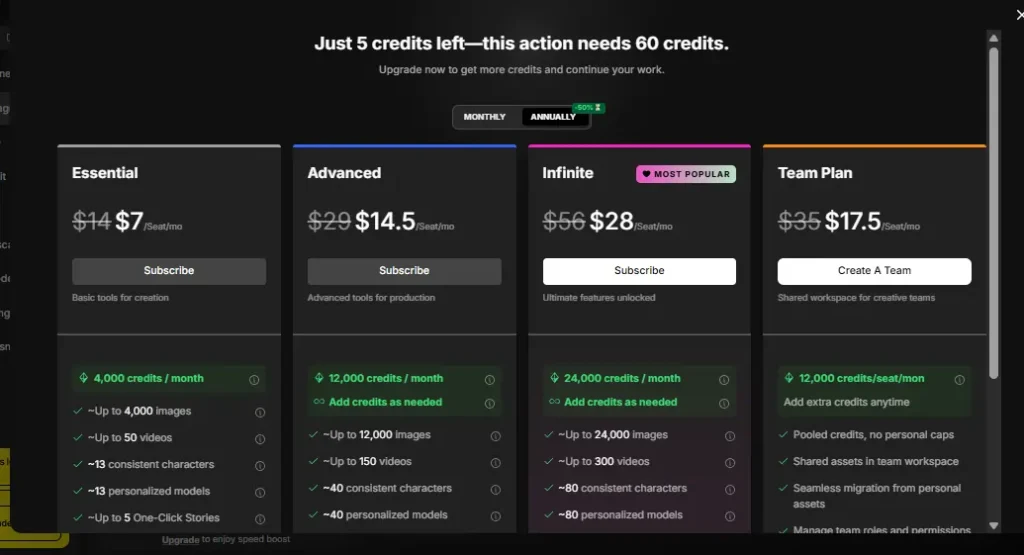
Free Plan vs Essential vs Pro — Full Breakdown
OpenArt’s pricing is incredibly flexible, especially with their 50% OFF annual built-in discounts.
- Free Plan ($0): 40 one-time trial credits. Good for testing.
- Essential Plan ($7/mo on annual): 4,000 credits/month. Perfect for solo YouTube creators who need a few thumbnails a week. Includes 8 parallel generations and access to 100+ models.
- Advanced Plan ($14.50/mo on annual): 12,000 credits/month. Ideal for daily uploaders. Unlocks 16 parallel generations and commercial use rights.
- Infinite Plan ($28/mo on annual): 24,000 credits/month. Best for agencies managing multiple YouTube channels.
- Wonder Plan ($120/mo on annual): 106,000 credits/month. For massive enterprise teams.
Is OpenArt Worth Paying For in 2026?
Absolutely. If you value your time, the OpenArt promo code annual plan route pays for itself after just one viral video. The ability to generate custom AI character consistency across your channel is something you cannot easily do on free, basic generators.
OpenArt Discount Code & Promo Code (Exclusive 2026)
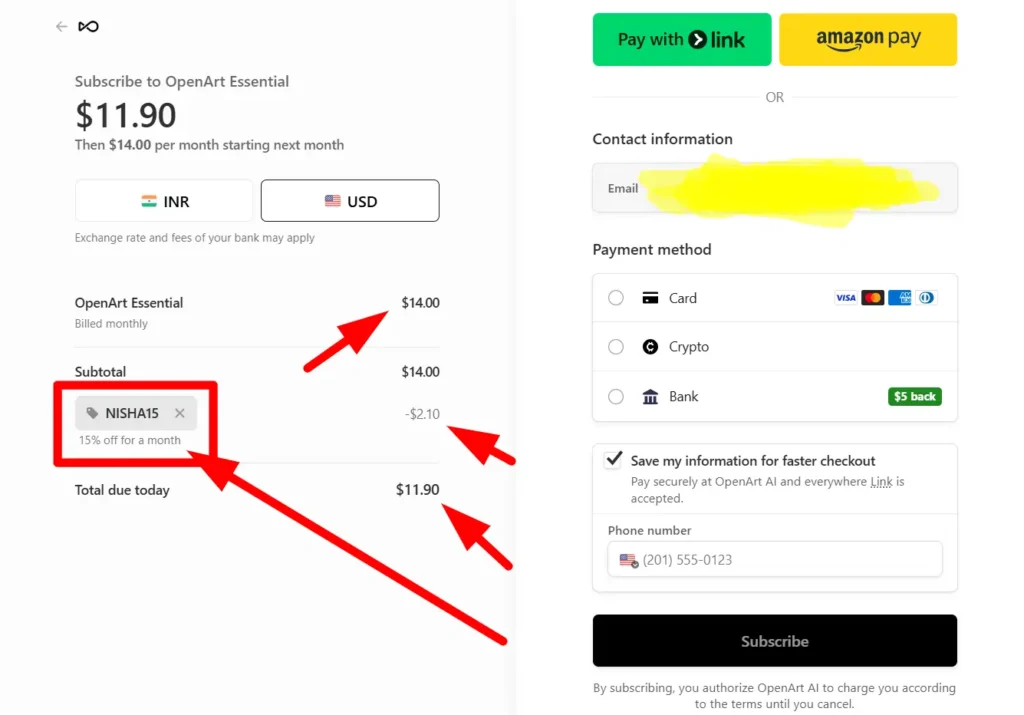
How to Apply Coupon Code NISHA15 for 15% OFF
If you are ready to upgrade your thumbnail game, I’ve partnered with them to get my readers a massive discount. When checking out, use the openart ai discount code 2026 NISHA15 to get a flat 15% off your chosen plan.
Where to Find the Latest OpenArt Deals & Offers
The best way to save is to combine the annual billing (which automatically gives you 50% off) with a coupon code. This makes it one of the most affordable professional AI suites on the market.
Exclusive OpenArt Promo Code: Get 15% Off Today
Ready to generate viral thumbnails? Upgrade your plan today and instantly save 15% using code NISHA15.
Frequently Asked Questions About OpenArt Thumbnail Prompts
Can I use OpenArt thumbnails on YouTube without copyright issues?
Yes. If you upgrade to the Advanced Plan or higher, OpenArt grants you full commercial use rights for everything you generate. You can safely use these images for monetized YouTube channels.
Does OpenArt support 1280×720 YouTube thumbnail dimensions?
Yes. Inside the image generation suite, simply select the 16:9 aspect ratio, which perfectly aligns with YouTube’s standard 1280×720 pixel requirement.
What is the best OpenArt model for face generation?
For realistic, expressive faces, standard hyper-realistic models work beautifully. If you need consistency across multiple videos, use OpenArt’s Custom Character features to train a personalized model on your own face.
How many free credits does OpenArt give per day?
Currently, OpenArt provides 40 one-time trial credits for new accounts to use over 7 days. You can earn an additional 50 credits by joining their Discord community. For daily, recurring usage, upgrading to the Essential plan is highly recommended.
Turning Your AI Prompts into Clickable Thumbnails
Getting great thumbnails from AI is less about luck and more about how clearly you communicate with it. Once you understand the structure behind an effective prompt — the lighting, the emotion, the composition — OpenArt starts feeling less like a tool and more like a creative partner.
The OpenArt prompts for YouTube thumbnails shared in this guide are a solid starting point, but the real growth comes from experimenting with your own niche, style, and audience expectations.
Start simple. Test one prompt today. And remember, my exclusive code NISHA15 gets you 15% off if you’re ready to go further.
Your next high-click thumbnail is closer than you think.