Kling 4.0 is now live on OpenArt, and the platform is offering 50% off the model until November 20. If you make AI videos and have been waiting for a good moment to try it, the timing matters.
The offer is open to existing Pro and Wonder subscribers, new users who upgrade to Pro or Wonder, and returning users who upgrade to either plan. Your eligibility depends on your current account status, so it’s worth checking before you pay.
This guide explains how Kling 4.0 on OpenArt works, who qualifies for the discount, and how the Pro and Wonder plans differ. That way you can decide whether the upgrade fits your video projects.
What Is Kling 4.0 on OpenArt?
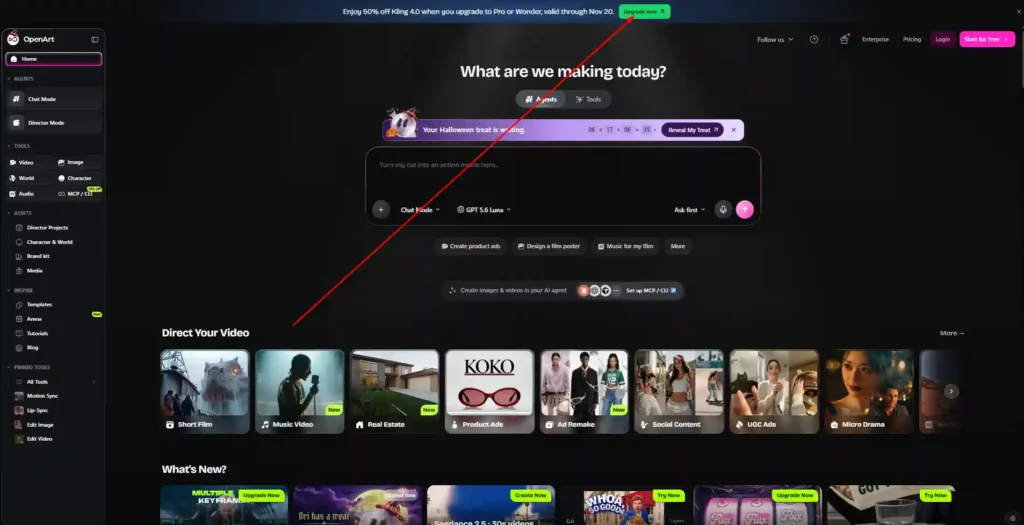
Kling 4.0 is an AI video model from the Kling family. OpenArt has added it to its platform, so you can use it alongside the other image, video, and audio models in one account.
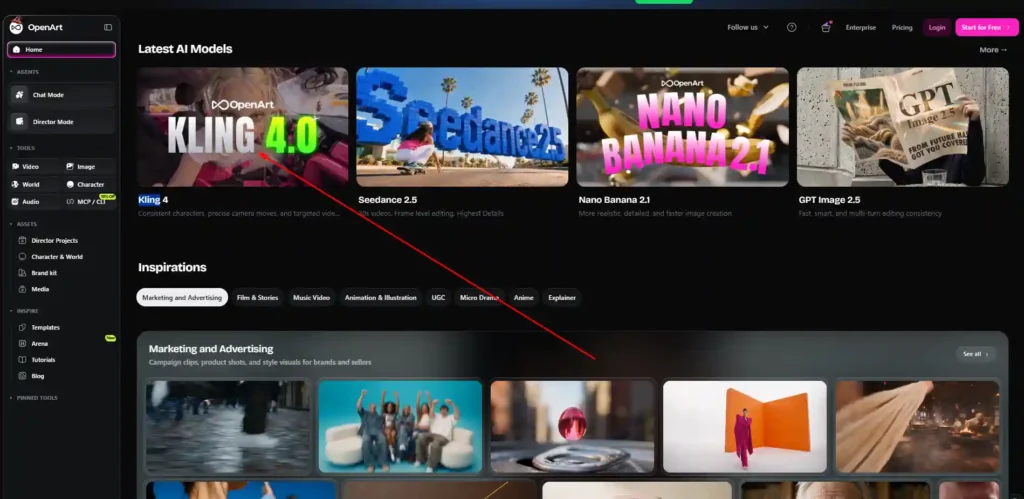
OpenArt describes it as a model built for consistent characters, precise camera moves, and targeted video edits. You can find it under the Video tool and in the “Latest AI Models” section on the OpenArt home page, where it appears as Kling 4.
OpenArt also lists access to 100+ premium image, video, and audio models on its paid plans, so Kling 4.0 is one option among many rather than the whole platform.
Get 15% Off OpenArt With Code NISHA15
Apply code NISHA15 at checkout to save 15% on your OpenArt purchase and start creating AI videos and images.
Key Features of Kling 4.0 on OpenArt
OpenArt highlights three strengths for Kling 4.0:
- Consistent characters: Your subject should keep a similar look across shots, which matters for stories, ads, and recurring characters.
- Precise camera moves: You can direct how the camera moves, such as pans or push-ins, instead of leaving it entirely to chance.
- Targeted video edits: You can change specific parts of a video rather than regenerating the whole clip.
OpenArt hasn’t published detailed specifications for these features on its pricing page. Treat them as the platform’s own description, and test them on a short clip before committing to a large project.
Kling 4.0 on OpenArt 50% Off: Who Qualifies and When It Ends
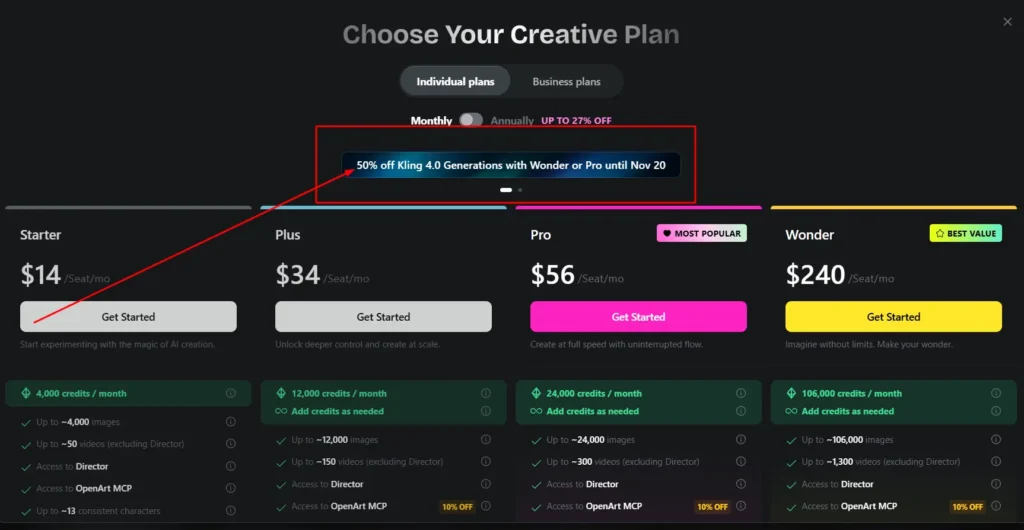
The short answer: OpenArt is running 50% off Kling 4.0 generations until November 20, for Pro and Wonder plan users.
You qualify if you are:
- An existing Pro or Wonder subscriber
- A new user upgrading to Pro or Wonder
- A returning user upgrading to Pro or Wonder
The pricing page lists the discount as “50% off Kling 4.0 generations with Wonder or Pro.” Starter and Plus are not mentioned in the offer, so they don’t appear to be included.
If you’re already on Pro or Wonder, you don’t need to change plans to benefit. If you’re on Starter or Plus, you would need to upgrade to Pro or Wonder to qualify, and you should do so before November 20.
Kling 4.0 on OpenArt Pricing: Starter, Plus, Pro and Wonder Compared
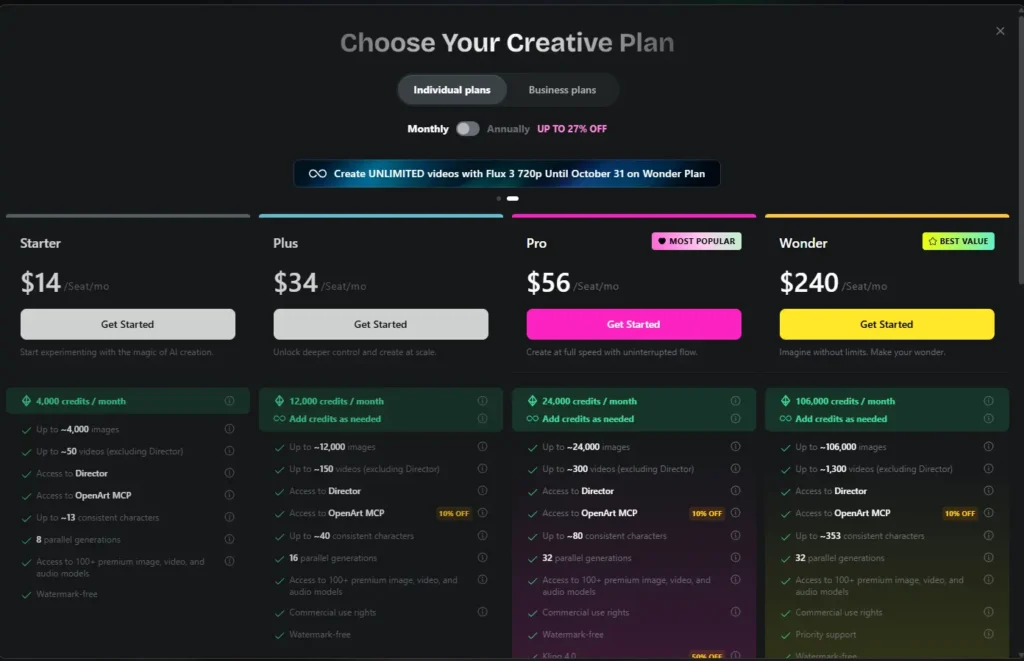
OpenArt lists four individual plans. Prices below are in US dollars, shown per seat per month.
| Features | Starter | Plus | Pro | Wonder |
|---|---|---|---|---|
| Price | $14 | $34 | $56 | $240 |
| Monthly credits | 4,000 | 12,000 | 24,000 | 106,000 |
| Approx. videos | Up to ~50 | Up to ~150 | Up to ~300 | Up to ~1,300 |
| Parallel generations | 8 | 16 | 32 | 32 |
| Commercial use rights | Not listed | Yes | Yes | Yes |
| Kling 4.0 50% off | No | No | Yes | Yes |
Video counts exclude Director mode, and OpenArt marks them as approximate. All four plans are watermark-free and include access to Director and OpenArt MCP.
Billing: The page offers monthly and annual billing, with annual listed as up to 27% off. Extra credits: Plus, Pro, and Wonder allow you to add credits as needed. There is also a separate add-on of 5,000 credits per month for $15, available to Plus subscribers and above.
[Internal link suggestion: OpenArt plans and credits explained]
Best OpenArt Plan for Kling 4.0 on OpenArt: Pro or Wonder?
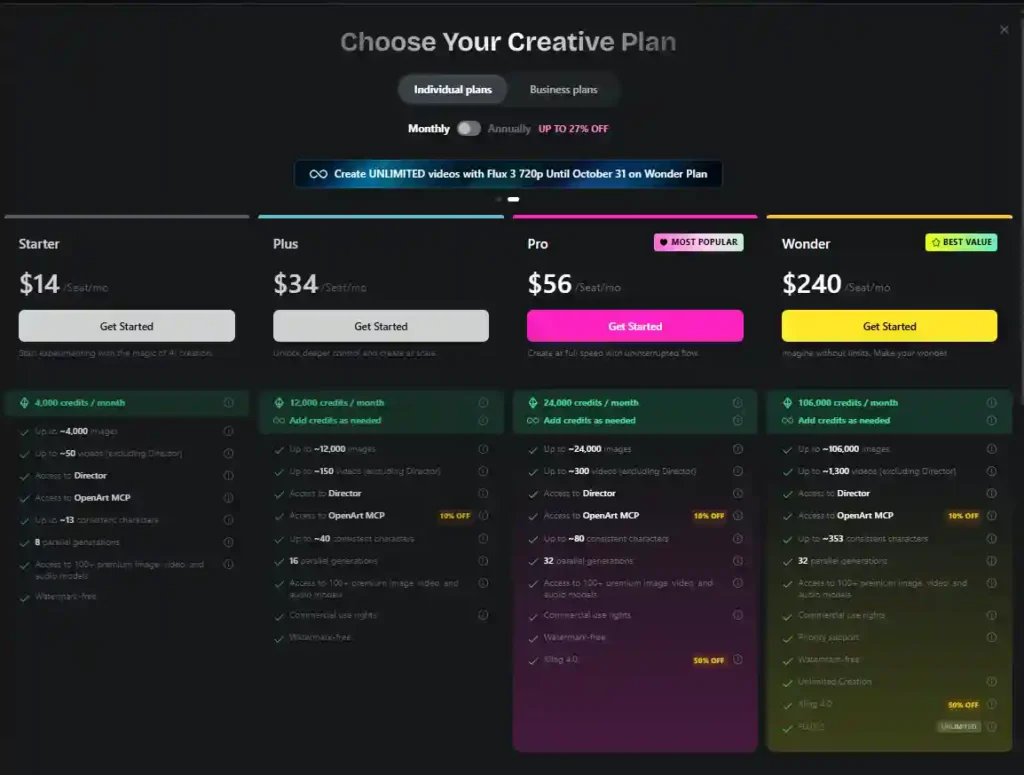
Since the discount applies only to Pro and Wonder, the choice comes down to those two.
Pro ($56/month) is labeled “Most Popular.” It includes 24,000 credits, up to about 300 videos, 32 parallel generations, and commercial use rights. It suits freelancers, creators, and small teams who produce video regularly but not at huge volume.
Wonder ($240/month) is labeled “Best Value.” It includes 106,000 credits, up to about 1,300 videos, priority support, and the “Unlimited Creation” label. OpenArt also lists unlimited Flux 3 720p video on Wonder until October 31. It suits heavy users, agencies, and anyone generating video daily.
If you’re unsure, Pro is the lower-cost way to reach the Kling 4.0 discount. Wonder makes more sense when you know you’ll use a large share of its credits.
How to Use Kling 4.0 on OpenArt Step by Step
- Choose a plan. Upgrade to Pro or Wonder before November 20 if you want the 50% discount.
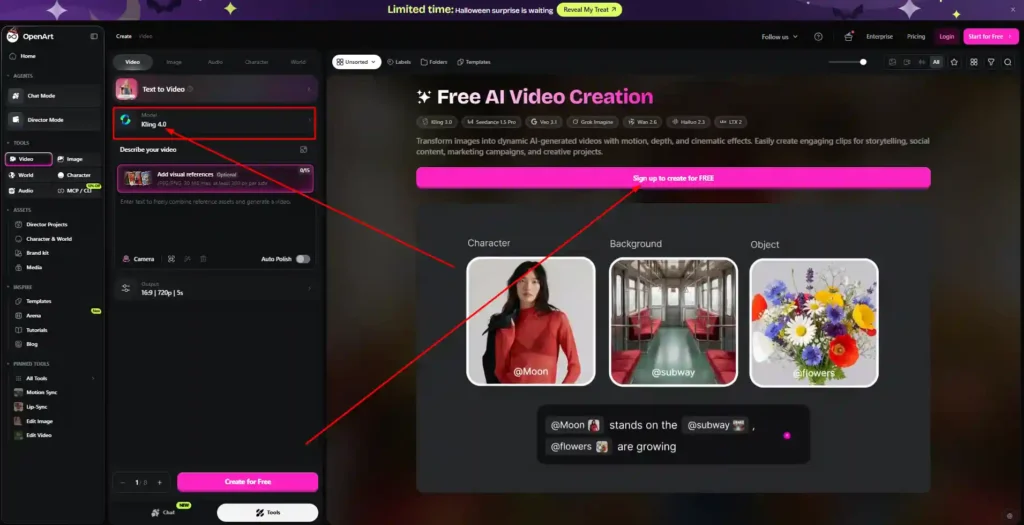
- Open the Video tool. From the OpenArt menu, go to Tools and select Video.
- Select Kling 4. Pick it from the model list. It also appears under “Latest AI Models” on the home page.
- Add your input. Write a text prompt, or upload a reference image if you want to animate an existing picture.
- Generate and review. Check how well the character stays consistent and whether the camera movement matches your prompt.
- Refine. Adjust your prompt or use targeted edits to fix specific parts instead of starting over.
Start with a short test clip so you can judge quality before spending more credits.
Kling 4.0 on OpenArt vs Seedance 2.5 and Other Models
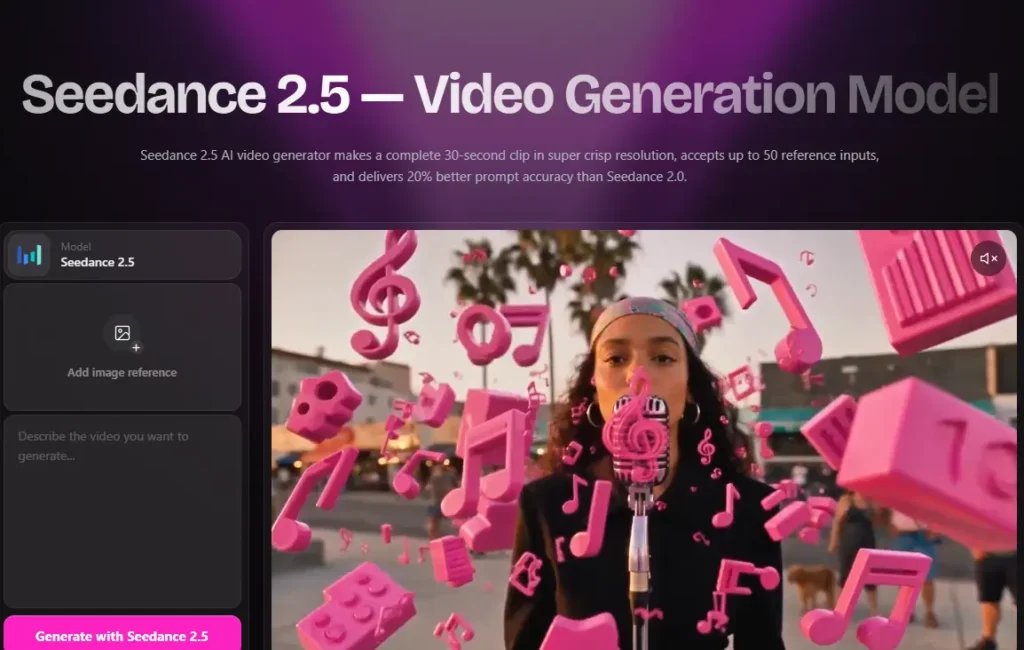
Both models appear on OpenArt’s home page as featured options, and they highlight different strengths:
- Kling 4: consistent characters, precise camera moves, and targeted video edits.
- Seedance 2.5: 30-second videos, frame-level editing, and high detail.
Kling 4 fits projects built around a recurring character or controlled camera work. Seedance 2.5 fits longer clips and detailed frame-level changes. We haven’t run side-by-side tests, so we aren’t declaring a winner. Because both are available on the same platform, you can try each on the same idea and compare the results yourself.
Is Kling 4.0 on OpenArt Worth It?
It depends on how you plan to use it.
- Creators: Worth trying if character consistency matters for your series or stories.
- Marketers and small businesses: Pro includes commercial use rights, which matters for ads and client work.
- Casual users: If you only want to experiment occasionally, a higher-priced plan may not be worth it just for the discount.
The 50% discount ends on November 20. It makes the most sense if you already planned to upgrade.
Kling 4.0 on OpenArt FAQs
Is Kling 4.0 on OpenArt free to use?
The 50% offer is tied to Pro and Wonder plans, so Kling 4.0 is presented as a paid-plan feature. OpenArt’s pricing page does not describe a free Kling 4.0 allowance.
How much is the Kling 4.0 on OpenArt discount?
It is 50% off Kling 4.0 generations for eligible Pro and Wonder users.
When does the Kling 4.0 on OpenArt offer end?
The offer runs until November 20.
Can I use Kling 4.0 on OpenArt for commercial projects?
Plus, Pro, and Wonder plans list commercial use rights. Starter does not list them.
Which OpenArt plans include the Kling 4.0 on OpenArt discount?
Pro and Wonder. Starter and Plus are not part of the offer.
Conclusion
Kling 4.0 on OpenArt is worth a look if you need consistent characters, controlled camera moves, or targeted edits in your AI videos. The 50% discount applies to Pro and Wonder users until November 20, so Pro is the practical entry point for most creators, and Wonder suits high-volume work.
If you were already considering an upgrade, doing it before the deadline gets you the lower Kling 4.0 rate. If not, test the model on a short clip first and decide from there.