Hey, my lovely audience! I’m Nisha from AiBlogFirst.com, and OpenArt has been part of my daily workflow for over a year now. Lately, my inbox is full of one question: why do OpenArt’s top models suddenly cost less to unlock right now?
Something changed inside OpenArt’s pricing page this month. A limited window opened, tied to models like Nano Banana 2 Lite, GPT Image 2, and Seedream 5.0 Pro, and it won’t stay open past July 31.
Save 40% on OpenArt in 2026 sounds simple, but the real terms behind this offer decide whether it actually helps daily creators or just sounds good on paper. Stick around, because the details matter more than the headline.
What Is the OpenArt 2026 Summer Sale?
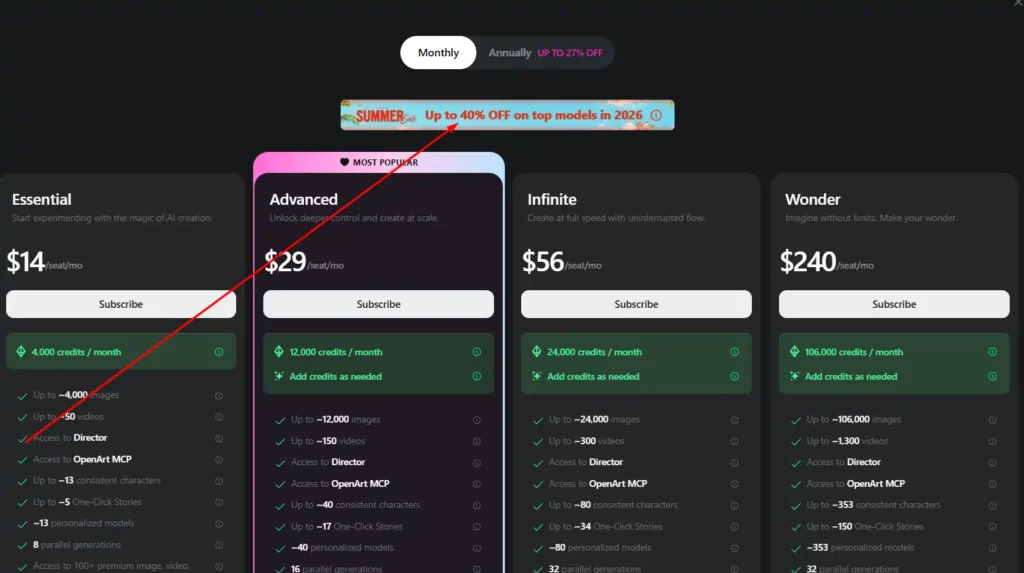
OpenArt is currently running what it calls the “Hot Summer Sale” — a limited-time upgrade promotion, not a coupon code you type in manually.
Here’s the actual mechanic: if you upgrade to the Advanced plan or above before July 31, you lock in up to 40% off on a set of top AI models, and that pricing stays active through December 31, 2026.
That’s a meaningful detail people miss. This isn’t a discount on your subscription price itself — it’s a locked-in rate on specific model usage (image and video generation) that would otherwise cost more once the promotion ends.
I’ve tested a fair number of these “upgrade before deadline” offers across AI platforms, and OpenArt’s version is more transparent than most. The countdown timer on the pricing page isn’t decorative — it’s tied to a real cutoff.
Save 15% on OpenArt with Code NISHA15
Use exclusive code NISHA15 at checkout to unlock 15% off your OpenArt subscription plan today.
How to Save 40% on OpenArt in 2026 (Step-by-Step)
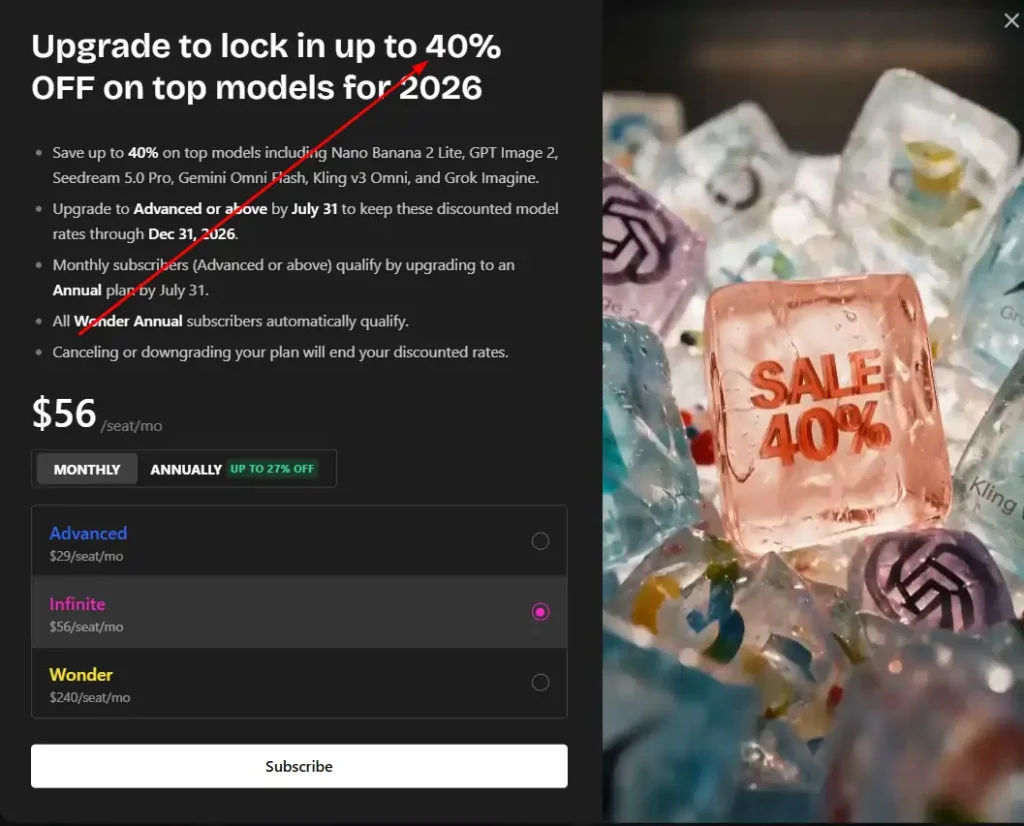
You don’t need to hunt for a promo code field anywhere. The discount is built into the upgrade path itself.
- Log into your OpenArt account (or create one — no credit card needed for the free tier).
- Go to the pricing/subscription page and review the plan tiers.
- Select Advanced, Infinite, or Wonder — Essential does not qualify for this particular promotion.
- Complete the upgrade before July 31. This is the hard deadline.
- Your discounted model access locks in automatically and stays valid through Dec 31, 2026.
No code entry, no “apply coupon” button. If a third-party site tells you there’s a manual OpenArt AI coupon code for this specific 40% deal, take that with a grain of salt — the discount structure here is upgrade-based, not code-based.
OpenArt Plans Eligible for the 40% Discount
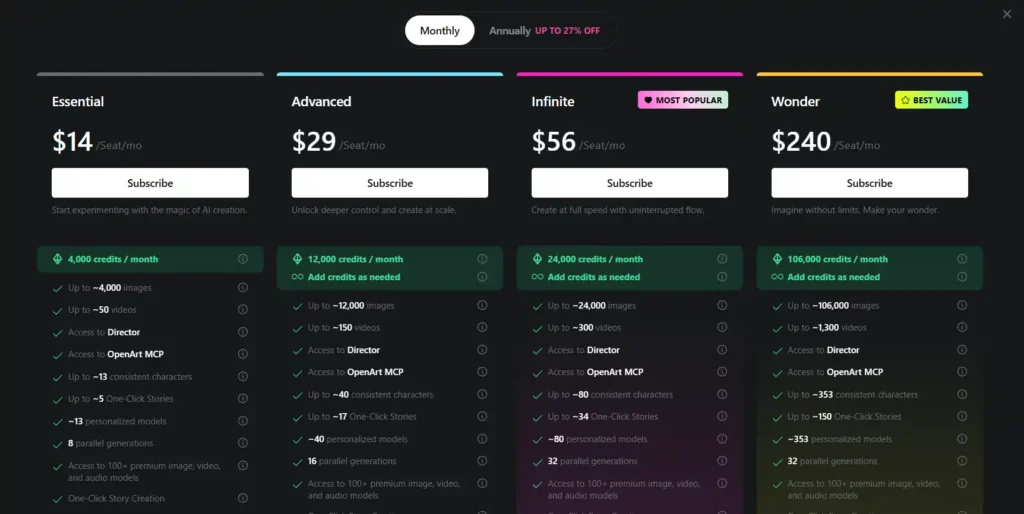
Not every plan gets access to the promotion. Here’s the breakdown:
| Plan | Monthly Price | Credits/Month | Eligible for 40% Deal? |
|---|---|---|---|
| Essential | $14/seat | 4,000 | No |
| Advanced | $29/seat | 12,000 | Yes |
| Infinite | $56/seat | 24,000 | Yes |
| Wonder | $240/seat | 106,000 | Yes (plus 10% off credit packs) |
Advanced is labeled “Most Popular” on OpenArt’s own pricing page, and it’s easy to see why — it’s the lowest tier that unlocks commercial use rights, along with the discount itself.
If you’re still on Essential and mainly experimenting, there’s no pressure to jump straight to Wonder. Advanced covers most solo creators comfortably.
OpenArt Pricing Breakdown (Monthly vs Annual)
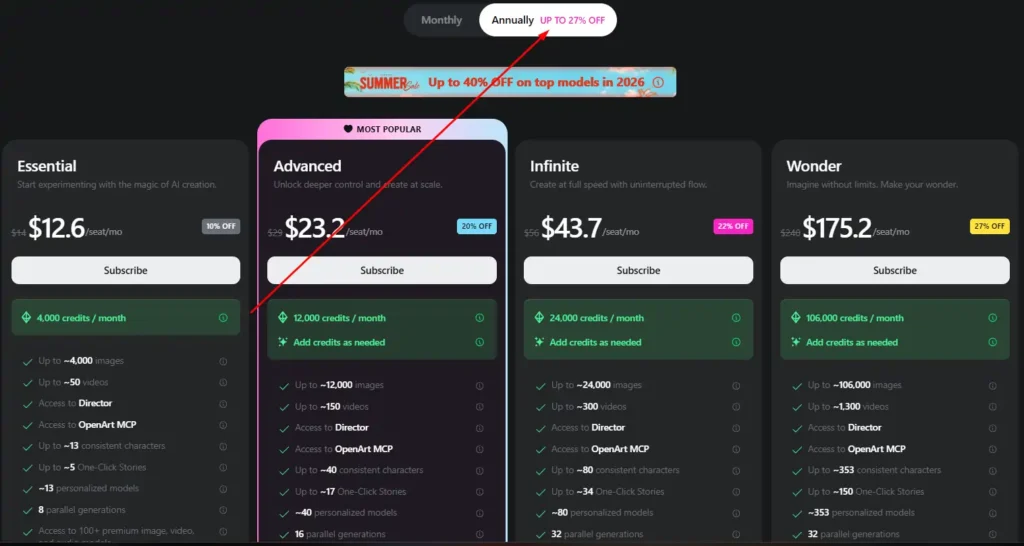
If you’re weighing whether to commit monthly or annually, annual billing brings its own separate savings — up to 27% off — which can stack with the value of the summer promotion depending on when you commit.
A few practical notes from actually comparing the numbers:
- Monthly plans give you flexibility if you’re not sure OpenArt fits your workflow yet.
- Annual plans make more sense once you know you’ll use it consistently past a few months.
- Credits don’t always roll over, so check your usage pattern before committing to a higher tier just for the discount.
→ You can also explore our guide on comparing AI subscription plans before locking into an annual commitment.
AI Models Included in the OpenArt Discount
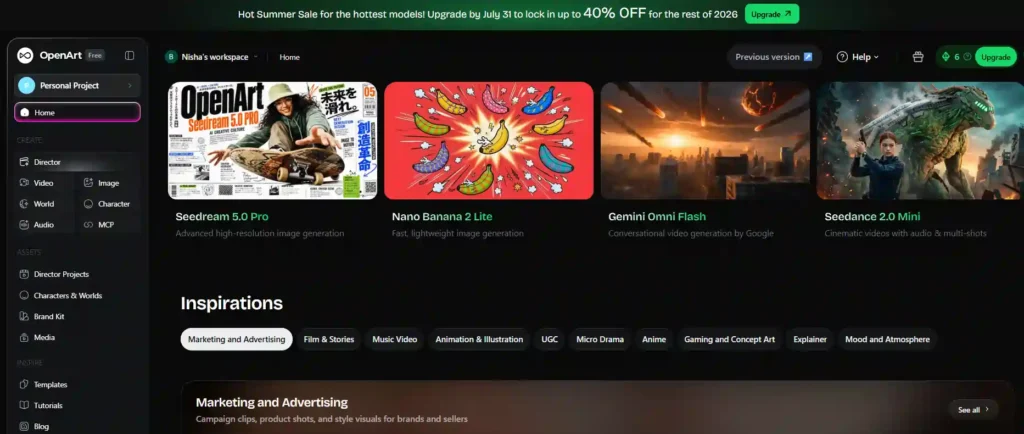
This is the part most coupon-hunting articles skip entirely, and it’s honestly the most useful piece of information here. The 40% discount applies specifically to these models:
- Nano Banana 2 Lite — fast, lightweight image generation.
- GPT Image 2 — general-purpose image generation.
- Seedream 5.0 Pro — high-resolution image generation (currently unlimited on Wonder plans.)
- Gemini Omni Flash — conversational video generation from Google.
- Grok Imagine — image/video generation.
- Kling v3 Omni — video generation.
Worth noting: Wonder plan users also get unlimited Seedream 5.0 Pro and Nano Banana 2 Lite access right now, separate from the 40% pricing lock. If your work leans heavily on those two models specifically, Wonder’s value goes up quite a bit.
Is There an OpenArt AI Coupon Code Right Now?
Short answer: not for this promotion.
A lot of search results (and honestly, a lot of coupon-aggregator sites) will tell you there’s an active OpenArt AI coupon code offering anywhere from 15% to 60% off. Some of those codes are real and tied to smaller, rotating promotions — a 15% off code here, a referral bonus there.
But the 40% off deal specifically tied to July 31 is not something you unlock with a code. It’s built into upgrading your plan tier before the deadline. If you see a site claiming a manual code stacks on top of this exact offer, verify it at checkout before trusting it — OpenArt typically allows only one promotional code to apply per transaction anyway.
My honest take: skip the code-hunting for this one and just upgrade directly through the pricing page. It saves time, and you get the same result.
Quick Comparison: Coupon Code vs Upgrade Promotion
| Traditional Coupon Code | OpenArt Summer Sale | |
|---|---|---|
| How it works | Enter code at checkout | Upgrade before deadline |
| Where to find it | Third-party coupon sites | OpenArt pricing page |
| Reliability | Varies, often expired | Confirmed on-site |
| Discount value | Typically 10–20% | Up to 40% |
Who Should Upgrade Before the OpenArt Deadline?
Not everyone needs to rush this.
Beginners experimenting with AI art casually can stay on Essential or the free tier — the discount isn’t built for light, occasional use.
Creators and marketers producing content weekly (product visuals, social content, UGC-style ads) will likely see real value in Advanced, especially with commercial use rights included at that tier.
Agencies and teams running higher volume — multiple consistent characters, frequent video generation — get the most out of Infinite or Wonder, where the locked-in model pricing compounds with higher monthly credit allowances.
If you’re unsure which bucket you fall into, a rough rule of thumb: if you’re generating more than a handful of images or videos per week, the upgrade likely pays for itself before the year is out.
Frequently Asked Questions About the OpenArt 40% Off Deal
Is there an OpenArt AI coupon code for the 40% discount?
No manual code is needed. Upgrading to Advanced or above before July 31 automatically locks in the 40% discount through December 2026.
Which OpenArt plans qualify for the 40% off deal?
Advanced, Infinite, and Wonder plans qualify. The Essential plan is excluded from this specific summer promotion and discount pricing.
What is the deadline to get 40% off on OpenArt?
You must upgrade by July 31, 2026. After that date, the discounted pricing on eligible AI models is no longer available.
Which AI models are included in the OpenArt discount?
Nano Banana 2 Lite, GPT Image 2, Seedream 5.0 Pro, Gemini Omni Flash, Grok Imagine, and Kling v3 Omni are all included.
Does the OpenArt discount apply to monthly or annual plans?
It applies to both. Annual billing adds up to 27% additional savings, which can stack with the model pricing lock.
Is the OpenArt 40% discount worth it for beginners?
Not usually. Beginners experimenting casually get more value from the free tier or Essential plan instead.
Final Thoughts on the OpenArt 40% Off Deal
The offer is real, it’s time-bound, and it rewards people who upgrade rather than people who hunt for codes. If OpenArt is already part of your workflow, there’s little downside to locking in the rate before July 31 — worst case, you’re paying for a plan you’d likely have needed anyway.
If you’re still deciding, it’s worth checking your own usage first. The discount is only valuable if the higher tier actually matches how much you create.
→ For more on getting the most from OpenArt’s tools, check out our breakdown of the Essential vs Advanced plan features.