Most free AI video tools are only free until you actually try to use them. You sign up, explore the dashboard, and then hit a paywall before exporting your first clip. It’s a pattern that wastes your time and kills momentum — especially when you’re testing tools for content creation, client work, or a side project.
The good news is that a handful of platforms genuinely offer starting credits, daily allowances, or limited free tiers that let you create and download real videos without entering a card. No tricks, no 7-day trap.
This article breaks down 7 free AI video generators with free credits that are actually worth your time in 2026. Whether you’re a solo creator, a marketer exploring options, or someone who simply wants to test AI video before spending a rupee or a dollar — this is written for you.
What Actually Makes a Free AI Video Generator Worth Using?
Finding a free AI video generator is easy, but finding one that is actually usable is a different story. Many platforms use the word “free” just to get your email, only to lock your final render behind a strict paywall.
A truly worthwhile text-to-video platform needs to offer practical value right out of the gate. When testing an artificial intelligence video maker, you need to look past the marketing hype and check the actual limitations of their free tier.
To determine if a platform is worth your time, evaluate these three core factors:
- Usable Credit Allowances: Look for tools that offer daily or monthly recurring credits rather than a small, one-time sign-up bonus that vanishes after two prompts.
- Reasonable Export Quality: If the software forces a massive, distracting watermark or restricts your downloads to 480p, it is useless for real social media publishing.
- Commercial Freedom: Always check if the generative AI platform allows you to monetize the generated clips on YouTube or use them for client work without upgrading.
Understanding these underlying constraints is the only way to avoid wasting hours on restrictive trials. Let’s look at exactly how we evaluated the platforms that actually pass this test.
7 Free AI Video Generator With Free Credits That Don’t Lock You Out (2026)
| AI Video Platform | Core Focus Area | Best Free Feature |
|---|---|---|
| OpenArt | – Cinematic generation – Image to video – Unlimited visuals | – Generous starting credits – Premium model access – Advanced motion sync |
| Pictory AI | – Blog repurposing – Text to video – Automated editing | – Easy URL import – Auto-synced captions – Quick video resizing |
| HeyGen | – Digital twins – Video localization – Realistic avatars | – 3 monthly credits – 175+ languages – Flawless lip-syncing |
| Akool | – Enterprise immersion – Live face swap – Streaming avatars | – Interactive virtual humans – High-end API – Top-tier models |
| Fliki | – Rapid conversions – PPT to video – Multilingual voices | – 2,500+ voice options – Automated B-roll – Free daily usage |
| ElevenLabs | – Cinematic audio – Voice cloning – Precise dubbing | – Free monthly characters – Custom sound effects – Emotional vocal range |
| Murf AI | – Studio-grade audio – Professional narration – Team collaboration | – 10 free minutes – Pitch & speed control – 120+ natural voices |
1. OpenArt

Are you tired of artificial intelligence platforms that drain your trial limits before you even figure out the dashboard? We know our community of creators, marketers, and digital artists values flexibility and actual usability over empty promises. You deserve a platform that respects your time and creative flow without constantly asking for your credit card.
That is exactly why OpenArt stands out as a top-tier free AI video generator with free credits. Instead of locking you into a rigid text-to-video box, it offers an expansive, unlimited creation environment. Whether you are generating cinematic shots with Sora 2, lipsyncing characters, or building 3D worlds, OpenArt gives you the sheer volume of credits needed to actually experiment, fail, and perfect your content.
Unlock Limitless Creativity with OpenArt Today!
Generate stunning cinematic videos and high-quality images instantly. Use promo code NISHA15 for an exclusive 15% discount.
Key Features of OpenArt:
- Unlimited Image Creation: Generate endless visuals using the powerful Qwen Image 2 model.
- Advanced Motion Syncing: Perfectly align your generated videos with specific image and motion references.
- One-Click Story Creation: Instantly build cohesive narratives with up to 150 automated storylines available.
- Precise Camera Control: Manipulate angles, panning, and zooming for true cinematic video direction.
- Seamless Team Workspace: Share pooled credits, custom assets, and roles across your entire creative department.
- High-End Model Access: Utilize premium generators like Kling 3.0 Omni, LTX-2, and Nano Banana Pro.
Pricing:
OpenArt provides a generous free tier, with paid plans starting at $14/month for 4,000 credits, up to unlimited creation tiers. (Use promo code NISHA15 for a discount!)
Best For:
Creative agencies, YouTube storytellers, and marketing teams needing high-volume, multi-model AI video and image generation.
Ratings: ⭐⭐⭐⭐⭐ 4.9/5
Core Use Cases:
- Cinematic Short Films: Generate highly consistent character videos for YouTube storytelling channels.
- Social Media Advertising: Create eye-catching, motion-synced promotional videos for TikTok and Instagram.
- Marketing Storyboards: Quickly visualize and render shot-by-shot commercial concepts for client pitches.
- Automated Voiceovers: Produce natural-sounding audio narratives directly synced to your generated video frames.
Why Choose This Tool:
Choose OpenArt if you are frustrated by restrictive credit limits and want a unified, all-in-one suite that combines top-tier video generation, unlimited image creation, and seamless team collaboration in a single workspace.
2. Pictory AI
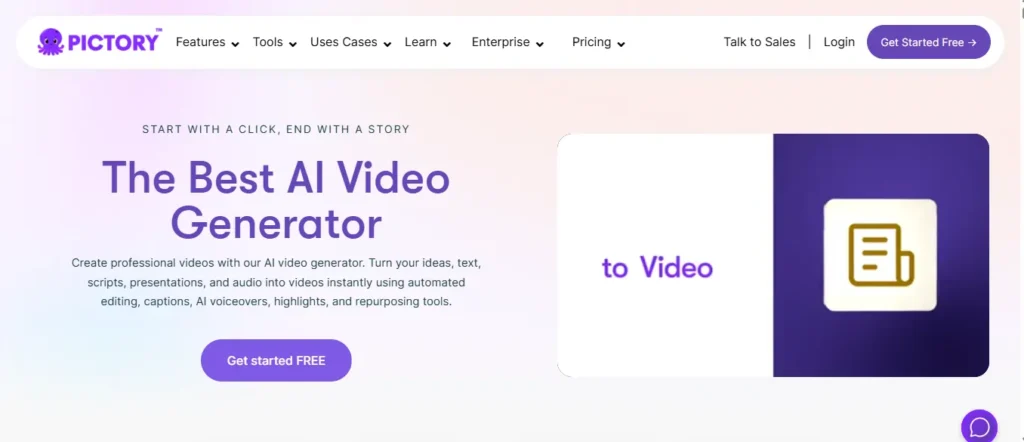
Producing a polished video from scratch demands time, equipment, and editing skills that most creators simply don’t have. Pictory AI eliminates every single one of those bottlenecks by transforming content you already own — a blog post, a URL, a script, or a PowerPoint — into a structured, publish-ready video within minutes.
What makes Pictory AI genuinely different is its intelligent scene-building engine. It doesn’t just stitch clips together randomly. It reads your content, identifies key messages, matches relevant visuals, generates synchronized captions, and layers in natural-sounding AI voices powered by ElevenLabs — all automatically.
Whether you are a solo content marketer, a YouTube creator, or part of an enterprise training team, Pictory gives you professional-grade video output without touching a single traditional editing timeline.
Automate Your Video Creation With Pictory AI!
Transform written content into ready-to-publish videos instantly without editing. Use promo code CABF20 for 20% off.
Key Features of Pictory AI:
- Blog-to-Video Conversion: Transform any written article or URL directly into structured video scenes.
- AI Studio Visual Generation: Create custom images and video clips from simple text prompts.
- ElevenLabs Voice Integration: Access hyper-realistic AI narration across 29 supported languages.
- Automatic Caption Syncing: Generate, style, and embed accurate captions without manual alignment work.
- Multi-Platform Export Resize: Instantly reformat any video for YouTube, TikTok, and Instagram simultaneously.
- PPT-to-Video Pipeline: Convert existing PowerPoint presentations into narrated, scene-structured video content.
Pricing:
Pictory AI offers a free trial with no credit card required, with paid plans starting at $25/month billed annually. (Use coupon code CABF20 for an exclusive discount!)
Best For:
Content marketers, YouTube creators, and corporate training teams who need high-volume, branded video production without traditional editing software.
Ratings: ⭐⭐⭐⭐⭐ 4.7/5 — Rated on G2, Capterra, Trustpilot, and Feefo by verified users worldwide.
Core Use Cases:
- Blog Repurposing: Convert SEO articles into branded YouTube videos without re-recording anything.
- Corporate Onboarding: Build consistent, professional employee training modules from existing documentation.
- YouTube Shorts Creation: Automatically extract short-form clips from long-form scripts for Shorts publishing.
- Social Media Campaigns: Generate multi-platform promotional videos from a single product description prompt.
Why Choose This Tool:
Choose Pictory AI if your primary content asset is written text and you want the fastest possible route from article to published video without hiring an editor.
3. HeyGen

Shooting high-quality talking-head videos requires expensive studio gear, perfect lighting, and flawless delivery — hurdles that stop most creators before they even begin. We understand that not everyone wants to be on camera, yet personal branding still demands a human connection.
HeyGen steps in to bridge this gap perfectly. As a highly advanced free AI video generator with free credits, it specializes in hyper-realistic digital twins and flawless lip-syncing technology. Instead of spending hours recording multiple takes, you simply upload a script and let a professional digital avatar deliver the performance.
What truly elevates HeyGen is its ability to break down language barriers instantly. With its built-in localization tools, a single English video can be instantly dubbed into Spanish, German, or Chinese while maintaining your original voice tone and natural mouth movements.
Key Features of HeyGen:
- 700+ Stock Avatars: Choose from a massive library of pre-made, diverse digital presenters.
- Instant Video Translation: Automatically dub your content into over 175 different languages and dialects.
- Custom Digital Twins: Clone yourself accurately to scale personal brand content without filming.
- Talking Photo Animation: Bring static portraits to life with natural voice synchronization and movement.
- Product Ad Placement: Automatically generate UGC-style promotional videos featuring your physical products.
- Voice Cloning Technology: Match your exact vocal tone and pacing across different languages seamlessly.
Pricing:
HeyGen provides a permanent free plan granting 3 video credits per month, with paid Creator tiers starting at $29/month.
Best For:
Sales teams, global marketers, and e-learning professionals who need to scale high-quality, multilingual presenter videos without a recording studio.
Ratings: ⭐⭐⭐⭐⭐ 4.8/5
Core Use Cases:
- Global Market Localization: Instantly translate single promotional videos into multiple regional dialects.
- Automated Sales Outreach: Send highly personalized, avatar-led video pitches directly to prospective clients.
- Corporate Training Modules: Produce consistent, professional onboarding materials for a remote international workforce.
- E-Commerce Product Ads: Generate scroll-stopping social media reaction videos without hiring actors.
Why Choose This Tool:
Choose HeyGen if you require absolute cinematic realism in your avatar presenters and need an all-in-one localization platform that flawlessly handles voice cloning, lip-syncing, and translation simultaneously.
4. Akool
We deeply value the trust and time you invest in exploring these platforms, which is why we only recommend solutions that genuinely respect your creative workflow. For professionals seeking a comprehensive, secure suite, Akool emerges as an exceptional free AI video generator with free credits.
It consolidates multiple high-end capabilities—from photorealistic streaming avatars to flawless face-swapping—into one unified studio. Instead of jumping between disconnected applications, you can animate photos, translate global campaigns, and generate cutting-edge visuals using premium models like Google Veo and Sora directly within a single dashboard.
By offering a generous starting allowance, Akool ensures our community can actually test its powerful, enterprise-grade features and API integrations without immediately hitting a frustrating paywall.
Key Features of Akool:
- Dynamic Face Swapping: Instantly replace faces in images and videos with highly realistic precision.
- Streaming Digital Avatars: Deploy interactive, real-time virtual spokespersons for engaging online customer service experiences.
- Multilingual Video Translation: Flawlessly dub your media into different languages while maintaining perfect lip-syncing.
- Advanced Background Manipulation: Effortlessly remove or alter video backgrounds to elevate e-commerce product visuals.
- Premium AI Models: Access top-tier generation engines like Sora, Kling, and Google Veo instantly.
- Talking Photo Animation: Animate static portraits into expressive, fully voiced characters within mere seconds.
Pricing:
Akool provides a helpful free tier loaded with starting credits, while premium enterprise subscriptions unlock unlimited API and production access.
Best For:
Highly recommended for global marketing agencies, event managers, and e-learning professionals demanding secure, enterprise-level digital immersion and scalable localization workflows.
Ratings: ⭐⭐⭐⭐⭐ 4.8/5 G2 Rating from global users.
Core Use Cases:
- Immersive Brand Campaigns: Launch interactive marketing experiences using highly accurate face swap technology integrations.
- Global E-Learning Courses: Localize educational materials globally to drastically increase international student enrollment rates.
- Live Event Engagement: Deploy real-time digital avatars to interact naturally with physical conference attendees.
- Personalized B2B Outreach: Generate tailored promotional messages for prospective clients to boost sales conversions.
Why Choose This Tool:
Select Akool if your strategy requires combining hyper-realistic digital humans, seamless language dubbing, and secure enterprise integration in one place.
5. Fliki
Most content creators waste their most productive hours on the wrong part of the job. Writing the script takes thirty minutes, but turning it into a watchable video can consume an entire afternoon — searching for clips, recording voiceovers, and editing transitions manually.
Fliki eliminates exactly that dead time. As a genuinely accessible free AI video generator with free credits, it connects directly to your existing workflow by accepting ideas, blog posts, PowerPoint presentations, product URLs, and raw scripts as starting points. No reformatting, no rebuilding from scratch.
What sets Fliki apart from every comparable text-to-video platform is its extraordinary voice depth. With over 2,500 ultra-realistic AI voices spanning 80+ languages, your content stops feeling robotic the moment a viewer hits play. Combined with its built-in voice and avatar cloning features, Fliki lets you maintain a consistent on-screen personality at scale without ever appearing on camera yourself.
Key Features of Fliki:
- 2,500+ Hyper-Realistic AI Voices: Select natural-sounding narration across 80+ supported global languages.
- Blog and PPT Conversion Pipeline: Directly transform written articles and presentations into structured video scenes.
- Personal Voice and Avatar Cloning: Replicate your exact speaking style for fully authentic faceless video content.
- AI-Powered B-Roll Automation: Automatically source and sync relevant visual footage to your narration timeline.
- Magic Edit for Raw Footage: Instantly polish existing recordings with auto-generated captions and contextual B-rolls.
- Product Listing to Video: Convert Amazon or Airbnb product pages into engaging promotional video ads instantly.
Pricing:
Fliki offers a permanent free tier with no credit card required, with paid plans unlocking extended minutes and commercial licensing rights.
Best For:
Independent content creators, HR training teams, and course builders who need rapid text-to-video conversion with premium multilingual voiceover quality.
Ratings: ⭐⭐⭐⭐⭐ 4.8/5 — Verified across 5,500+ reviews on G2 and Capterra.
Core Use Cases:
- Employee Training Modules: Replace static PDF documentation with dynamic, avatar-narrated onboarding materials instantly.
- Blog Content Repurposing: Convert published SEO articles directly into YouTube-ready video without any re-editing.
- Social Media Campaigns: Produce platform-optimized short-form videos from raw product descriptions or ideas.
- Multilingual Course Creation: Translate existing educational modules into 80+ languages using a single click workflow.
Why Choose This Tool:
Choose Fliki if your primary challenge is converting high volumes of written content into multilingual, voice-driven video without spending hours manually sourcing footage or recording narration.
6. ElevenLabs

Visuals only tell half the story. A beautifully rendered clip falls completely flat if the narration sounds hollow, robotic, or emotionally disconnected. For creators who demand sonic perfection, ElevenLabs serves as the ultimate audio-centric free AI video generator with free credits. While other platforms focus exclusively on pixels, this software specializes in breathtaking vocal realism and automated video dubbing.
Instead of booking expensive recording studios, you can generate studio-quality narration, clone your own speech patterns, or add cinematic sound effects directly to your visual projects. By granting a monthly allowance of characters at zero cost, ElevenLabs empowers independent filmmakers and YouTube producers to elevate their visual storytelling with unmatched auditory precision and genuine emotional depth.
Key Features of ElevenLabs:
- Advanced AI Dubbing: Dub existing video files while retaining the original speaker’s exact emotional delivery.
- Cinematic Sound Effects: Generate custom Foley sounds and background audio by simply typing text descriptions.
- Instant Voice Cloning: Replicate any speaking style precisely using just a short audio sample upload.
- Contextual Speech Synthesis: Produce highly expressive narration that naturally adapts to punctuation and narrative pacing.
- Global Language Support: Access dozens of different languages and regional accents for international media distribution.
- Powerful API Access: Integrate industry-leading speech models seamlessly into your customized application or production pipeline.
Pricing:
ElevenLabs provides a generous zero-cost tier renewing monthly, alongside affordable premium subscriptions starting at just $5 for extended commercial usage.
Best For:
Ideal for podcast producers, documentary filmmakers, and faceless channel operators requiring top-tier vocal synthesis and automated localization capabilities.
Ratings: ⭐⭐⭐⭐⭐ 4.8/5 — Highly rated by audio professionals globally.
Core Use Cases:
- Faceless Channel Narration: Produce captivating voiceovers for documentary-style visual essays without owning a microphone.
- Global Video Localization: Expand your audience reach by converting native English clips into multiple dialects.
- Audiobook Production: Transform lengthy written manuscripts into engaging, commercially viable auditory listening experiences.
- Gaming Character Voices: Assign distinct, emotionally resonant dialogue to animated figures and non-playable characters instantly.
Why Choose This Tool:
Select ElevenLabs when pristine audio quality is your absolute highest priority and you need unmatched vocal expression for your visual media.
7. Murf AI

There is a specific frustration that hits every video marketer at the worst possible moment — your visuals are polished, your script is perfect, but the voiceover sounds like it was generated by a machine from 2015. Audiences notice instantly, and trust evaporates just as fast.
Murf AI was purpose-built to solve exactly this problem. Positioning itself as a serious audio-first free AI video generator with free credits, Murf delivers an entire professional-grade studio experience directly inside your browser. Unlike platforms that treat audio as an afterthought, Murf places vocal authenticity at the absolute center of its entire production ecosystem.
Its signature offering is a meticulously curated library of 120+ natural-sounding voices across multiple accents and professional styles. Whether your brand demands a warm conversational instructor, an authoritative executive narrator, or a youthful energetic social media presenter, Murf provides precisely the right vocal character for every individual use case.
Key Features of Murf AI:
- 120+ Studio-Grade AI Voices: Access professionally crafted narrator voices across 20+ different supported languages.
- Built-In Video Sync Studio: Precisely align your generated voiceover directly to uploaded video timelines automatically.
- Custom Pronunciation Control: Define exactly how technical terms, brand names, and acronyms get articulated.
- Pitch and Speed Customization: Fine-tune vocal delivery with granular control over pacing, emphasis, and tone.
- Collaborative Team Workspace: Share voice projects, leave timestamped comments, and approve drafts as a team.
- AI Voice Changer Tool: Transform existing raw recordings into completely different professional vocal styles instantly.
Pricing:
Murf AI offers a no-credit-card-required free tier with 10 minutes of voice generation, with affordable paid plans unlocking unlimited commercial downloads.
Best For:
Corporate trainers, explainer video producers, and SaaS marketing teams requiring consistent, branded narration quality across large volumes of content simultaneously.
Ratings: ⭐⭐⭐⭐⭐ 4.9/5 — Consistently ranked among the top AI voice platforms globally.
Core Use Cases:
- Explainer Video Production: Narrate complex software or product demos using clear, articulate professional-grade AI voices.
- E-Learning Module Narration: Add consistent instructor voices to training courses without scheduling recording sessions.
- Corporate Presentation Voiceovers: Transform silent internal slide decks into compelling, narrated stakeholder presentations.
- Podcast Advertisement Reads: Generate perfectly paced, natural-sounding ad spots without hiring external voice talent.
Why Choose This Tool:
Choose Murf AI when your priority is delivering a consistently premium auditory brand experience across high-volume content without the recurring cost of professional voice talent.
How We Tested and Ranked These Free AI Video Generators With Free Credits
To bring you a reliable list, we didn’t just read pricing pages—we actively signed up and generated content with over 20 different AI video creation software platforms. We wanted to see what happens when you actually try to hit the export button.
Our ranking methodology focused on how much real-world value a creator can extract before being forced to upgrade. We scored each free AI video generator with free credits based on four strict criteria:
- Credit Refresh Rates: Do you get a one-time sign-up bonus, or do your generation credits refill daily or monthly?
- Watermark Intrusiveness: Can you download clean videos, or is the company’s branding aggressively placed across the center of your clip?
- Export Resolution: We prioritized tools that allow at least 720p downloads, ensuring your content looks professional on social platforms.
- Feature Access: Does the free tier allow you to test premium features like AI text-to-speech voices and custom avatars, or are you locked out?
By running consistent test prompts through these text-to-video AI models, we separated the genuinely useful tools from the frustrating trial traps.
Common Mistakes People Make With Free AI Video Generator Credits
When you first sign up for a generative AI video platform, it is incredibly easy to burn through your initial allowance within minutes. Because these tools are so fast, new users often make critical errors that waste their limited access.
The most frequent mistake is testing complex ideas without optimizing the AI video generation prompt first. Instead of rendering a full 60-second video immediately, you should always test your visual style with a short 3-second clip to ensure the AI understands your vision.
Another massive oversight is ignoring the commercial licensing terms. Many creators spend their free AI video generator credits building a YouTube Short or a client ad, only to realize later that the free tier restricts usage strictly to personal, non-commercial projects.
Finally, do not forget to double-check your audio settings before hitting render. Generating a complete video only to realize you left the default robotic voiceover on means you will have to spend double the credits to fix it. Being strategic with your automated video content creation ensures every single credit counts.
Frequently Asked Questions (FAQs)
Do free AI video generators require a credit card to sign up?
No. Most reputable platforms, like HeyGen and Pictory, allow you to create an account and access your initial free credits using just a Google login or email address.
How do free daily credits actually work?
Platforms like ToMoviee and EaseMate deposit a specific amount of free generation credits into your account every 24 hours, which expire if you do not log in and use them.
Can I remove the watermark on a free AI video generator plan?
Yes, but it is rare. Tools like JAI Portal and certain open-source unlimited generators allow you to download completely watermark-free videos without upgrading to a paid subscription.
Are AI videos generated with free credits safe for commercial use?
It depends on the platform’s terms. JAI Portal grants full commercial rights for free generations, whereas others strictly limit free credit exports to personal, non-monetized projects.
Which free AI video maker gives the most starting credits?
AIVeed offers 200 free credits upon Google sign-up, while platforms like LTX Studio and ToMoviee offer generous sign-up bonuses that let you test full video generation risk-free.
Can I use free credits to translate my videos into other languages?
Yes. Platforms like Fliki and HeyGen allow you to spend your monthly free credits on their AI dubbing and translation tools to test multilingual localization.
How long of a video can I make using just free credits?
Most free tiers restrict single exports to short durations. For example, AIVeed’s starting credits yield an 8-second clip, while HeyGen allows up to 3-minute video exports per credit.
Stop Wasting Time: Start Creating With Free AI Video Credits Today
Finding a free AI video generator with free credits that actually delivers results is no longer a guessing game. Whether you are a solo creator repurposing blog content with Pictory, building multilingual campaigns through HeyGen, or perfecting your narration with Murf AI, the right tool genuinely exists for your specific workflow.
The key is to stop chasing every shiny platform and instead pick one or two that align with your real content goals. Sign up, use those free credits strategically, and test before you ever spend a dollar.
Your next great video is already waiting — it just needs the right tool to bring it to life. Start today, completely free.