Building a faceless YouTube channel usually comes down to one problem: you don’t want to show your face, but editing footage, writing scripts, and syncing voiceovers still takes hours you don’t have. Pictory AI is built around that gap, turning scripts or articles into finished videos using stock footage, AI voiceovers, and automatic captions.
This matters most for creators testing niche channels or scaling content without hiring an editor. The real questions are practical: how well does the automation actually work, what does it cost, and can it keep up with a consistent upload schedule.
That’s what this article breaks down — how Pictory AI handles faceless video creation, where it performs well, and where you might need a different tool.
What Is Pictory AI and How Does It Work for Faceless Channels?

Pictory AI is a text-to-video platform that converts scripts, blog posts, PowerPoint presentations, URLs, and existing videos into edited, publish-ready videos. For faceless YouTube creators, this means you can go from a written script or article straight to a video with visuals, captions, and voiceover — without ever appearing on camera.
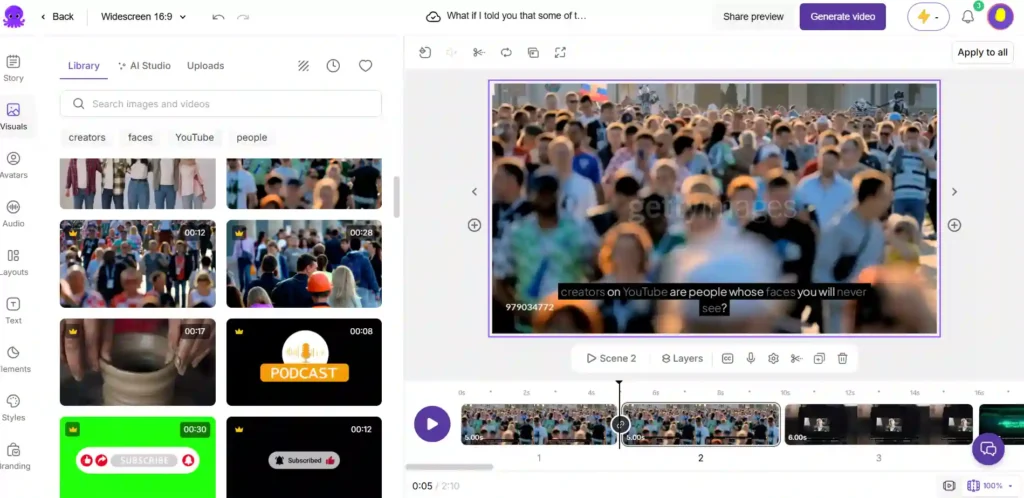
The core workflow is simple: you provide a content source, and Pictory analyzes it to build a scene-based structure, matches relevant visuals from stock libraries or AI-generated imagery, adds captions automatically, and layers in an AI voice for narration. This automated pipeline is what makes it a common choice for channels that rely entirely on voiceover and visuals rather than an on-screen presenter.
Pictory AI Coupon Code: Save 20% Today
Use code CABF20 at checkout to get 20% off your Pictory AI subscription plan instantly.
Key Pictory AI Features for Faceless YouTube Videos
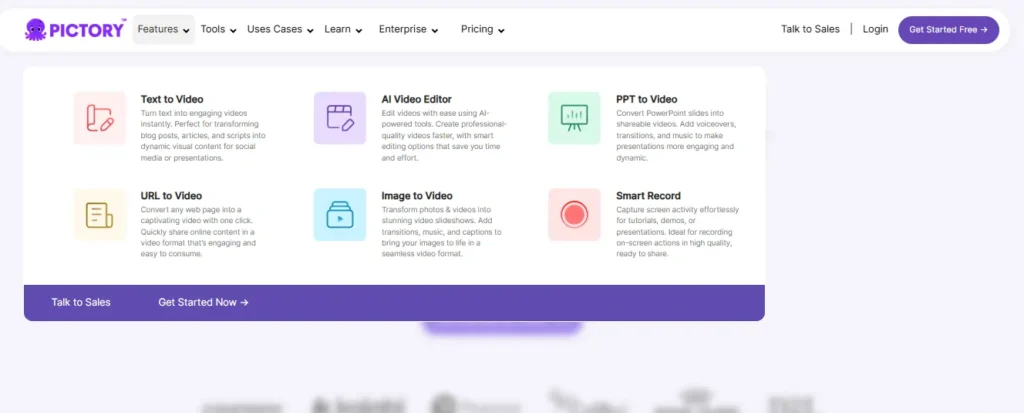
Text to Video and Script to Video Generation
Pictory’s text-to-video engine reads a script or written prompt, identifies key points, and builds a matching video structure with scenes, timing estimates, and visuals. This is the feature most faceless channels rely on, since it removes the need to manually storyboard or source clips for every line of narration.
AI Voiceovers for Faceless Narration
Since faceless videos depend entirely on narration to carry the content, voiceover quality matters. Pictory includes standard AI voices as well as more natural-sounding voices powered by ElevenLabs, available in multiple languages. Higher-tier plans include more minutes of the ElevenLabs voice option, which tends to sound less robotic than standard text-to-speech.
Stock Footage and AI-Generated Visuals (AI Studio)
Pictory pulls from stock video and image libraries, including Getty Images and Storyblocks, to automatically match visuals to your script. For creators who want more original visuals, AI Studio can generate images and video clips from text prompts, which can then be inserted directly into scenes — useful when stock footage feels generic or doesn’t fit a specific niche.
Auto Captions and Subtitles
Captions are generated and synced automatically, with export options for formats like .srt and .vtt on higher plans. This matters for faceless YouTube content because captions improve watch time and accessibility, and many faceless channels lean on burned-in captions as a core part of their visual style.
Blog to Video and URL to Video Conversion
Pictory can convert an existing blog post or webpage URL directly into a video. This is particularly useful for faceless creators who already publish written content and want to repurpose it into video form without rewriting a script from scratch.
AI Avatars vs. Faceless Video Options
Pictory also offers AI avatars — digital presenters that narrate content on screen. This is worth noting specifically because it’s the opposite approach to faceless video: an avatar adds a visual presenter, while faceless content typically relies on stock or AI-generated visuals with narration only. If your goal is a true faceless channel, you’d skip the avatar feature and stick with the standard text-to-video workflow.
How to Create a Faceless YouTube Video Using Pictory AI (Step-by-Step)
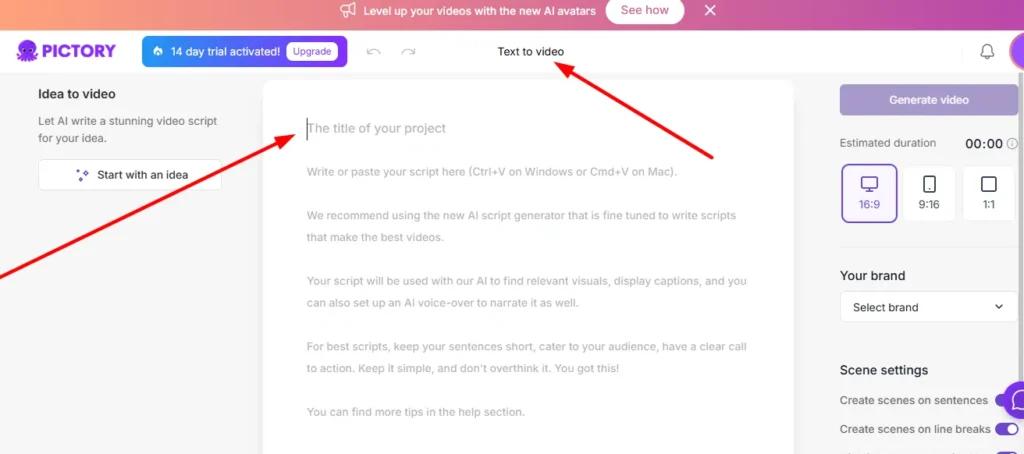
Step 1 — Choose Your Content Source
Start by selecting how you want to generate your video: paste in a script, enter a blog URL, upload a presentation, or write a prompt. For faceless YouTube content, a written script or article tends to give you the most control over pacing and messaging.
Step 2 — Build and Edit Your Scenes
Once your content is processed, Pictory segments it into scenes with estimated durations and suggested visuals. You can review and adjust this structure in the editor before moving forward — this is a good point to tighten pacing or remove sections that don’t need visual support.
Step 3 — Customize Visuals, Voice, and Branding
Swap out stock visuals, generate custom images through AI Studio, select your voiceover style, and apply brand elements like logos, fonts, and colors if you’re maintaining a consistent channel identity. Caption styles and subtitle placement can also be adjusted here.
Step 4 — Export and Publish to YouTube
Preview the finished video, confirm timing and audio sync, then export in the aspect ratio suited to YouTube (typically 16:9 for long-form, or 9:16 for Shorts). From there, the video is ready to upload directly to your channel.
Pictory AI Pricing Plans for Faceless YouTube Creators
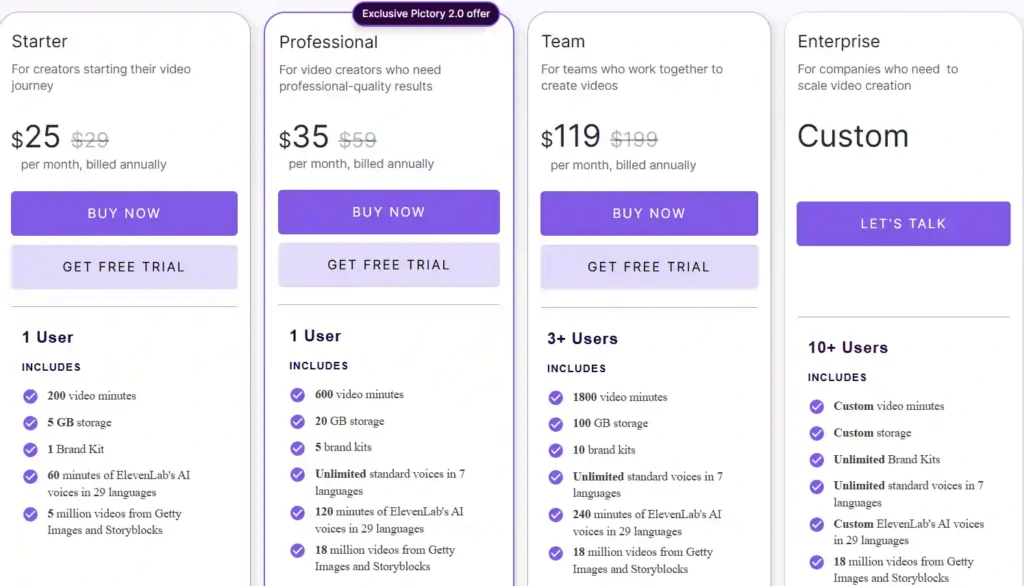
Pictory’s pricing is structured around video minutes per year, storage, and AI credits for image, video, and avatar generation. Below is a breakdown based on annual billing.
| Plan | Price (billed annually) | Video Minutes/Year | Storage | AI Voice (ElevenLabs) | Brand Kits |
|---|---|---|---|---|---|
| Starter | $25/month | 2,400 minutes | 5 GB | 720 minutes/year | 1 |
| Professional | $35/month | 7,200 minutes | 20 GB | 1,440 minutes/year | 5 |
| Team | $119/month | 21,600 minutes | 100 GB | 2,880 minutes/year | 10 |
| Enterprise | Custom pricing | Custom | Custom | Custom | Unlimited |
Starter Plan Breakdown
The Starter plan is aimed at creators beginning a faceless channel. It includes basic AI tools, no watermark on exported videos, and a set amount of ElevenLabs voice minutes and AI credits for generating images or short video clips.
Professional Plan Breakdown
The Professional plan increases video minutes, storage, and brand kits significantly, and adds features like custom avatars, voice cloning, and video summarization for longer source content. This tier suits creators publishing more frequently or managing more than one faceless channel.
Team and Enterprise Plans
The Team plan is built for multiple users collaborating on video projects, with a shared workspace and higher combined usage limits. Enterprise plans offer custom volume, API access, and dedicated support, which is generally more relevant to businesses or agencies producing video at scale rather than individual faceless YouTube creators.
Free Trial Details
Pictory offers a free trial that does not require a credit card to start, along with a 14-day free trial option listed on its pricing page. Trial limits are lower than paid plans — for example, a capped number of video minutes and shorter maximum video length — so it’s mainly useful for testing the workflow before committing to a paid tier.
Pictory AI Pros and Cons for Faceless YouTube Automation
Pros:
- Converts scripts, blogs, and URLs into video without manual editing.
- Includes AI voiceovers, so no on-camera presence or voice recording is needed.
- Access to large stock libraries (Getty Images, Storyblocks) plus AI-generated visuals.
- Automatic captions, which are commonly used in faceless content.
- Scales well for creators publishing multiple videos per week.
Cons:
- Video minutes and AI credits are capped by plan, which can limit high-volume publishing on lower tiers.
- Higher-quality ElevenLabs voice minutes are limited even on paid plans.
- Some advanced features (custom avatars, voice cloning) are only available from the Professional tier upward.
- Stock visuals may feel generic for very specific or niche topics without supplementing with AI Studio generations.
Is Pictory AI Good for Faceless YouTube Channels? (Honest Assessment)
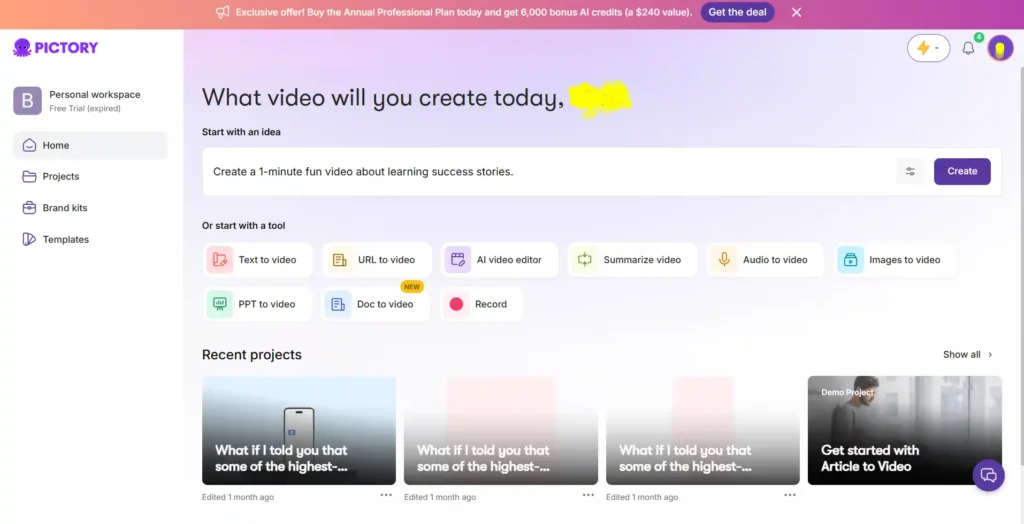
Based on its feature set, Pictory AI is well-suited to faceless YouTube channels that rely on a script-to-video workflow — turning written narration into a finished video with visuals and captions. It removes most of the manual editing work that faceless creators would otherwise need to do by hand or outsource.
Where it’s less clear-cut is volume and customization. Creators publishing daily or producing long-form content will need to pay attention to the minute caps on each plan, since going over your allotted video minutes or AI credits typically requires an upgrade. Channels that want highly specific or unusual visuals may also need to lean more heavily on AI Studio generation rather than stock footage alone.
Pictory AI vs. Other AI Tools for Faceless YouTube
Pictory AI vs InVideo
Both platforms convert text and scripts into video, but InVideo is generally known for offering more manual editing depth and template variety, while Pictory tends to emphasize a more streamlined, automated pipeline from script to finished video. Creators who want more hands-on control over editing may prefer InVideo; those who prioritize speed may lean toward Pictory.
[Pictory AI vs InVideo — Full Comparison]
Pictory AI vs Fliki
Fliki is also built around text-to-speech and text-to-video generation, with a strong focus on multilingual voice options. The comparison typically comes down to voice quality and language support versus Pictory’s broader stock library and blog-to-video conversion tools.
[Pictory AI vs Fliki for Faceless YouTube Videos]
Pictory AI vs Steve AI
Steve AI includes animated and mixed-media video styles alongside live-action stock footage, which can appeal to faceless channels using an animated or explainer-style format. Pictory’s strength remains its blog-to-video and URL-to-video conversion, which Steve AI does not emphasize in the same way.
[Steve AI vs Pictory: Which Is Better for Faceless Content?]
Best Practices for Scaling a Faceless YouTube Channel with Pictory AI
- Write scripts with pacing in mind. Since Pictory segments scripts into scenes automatically, clear paragraph breaks and concise sentences help the AI build a cleaner scene structure.
- Supplement stock footage with AI Studio when needed. For niche topics where stock visuals run thin, generating custom images or clips can keep videos from looking repetitive across a channel.
- Reuse existing blog content. If you already publish articles, converting them into video via the blog-to-video or URL-to-video feature can save scripting time entirely.
- Track your video minutes and AI credits. Plan your publishing schedule around your plan’s annual limits to avoid mid-month upgrades.
- Maintain a consistent brand kit. Using the same fonts, colors, and caption style across videos helps a faceless channel build visual recognition, since there’s no on-camera personality to do that instead.
Pictory AI Discount, Coupon Codes, and Free Trial for Faceless YouTube

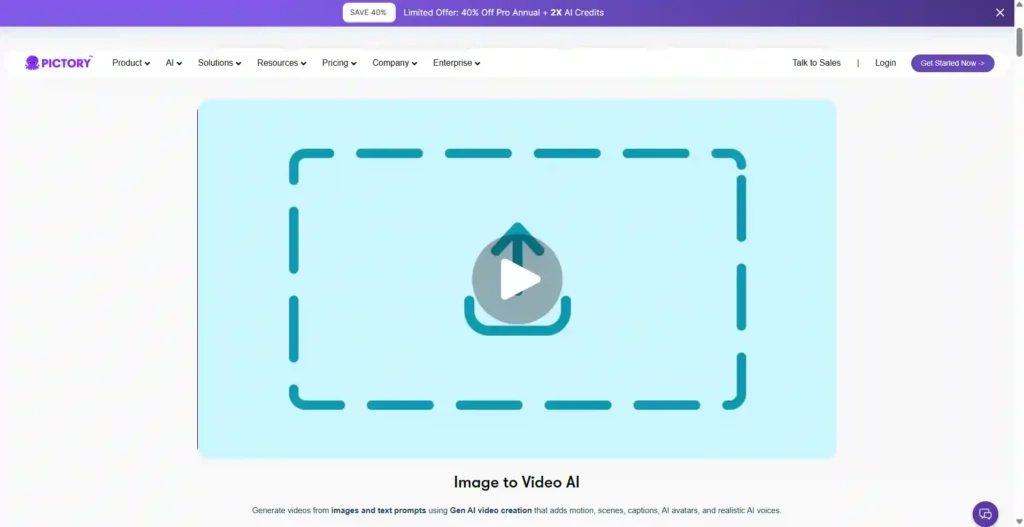
Pictory has advertised a limited-time offer of 40% off the Pro annual plan along with additional AI credits, though promotional offers like this can change or expire without notice. Before purchasing, it’s worth checking Pictory’s official pricing page directly to confirm what discount, if any, is currently active and what conditions apply.
Separately, Pictory offers a free way to test the platform without entering payment details, as well as a 14-day free trial listed alongside its paid plans. Trial usage is limited compared to paid tiers, so it’s best used to evaluate the workflow rather than to produce a full batch of channel content.
Frequently Asked Questions About Pictory AI for Faceless YouTube
Is there a free version of Pictory AI?
Pictory offers a free way to start without a credit card, plus a separate 14-day free trial option, though usage limits such as video minutes and maximum video length are lower than on paid plans.
How much does Pictory AI cost per month?
Based on annual billing, plans start at $25/month for Starter, $35/month for Professional, and $119/month for Team, with custom pricing for Enterprise. Monthly (non-annual) rates are typically higher than the annual price shown.
Can Pictory AI turn blog posts into YouTube videos?
Yes. Pictory includes a blog-to-video and URL-to-video feature that converts existing written content, including blog posts and webpages, into a video with matched visuals and voiceover.
What is the best AI tool for faceless YouTube videos?
There isn’t a single universal answer, since it depends on priorities like voice quality, editing control, or stock footage variety. Pictory is a strong option for creators who want to convert scripts or blog content into video quickly, while tools like InVideo or Fliki may suit different priorities such as deeper manual editing or multilingual voice generation.
Is Pictory AI worth it for content creators?
For creators building a script-driven faceless channel, Pictory’s automation around scripting, visuals, and captions can meaningfully cut production time. Whether it’s worth the cost depends on your publishing volume and whether the plan’s video-minute and credit limits match your output needs.
Final Verdict: Should You Use Pictory AI for Your Faceless YouTube Channel?
Pictory AI is a solid fit for faceless YouTube creators who work from scripts, articles, or existing blog content and want an automated path from text to finished video. Its combination of AI voiceovers, auto captions, and stock or AI-generated visuals covers the core needs of a faceless channel without manual editing.
The main trade-off is scale: heavier publishers need to watch plan limits on video minutes and AI credits, and very niche content may require supplementing stock visuals with AI Studio generations. If your channel runs primarily on scripted narration, Pictory is worth testing through its free trial before committing to a paid plan.