
Setting up your first AI agent sounds simple until you hit MCP servers. Every guide throws different install steps at you. Some need Docker. Others demand API keys before you even test them. If you just want your assistant to browse the web, read files, or pull live data, all that setup feels like a wall.
Here’s the part most guides skip: several remote MCPs need zero installation. No terminal commands. No dependency errors. Just a URL and a working connection.
For developers, creators, and anyone experimenting with Claude or Cursor, that difference matters. Free remote MCPs strip away the friction that stops most people from ever testing what these tools can actually do.
The question is which ones are worth connecting first.
What Are Free Remote MCPs? (A Quick Overview)
A remote MCP is a hosted server built on the Model Context Protocol, an open standard that lets AI assistants like Claude, Cursor, or Windsurf connect to outside tools and data. Instead of running code on your own machine, you connect through a simple URL.
Free remote MCPs give you this connection at no cost. There’s nothing to install, no dependencies to manage, and often no API key required to get started.
This matters because local MCP setups can be time-consuming. You deal with Node versions, PATH errors, and processes that fail to start. Remote servers skip that entirely.
Most free remote MCPs fall into a few categories:
- Productivity tools — Notion, Linear, and similar apps.
- Developer tools — GitHub, code search, documentation servers.
- Research tools — web search, Wikipedia, data lookups.
Authentication varies too. Some use OAuth and ask you to sign in once. Others need no login at all.
Understanding this foundation makes the next part easier: seeing exactly which free remote MCPs are worth connecting first, and what each one actually does for your workflow.
Why Developers Are Switching to Free Remote MCPs in 2026
More developers are moving away from local installs, and free remote MCPs are a big reason why. The shift comes down to speed, reliability, and less time spent on setup.
Local MCP servers require Node, Docker, or Python environments running correctly on your machine. One broken dependency can stop the whole workflow. Free remote MCPs remove that layer completely.
A few reasons this shift is happening fast in 2026:
- Zero maintenance: No updates to manage, no local processes to restart when they crash.
- Faster onboarding: Most free remote MCPs connect in under a minute with just a URL or OAuth login.
- Better reliability: Hosted servers run on stable infrastructure instead of your personal machine.
- Wider access: Free remote MCPs work the same way across Claude, Cursor, and Windsurf, so teams don’t need separate setups per tool.
The ecosystem has also matured. Major platforms now offer official free remote MCPs instead of relying only on community-built versions, which adds a layer of trust that wasn’t there a year ago.
This growing reliability naturally raises a question: how do free remote MCPs actually compare to running servers locally?
Free Remote MCPs — Quick Comparison Table
| MCP Tool | Best For | Cost |
| OpenArt MCP | AI media generation | Paid, from $14/mo |
| GitHub MCP | Repo & PR management | Free, official |
| Notion MCP | Docs & workspace search | Free, core access |
| Figma MCP | Design-to-code sync | Free, any plan |
| Firecrawl MCP | Live web scraping | Free tier, keyless |
1. OpenArt MCP — Premium AI Creative Suite for Claude, Cursor & More
Most MCP servers connect your AI assistant to text and data. OpenArt MCP connects it to a full creative studio.
Once linked, your assistant can generate images, videos, voiceovers, and music directly from a prompt, without switching tools or tabs.
It plugs into Claude, Cursor, and other MCP clients, giving you access to 100+ premium models including Seedance 2.0, Nano Banana Pro, and Kling 3.0 Omni.
For teams mixing AI development with content production, this turns your assistant into an actual creative partner.
Exclusive OpenArt Coupon: Save 15% Now
Unlock premium AI art generation at a discount. Use code NISHA15 to get 15% off your OpenArt subscription today.
Pros and Cons
Pros:
- Access to 100+ premium AI models.
- Works across Claude, Cursor, MCP clients.
- Generates video, image, music, voiceover.
- Commercial use rights on paid tiers.
Cons:
- No free MCP access tier.
- Credit system limits monthly output.
Best For: Creators, marketers, and dev teams who want AI-generated video, image, and audio content built directly into their existing MCP workflow.
Free Trial: No free MCP trial exists; MCP access starts on paid plans only.
My Experience: Setup was quick once subscribed, and switching between image, video, and voice generation inside one MCP connection felt genuinely efficient for mixed-media projects.
Limitations:
- Requires paid subscription upfront.
- Credits run out on heavy use.
Rating: 4.2/5
Why Pick OpenArt: If your workflow needs actual media generation, not just data or task automation, OpenArt MCP fills a gap most free remote MCPs don’t touch at all.
2. GitHub MCP — Official Free Remote MCP for Repos, Issues & Pull Requests

Most developer workflows live inside GitHub, so connecting it directly to your AI assistant makes sense.
GitHub MCP is hosted and maintained by GitHub itself, with one-click OAuth setup and no local installation required.
Once connected, your assistant can read repositories, open issues, review pull requests, and trigger workflows straight from chat.
It works natively with Claude, Cursor, VS Code, and other Copilot-integrated IDEs, keeping your coding context in one place.
Pros and Cons
Pros:
- Official server, maintained by GitHub.
- One-click OAuth, no setup needed.
- Works across major AI coding tools.
- Automates PRs, issues, CI triage.
Cons:
- Broad scopes need careful permissions.
- Some features tied to Copilot plans.
Best For: Developers who want their AI assistant to manage repositories, issues, and pull requests without leaving their editor or chat window.
Free Trial: No trial needed, GitHub MCP is free to connect with any GitHub account.
My Experience: Connecting took under a minute, and having pull request reviews and issue triage handled inside chat noticeably cut down tab-switching during coding sessions.
Limitations:
- Requires GitHub account access.
- Broad token scopes need review.
Rating: 4.6/5
Why Pick GitHub MCP: It’s one of the few free remote MCPs backed directly by the platform it connects to, which means fewer surprises and long-term reliability.
3. Notion MCP — Free Remote MCP for Your Notes, Docs & Databases
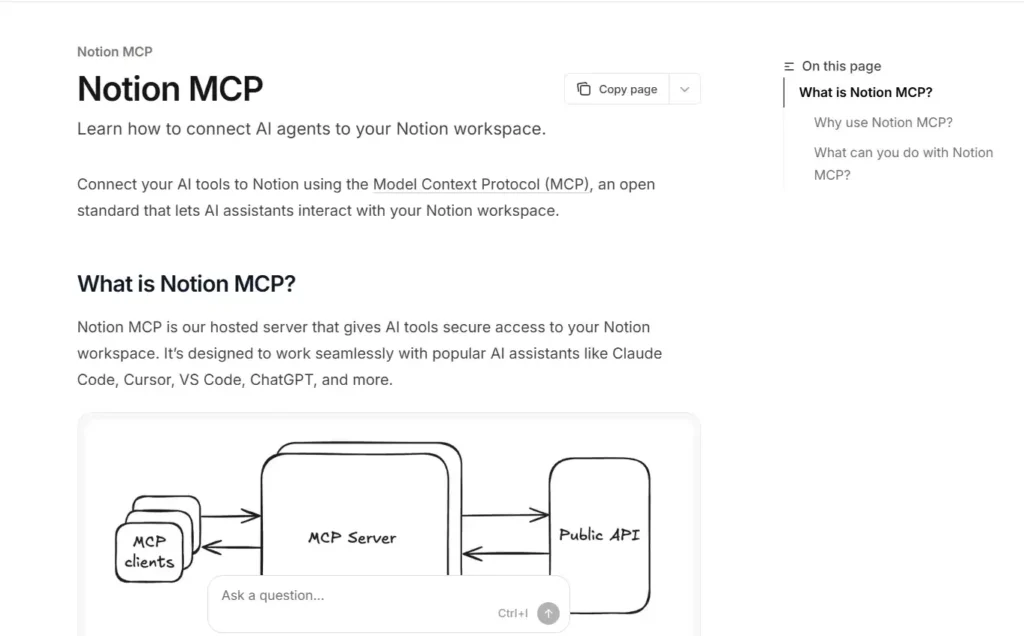
If your notes, specs, and project docs live in Notion, connecting it to your AI assistant closes a real workflow gap.
Notion MCP is a free, official hosted server that links Claude, Cursor, and ChatGPT directly to your workspace through simple OAuth, no API key required.
Once connected, your assistant can search across pages, create documentation, update databases, and pull answers straight from your existing notes.
Core connection works on Notion’s free plan, though some advanced features scale with paid tiers.
Pros and Cons
Pros:
- Free to connect on any Notion plan.
- One-click OAuth, no API key.
- Reads and writes pages directly.
- Works with Claude, Cursor, ChatGPT.
Cons:
- Guest users currently locked out.
- Some bugs reported in recent updates.
Best For: Teams and solo users who manage docs, tasks, and knowledge bases in Notion and want AI to search and update them directly.
Free Trial: No trial needed, core MCP connection is free on every Notion plan.
My Experience: Setup took one OAuth click, and having Claude pull answers straight from old meeting notes saved real time compared to manual searching.
Limitations:
- Advanced AI features need paid plan.
- Some open reliability issues.
Rating: 4/5
Why Pick Notion MCP: It turns scattered notes and databases into something your assistant can actually search and act on, without copy-pasting between tabs.
4. Figma MCP — Free Remote MCP for Design-to-Code Workflows
If your team builds UI with AI, working from a screenshot has always been a weak substitute for the real design file.
Figma MCP is an official remote server that connects Claude, Cursor, and VS Code directly to your Figma files using OAuth and a share link.
Once connected, your assistant can read actual components, variables, styles, and layout metadata, not guesses based on how a screenshot looks.
It’s included free with any Figma account, even the Free plan, so there’s no extra cost to start using it.
Pros and Cons
Pros:
- Free with any Figma account.
- Reads real design tokens directly.
- Works with Claude, Cursor, VS Code.
- Keeps generated code on-brand.
Cons:
- Requires Figma desktop app running.
- Still in open beta, expect changes.
Best For: Developers and designers who want AI-generated code to match actual design files instead of approximated screenshots.
Free Trial: No trial needed, Figma MCP is free on every Figma plan, including Free.
My Experience: Once connected, pulling exact spacing and variable names into code felt far more accurate than any screenshot-based workflow I’d tried before.
Limitations:
- Needs Figma Dev Mode active.
- Beta stability varies by client.
Rating: 4.3/5.
Why Pick Figma MCP: It closes the gap between design and code by giving your assistant the actual source of truth, not an interpretation of it.
5. Firecrawl MCP — Free Remote MCP for Live Web Scraping & Search
Your AI assistant’s knowledge has a cutoff date, and copy-pasting web pages into chat gets old fast.
Firecrawl MCP is an official remote server that gives Claude, Cursor, and Windsurf real-time access to search, scrape, and crawl live websites.
It connects with a hosted URL or a free API key, and even without one, keyless scraping and search still work at limited rate.
Results come back as clean markdown or structured JSON, so your assistant gets usable content instead of raw HTML clutter.
Pros and Cons
Pros:
- Works keyless on free tier.
- Scrapes, crawls, and searches live web.
- Returns clean, structured content.
- Works with Claude, Cursor, Windsurf.
Cons:
- Advanced tools need an API key.
- Credits run out on heavy scraping.
Best For: Developers and researchers who need their AI assistant to pull current, real web data instead of relying on outdated training knowledge.
Free Trial: Free plan included, 500 one-time credits with no credit card needed.
My Experience: Running a search-then-scrape workflow in one conversation felt seamless, and the structured JSON output meant no cleanup before using the data.
Limitations:
- Rate limits apply without a key.
- Heavier crawls need paid credits.
Rating: 4.4/5
Why Pick Firecrawl MCP: It closes the gap between what your AI knows and what’s actually happening on the web right now, without leaving your chat.
Free Remote MCPs vs Local MCP Servers: What’s the Difference
The core difference is where the server runs. Free remote MCPs run on hosted infrastructure and connect through a URL. Local MCP servers run directly on your computer using commands like npx or Docker.
This changes how each one behaves day to day.
- Setup: Free remote MCPs need only a URL or login. Local servers need installation, dependencies, and environment configuration.
- Performance: Remote servers often respond faster since they run on dedicated infrastructure. Local servers depend on your machine’s resources.
- Offline access: Local MCP servers keep working without internet. Free remote MCPs require a live connection.
- Data control: Local servers keep everything on your device. Remote servers process requests through the provider’s infrastructure, so it’s worth checking what data is shared.
- Maintenance: Local setups need updates and occasional troubleshooting. Free remote MCPs are maintained by the provider.
Neither option is strictly better. The right choice depends on your workflow, privacy needs, and how much setup time you’re willing to spend.
With that difference clear, it’s time to look at the actual free remote MCPs worth connecting first.
Free Remote MCPs vs Paid MCP Servers: Is Free Enough?
Once you’ve tried a few free remote MCPs, a natural question comes up: do you actually need to pay for anything? The answer depends on how you use them.
Free remote MCPs handle most everyday tasks well. Reading repositories, searching Notion pages, pulling design tokens, and basic web scraping all work fine on free tiers.
Paid MCP servers become relevant when usage scales up.
- Higher rate limits: Free tiers often cap requests per minute or per day.
- Advanced features: Tools like autonomous research agents or bulk scraping usually sit behind paid plans.
- Media generation: Servers like OpenArt MCP require a subscription since there’s no free access point.
- Team usage: Shared credits and priority support typically come with paid tiers.
For individual developers experimenting or building small workflows, free remote MCPs are genuinely enough. For production use, media-heavy projects, or team-scale automation, paid plans remove real limitations.
The right answer isn’t free versus paid, it’s matching the tool to what your workflow actually demands. That distinction matters even more once you start looking for additional MCPs beyond this list.
FAQs About Free Remote MCPs
What is a free remote MCP?
A free remote MCP is a hosted Model Context Protocol server that connects AI assistants like Claude or Cursor to external tools through a URL, without local installation or setup cost.
Are free remote MCPs safe to use?
Most official remote MCP servers use OAuth authentication and scoped permissions. Risk depends on the provider, so always review data access and avoid granting broader permissions than your workflow actually needs.
Do free remote MCPs need an API key?
It depends on the server. GitHub and Notion MCP use OAuth logins, while some tools like Firecrawl offer limited keyless kaccess before requiring an API key for full functionality.
Can I use free remote MCPs with Cursor and Windsurf?
Yes, most official remote MCPs, including GitHub, Notion, and Figma, work across Claude, Cursor, and Windsurf since they all follow the same open Model Context Protocol standard.
What’s the difference between remote and local MCP servers?
Remote MCPs run on hosted infrastructure and connect via URL, requiring no setup. Local MCP servers run on your machine using npx or Docker, needing installation and maintenance.
Do free remote MCPs work without internet access?
No. Since remote MCP servers are hosted externally, they require an active internet connection. Local MCP servers remain the better choice for fully offline workflows.
Are free remote MCPs enough, or do I need a paid plan?
Free tiers cover most everyday tasks like search, documentation, and repo management. Heavier usage, like large-scale scraping or media generation, usually requires upgrading to a paid plan.
Final Thoughts by Nisha
I tested each of these free remote MCPs myself before writing this, and honestly, the setup differences surprised me. GitHub and Figma took under a minute. Notion needed one OAuth click. Firecrawl worked instantly, even without a key.
OpenArt didn’t fit the free list, and I won’t pretend it does. It’s a paid MCP, but if your work involves AI-generated video, image, or voice content, it’s genuinely worth the cost.
Start with the free ones. Add OpenArt when your workflow actually needs real media generation. That’s the honest answer.