Before paying for an AI image or video generator, most people want to test it first. OpenArt AI’s free trial lets you do exactly that, giving new users access to its personal plan so you can generate images, try editing tools, and explore features like consistent characters before committing to a subscription.
This matters because OpenArt’s paid tiers vary quite a bit, from entry-level plans built for casual creators to higher-tier options with more credits and commercial usage rights. Testing the free version first helps you figure out which plan actually fits how much you create.
Below, we’ll look at what’s included in OpenArt AI’s free access, what limitations to expect, and how the free plan compares to its paid subscription options.
Is There an OpenArt AI Free Trial?
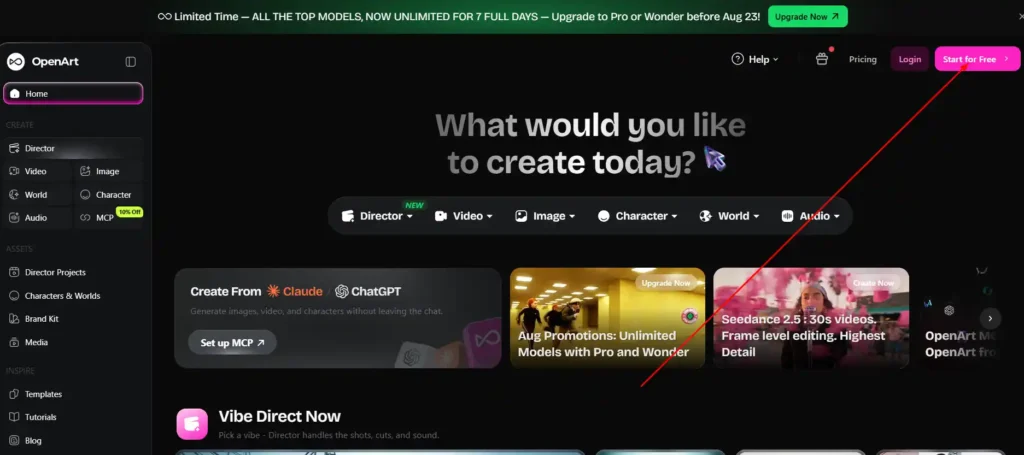
Yes. OpenArt AI offers a free plan under what it calls a “Personal Project” tier, which gives new users access to core tools without requiring payment upfront.
What OpenArt AI’s Free Plan Includes
The free tier gives you access to OpenArt’s main creation tools, including:
- Text-to-image generation.
- Access to a limited selection of AI models.
- Basic image editing tools.
- Access to OpenArt’s Director and MCP features in a limited capacity.
The exact number of free credits included and how often they refresh can change, so check OpenArt’s current pricing page directly before assuming a specific credit amount.
Save 15% on Your OpenArt AI Subscription
Use our exclusive code NISHA15 at checkout to get 15% off any OpenArt AI paid plan today.
OpenArt AI Free Trial Limitations to Know Before You Sign Up
The free plan is designed to let you sample the platform, not replace a paid subscription. Expect these constraints:
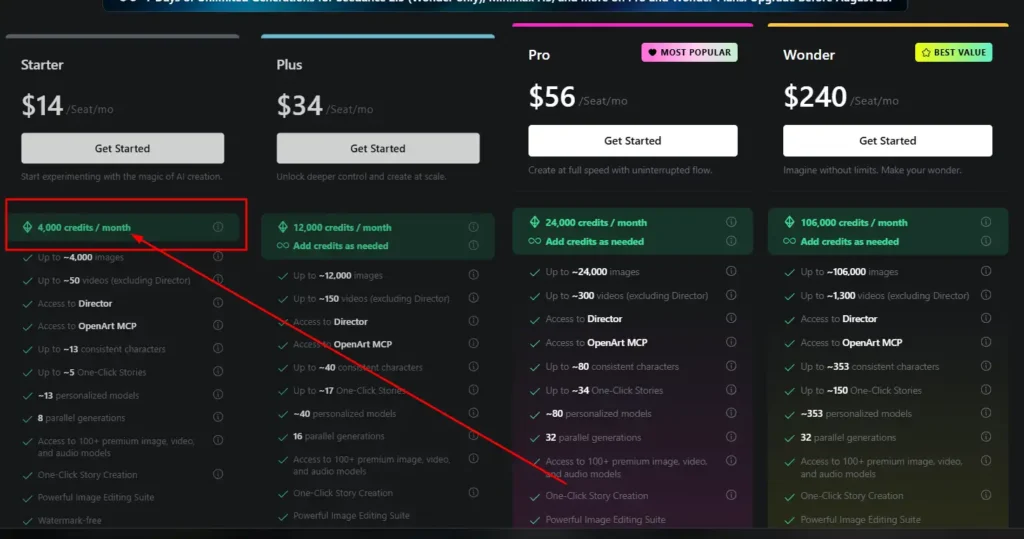
- Lower credit allowance than any paid tier (paid plans start at 4,000 credits/month on Starter.)
- No commercial use rights — commercial licensing starts on the Plus plan and above.
- Fewer parallel generations at once compared to paid plans.
- Limited access to premium models like Seedance 2.5 or MiniMax H3, which are often gated behind paid or promotional access.
- No priority support.
If you’re testing OpenArt for a specific project with a deadline, keep these limits in mind before you start.
How to Get Started with the OpenArt AI Free Trial
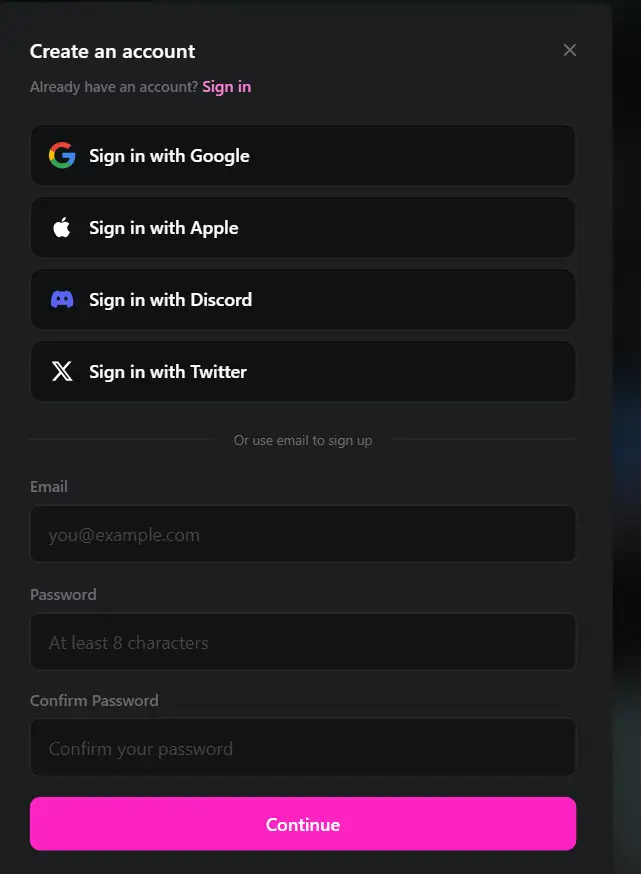
Step-by-Step: Signing Up for OpenArt AI Free
- Go to OpenArt’s website and select the sign-up option.
- Create an account using an email address or a supported login method.
- You’ll land on the free “Personal Project” workspace automatically — no separate trial activation is required.
- Start generating images or exploring tools like Edit Image, Image Upscale, or Create Music directly from the dashboard.
Does the OpenArt AI Free Trial Require a Credit Card?
Based on how OpenArt structures its free plan, no credit card is required to access the free “Personal Project” tier — you’re only asked for payment details when you choose to subscribe to a paid plan.
OpenArt AI Free Trial vs. Paid Plans
OpenArt AI Pricing Breakdown (Starter, Plus, Pro, Wonder)
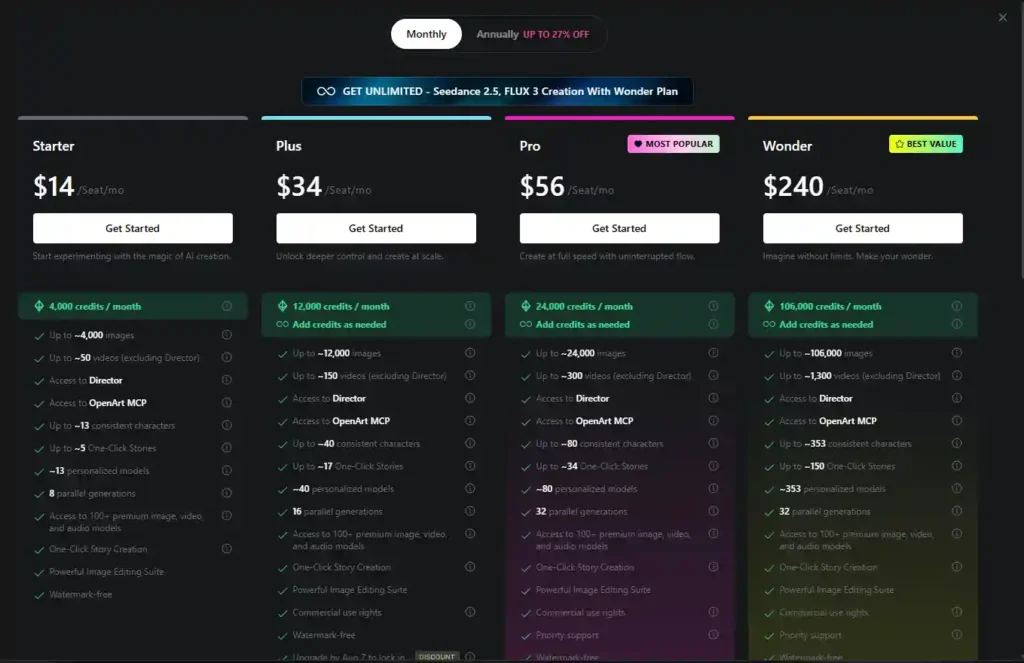
| Plan | Price | Credits/Month | Commercial Use | Notable Features |
|---|---|---|---|---|
| Free | $0 | Limited | No | Basic tools, limited models |
| Starter | $14/seat/mo | 4,000 | No | Director access, ~13 consistent characters |
| Plus | $34/seat/mo | 12,000 | Yes | ~40 consistent characters, watermark-free |
| Pro | $56/seat/mo | 24,000 | Yes | Priority support, unlimited access to select models |
| Wonder | $240/seat/mo | 106,000 | Yes | Unlimited access to Nano Banana 2 Lite, Qwen Image 3.0, Seedance 2.5, MiniMax H3, FLUX 3 |
Pricing and included credits are accurate as of the source used for this article but can change — always confirm current numbers on OpenArt’s pricing page before purchasing.
What You Lose on the Free Plan (Watermarks, Credits, Commercial Use)
The biggest gaps between free and paid are commercial usage rights and credit volume. If you plan to use generated images or videos in client work, marketing, or any commercial product, you’ll need at least the Plus plan, since commercial use rights aren’t included on Starter or the free tier.
When It’s Worth Upgrading from the OpenArt AI Free Trial
Upgrading generally makes sense if you:
- Run out of free credits regularly.
- Need commercial rights for client or business work.
- Want access to premium video models like Seedance 2.5 or MiniMax H3.
- Need more parallel generations for faster workflows.
Casual users experimenting with AI art may find the free tier sufficient for a while.
How Many Free Credits Does OpenArt AI Give?
The specific free credit allowance isn’t confirmed in the pricing information available here. For comparison, the lowest paid tier (Starter) includes 4,000 credits per month, covering roughly 4,000 images or 50 videos.
How Credits Are Used (Images vs. Videos)
Credits are consumed differently depending on output type. Based on OpenArt’s paid-tier ratios, video generation uses significantly more credits per output than image generation — roughly 80 credits per video versus 1 credit per image at the Starter tier.
What Happens When You Run Out of Free Credits
Once free credits are used up, you’ll typically need to wait for a refresh cycle (if one applies) or upgrade to a paid plan to continue generating. OpenArt’s paid plans also allow adding extra credits as needed, starting at $15/month for 5,000 additional credits (available to Plus subscribers and above).
Can You Use OpenArt AI Free Trial Images Commercially?
No. Commercial use rights are not included on OpenArt’s free plan or the Starter plan. If you need to use AI-generated images or videos for business purposes, you’ll need to subscribe to at least the Plus plan, which explicitly includes commercial use rights.
OpenArt AI Coupon Codes and Discounts (Current Offers)
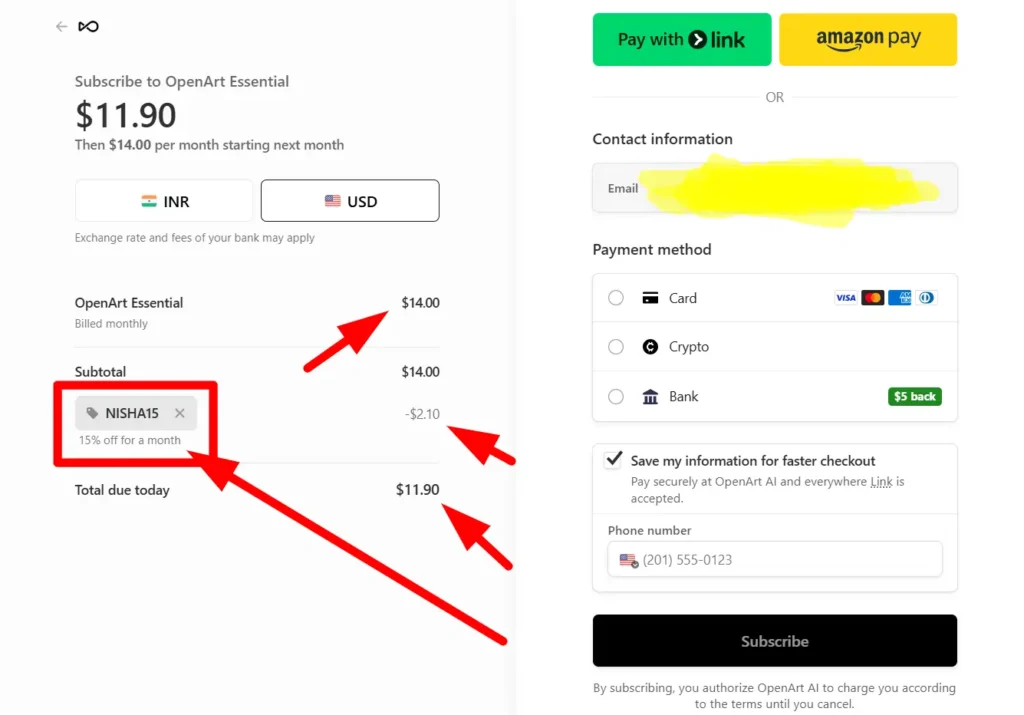
Use code NISHA15 at checkout for 15% off your first OpenArt AI subscription. This is our exclusive reader discount and is separate from any promotions OpenArt runs directly — availability and terms may change, so confirm the discount applies at checkout before completing your purchase.
How to Check for Active OpenArt AI Promotions
OpenArt periodically runs its own limited-time promotions directly on its site, such as discounted upgrade windows or temporary unlimited access to premium models. These offers rotate and aren’t guaranteed to be active at any given time — check OpenArt’s pricing page directly for current official deals.
Student and Business Plan Discounts
OpenArt offers separate Business and Enterprise pricing structures with shared credit pools instead of per-seat pricing, which can lower costs for teams. Specific student discount programs aren’t confirmed here.
OpenArt AI Free Trial Alternatives Worth Comparing
Free AI Image Generators Similar to OpenArt AI
If you want to compare OpenArt’s free tier against other tools before committing, look at platforms offering similar freemium structures with limited free generations and paid upgrades for commercial use and higher volume.
OpenArt AI vs. Midjourney: Which Free Option Is Better?
Midjourney and OpenArt take different approaches — Midjourney operates primarily through Discord with paid-only access in most cases, while OpenArt offers a genuinely free web-based tier alongside its paid plans. If free access without a subscription is your priority, OpenArt’s free plan is generally more accessible.
How to Cancel or Manage Your OpenArt AI Subscription
You can cancel an OpenArt subscription anytime through your account settings. Canceling stops future renewals but typically doesn’t refund the current billing period. Downgrading from a paid plan will return you to free-tier limits at the start of your next billing cycle.
Frequently Asked Questions About the OpenArt AI Free Trial
Is OpenArt AI Free Forever?
The free “Personal Project” tier appears to be ongoing rather than a time-limited trial, though feature access is limited compared to paid plans.
How Long Does the OpenArt AI Free Trial Last?
Based on available information, OpenArt’s free tier doesn’t appear to expire after a set number of days — it functions as a permanent limited-access plan rather than a countdown trial.
What’s the Best Plan After the OpenArt AI Free Trial Ends?
For most individual creators needing commercial rights, Plus ($34/seat/mo) offers the best balance of credits and commercial licensing. Heavier users or teams needing premium video models may find Pro or Wonder more practical despite the higher cost.
Final Thoughts: Is the OpenArt AI Free Trial Worth It?
OpenArt’s free plan is a reasonable way to test core features before paying for anything.
It won’t cover commercial projects or heavy usage, but it’s enough to explore the interface, try basic generation tools, and decide whether a paid plan fits your workflow.
If you do upgrade, code NISHA15 takes 15% off — just confirm current OpenArt promotions on their pricing page too, in case a better official offer is running at the time.