Hello, lovely readers! It’s Nisha, and after six months of using Pictory AI daily for content creation, one question keeps popping up in comments and DMs.
Pictory AI pricing looks simple on the surface. Then plans, credits, and hidden limits start piling up, and confusion creeps in fast.
Beginners wonder if the free trial is really free. Creators worry about video minutes running out mid-project. Marketers question whether upgrading actually saves money or just adds cost.
Every plan promises value, but numbers rarely tell the full story. Something about the credit system and annual discounts changes everything once real usage begins.
What Is Pictory AI?

Pictory AI is a text-to-video platform that turns scripts, blog posts, PowerPoint slides, and even plain URLs into edited videos. You skip the timeline editing and let the AI handle scene selection, captions, and voiceovers.
It’s built for people who need videos regularly but don’t have hours to spend in a traditional editor. That’s the whole pitch, and honestly, it holds up once you understand what each plan actually gives you.
Exclusive Pictory AI Coupon: Save 20%
Use code CABF20 at checkout and get 20% off any Pictory AI plan — Starter, Professional, or Team.
Pictory AI Pricing Plans Overview
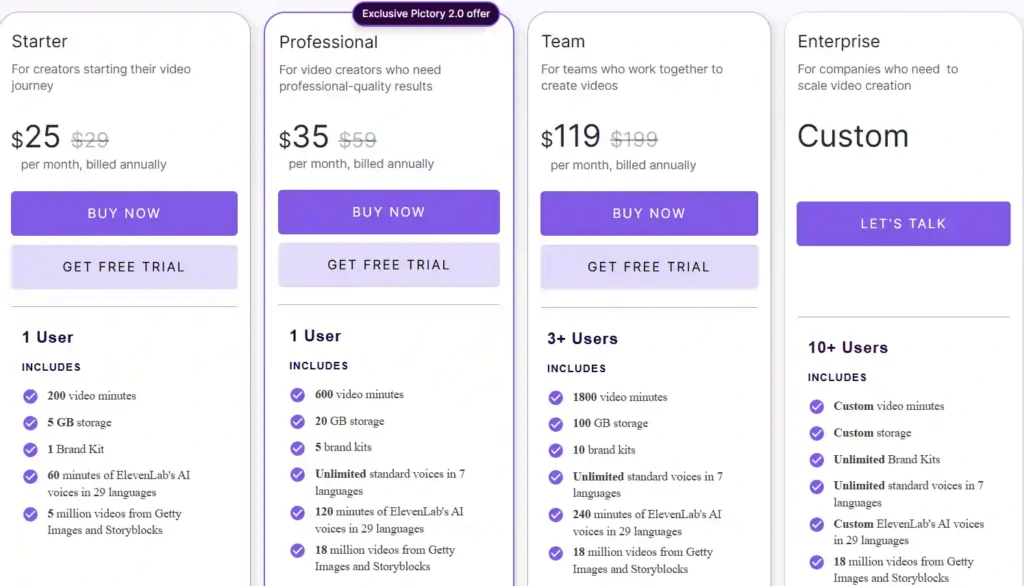
There are four tiers: Starter, Professional, Team, and Enterprise. Annual billing knocks the price down noticeably compared to paying month to month, and that gap matters more than most reviews admit.
Pictory Starter Plan Pricing – $25/month
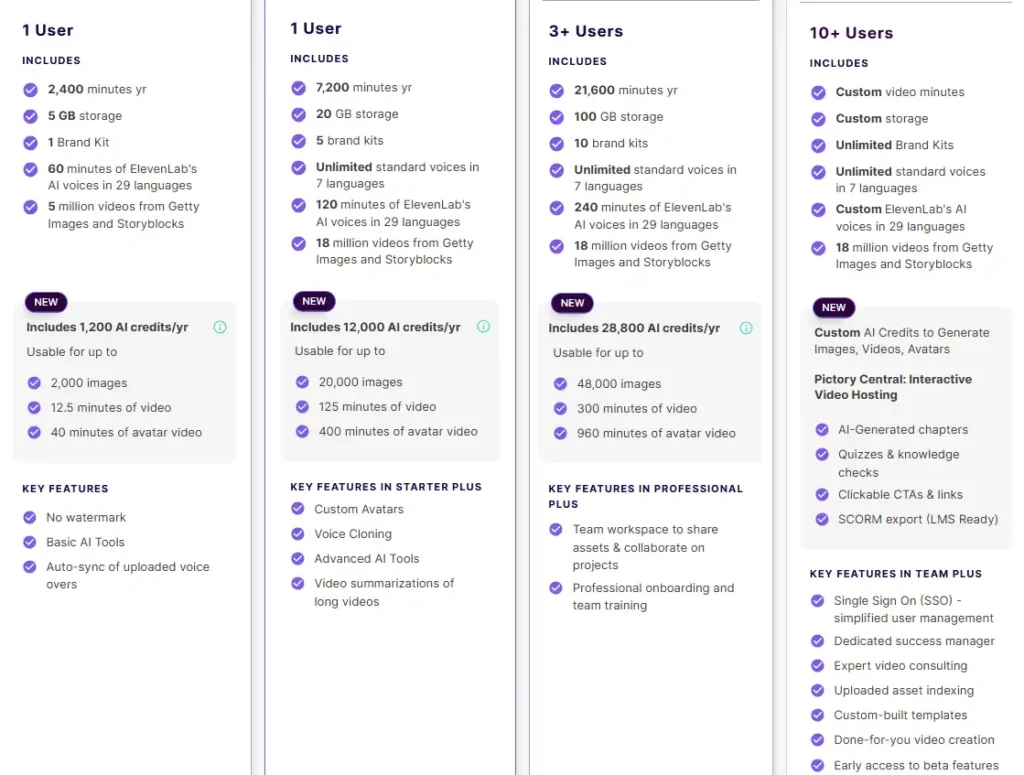
The Starter plan runs $25/month when billed annually (regularly $29), or $29/month if you pay monthly. It includes 2,400 video minutes per year, 5 GB of storage, one brand kit, and 1,200 AI credits annually.
This tier suits solo creators who post occasionally rather than daily. Max video length caps at 30 minutes, and export resolution tops out at 720p — worth knowing before you commit.
Pictory Professional Plan Pricing – $35/month
Professional costs $35/month annually (or $59/month billed monthly), and it’s the plan most active creators actually land on. You get 7,200 minutes yearly, 20 GB storage, five brand kits, and 12,000 AI credits a year.
This is also where custom avatars, voice cloning, and 1080p export unlock. If you’re publishing weekly, the jump from Starter to Professional pays for itself fast.
Pictory Team Plan Pricing – $119/month
Team pricing sits at $119/month annually (versus $199 monthly) for three or more users. It bundles 21,600 minutes per year, 100 GB storage, ten brand kits, and 28,800 AI credits, shared across the whole workspace.
Collaboration tools and shared asset libraries come standard here — genuinely useful once more than one person touches the same project.
Pictory Enterprise Pricing – Custom Quote
Enterprise pricing isn’t published. You’ll need to talk to sales for custom video minutes, storage, and AI credits, plus features like SSO, SCORM export, and a dedicated success manager.
This tier makes sense for companies producing training or onboarding content at scale — not for individual creators.
Pictory AI Monthly vs Annual Pricing (Which Saves More?)
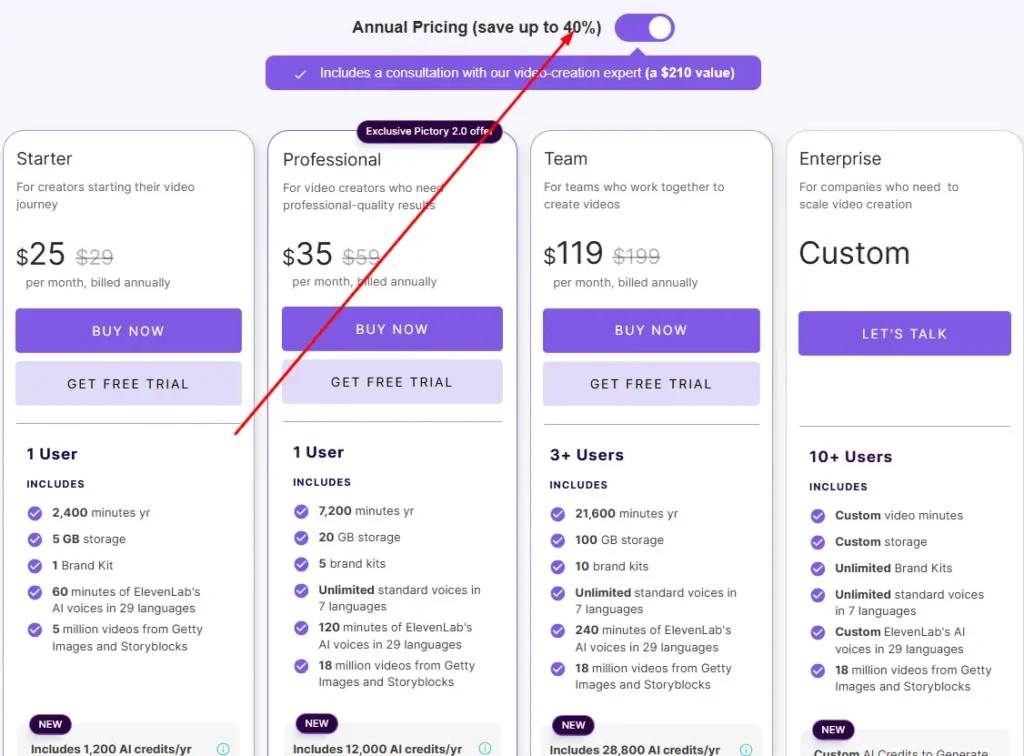
Annual billing saves close to 40% across every plan. That’s not marketing fluff — the numbers back it up plainly.
| Plan | Monthly Price | Annual Price (per month) | Yearly Savings |
|---|---|---|---|
| Starter | $29 | $25 | ~14% |
| Professional | $59 | $35 | ~40% |
| Team | $199 | $119 | ~40% |
If you’re testing Pictory casually, monthly billing gives flexibility. But if you already know you’ll use it past month two, annual billing is the smarter financial call — full stop.
What’s Included in Each Pictory Pricing Plan
Pricing pages love to hide the details that actually decide whether a plan works for you. Here’s what matters in practice.
Video Minutes & Export Limits by Plan
Video minutes refer to exported video, not previews or edits. You can rework a project endlessly inside the editor without touching your quota — only the final download counts.
Starter gives 200 minutes monthly (or 2,400/year annually), Professional offers 600 monthly (7,200/year), and Team provides 1,800 monthly (21,600/year). Unused minutes don’t roll over, so plan your exports accordingly.
AI Credits Explained (Images, Video, Avatars)
AI credits power the generative features — text-to-image, AI video clips, and avatar generation. This part trips people up the most.
Roughly speaking, 1 AI credit generates about 1.67 images, or a fraction of a minute of AI video or avatar footage. Avatar and video generation burn credits much faster than static images, so heavy avatar users should budget carefully on Starter.
Here’s a rough breakdown of what your annual credit allowance actually stretches to on each plan:
| Plan | AI Credits/Year | Images | AI Video | Avatar Video |
|---|---|---|---|---|
| Starter | 1,200 | ~2,000 | ~12.5 min | ~40 min |
| Professional | 12,000 | ~20,000 | ~125 min | ~400 min |
| Team | 28,800 | ~48,000 | ~300 min | ~960 min |
Forty minutes of avatar footage a year sounds generous until you realize a single weekly avatar-led video eats through that in under two months. If avatars are central to your content plan, Starter runs out fast — plan for Professional from day one.
Storage, Brand Kits & Stock Media Access
Storage scales with plan tier — 5 GB on Starter up to 100 GB on Team. Brand kits (for logos, fonts, and colors) go from just one on Starter to ten on Team.
Stock media access also differs: Starter includes Storyblocks only, while Professional and above unlock both Storyblocks and Getty Images libraries.
AI Voiceovers & Voice Cloning by Plan
Every plan includes standard AI voices, but ElevenLabs’ hyper-realistic voices are capped by minutes — 60 on Starter, 120 on Professional, and up to 240 on Team. Voice cloning is exclusive to Professional and above.
Does Pictory AI Offer a Free Trial?
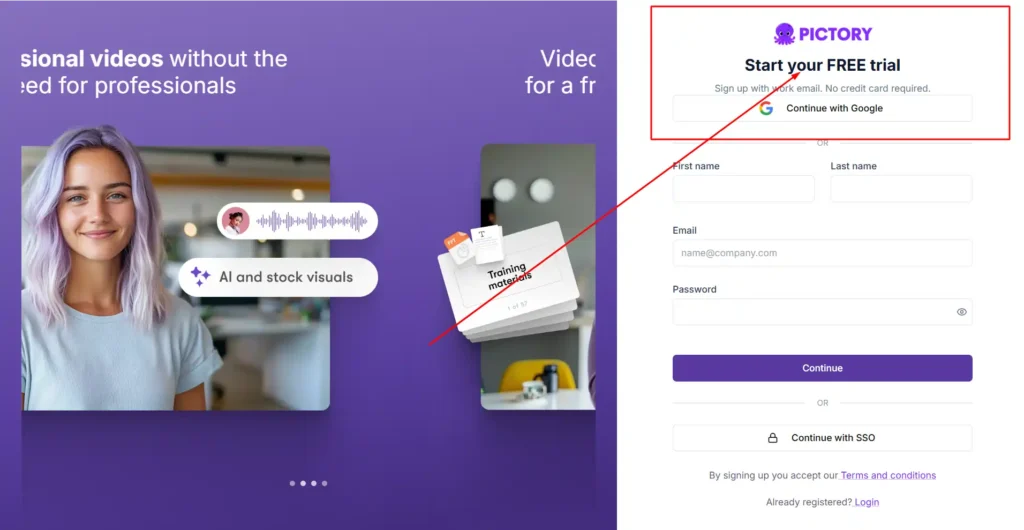
Yes. Pictory offers a 14-day free trial with no credit card required upfront, and you can create up to 3 video projects during that window.
It’s enough time to test the script-to-video workflow and see if the output quality fits your needs, though it won’t cover heavy avatar or voice-cloning testing given the limited credits.
Pictory AI Pricing for Different Users
Not every plan fits every workflow. Here’s how the tiers break down by actual use case.
Best Pictory Plan for Beginners & Creators
If you’re posting a few videos a month — say, for a small YouTube channel or personal brand — Starter covers the basics without overpaying. Just watch your AI credit usage if you plan to lean on avatars.
Creators publishing weekly or working with clients usually outgrow Starter within a couple of months and move to Professional. The tipping point is almost always AI credits, not video minutes — you’ll hit the credit ceiling before you run out of export time.
A freelancer producing client videos should lean toward Professional from the start too. Client work tends to demand higher resolution exports and custom branding, both of which Starter doesn’t fully support.
Best Pictory Plan for Teams & Businesses
Marketing teams and agencies producing multiple videos per week benefit most from Professional or Team. The shared workspace on Team plans alone justifies the jump once more than one person is involved.
For training departments or large-scale content operations, Enterprise’s custom limits and SSO support become worth the sales conversation.
Is Pictory AI Pricing Worth It? (Value Breakdown)
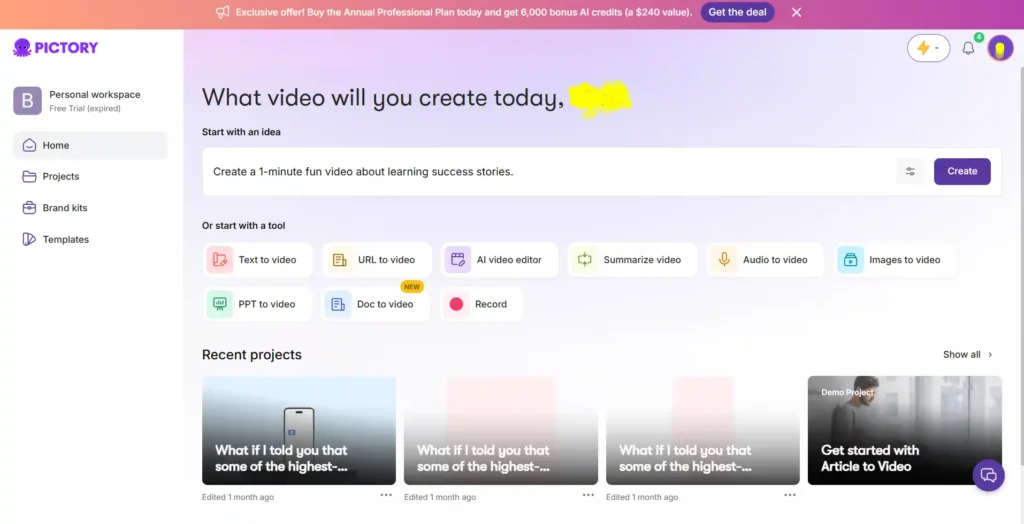
Compared to hiring a freelance editor or maintaining in-house production, Pictory’s pricing is genuinely competitive — especially on the Professional plan, which unlocks most premium features for $35/month annually.
Where it gets less clear-cut is credit consumption. Heavy AI avatar or AI video generation users can burn through monthly credits faster than expected, making the advertised price feel lower than the real cost of consistent use.
You can also explore our guide on AI avatar generators if avatar-heavy workflows are your main use case — it changes which plan makes financial sense.
There’s another angle worth mentioning: the value bundled into the Professional annual plan. Pictory throws in ElevenLabs voiceovers, Getty Images access, and Storyblocks footage — assets that would cost hundreds of dollars if licensed separately. On paper, that bundled value pushes well past what you’re actually paying monthly.
That said, “value” only counts if you’re using those assets. If your videos rarely touch stock footage or premium voices, you’re paying for headroom you won’t use. Match the plan to your actual workflow, not the plan with the biggest feature list.
Pictory AI Refund & Cancellation Policy
Pictory doesn’t offer refunds on paid subscriptions. You can cancel anytime, and you simply won’t be charged on the next renewal cycle.
Before canceling, download any videos you want to keep — all projects are permanently deleted from the platform once your account closes.
Pictory AI Pricing FAQs
Is Pictory AI free to use?
Not entirely. There’s a 14-day free trial with limited projects, but ongoing use requires a paid plan starting at $25/month.
Does Pictory AI pricing include AI avatars?
Custom avatars are available starting on the Professional plan, not on Starter.
Can I switch plans later?
Yes, you can upgrade or downgrade within your Pictory account settings at any time.
Do unused AI credits roll over?
No. Both video minutes and AI credits reset each billing cycle and don’t carry forward.
Is there a student or nonprofit discount?
Pictory offers nonprofit discounts on request through their support chat, though no public student discount is currently listed.
Nisha’s Final Take on Pictory AI Pricing
After six months of daily use, here’s my honest verdict: Pictory AI pricing rewards people who match the plan to their real output, not their ambitions. Starter suits occasional creators, but Professional is where the actual value sits.
If video content matters to your growth in 2026, don’t just read about it — start the 14-day free trial and test it on your own project. See the numbers for yourself before committing a single rupee.
Until next time, keep creating smart. — Nisha