Hello, lovely readers! I’m Nisha, testing AI tools daily on my blog for the last six months. Today’s topic touches a real frustration: Higgsfield AI looks impressive until credit limits, short clips, and rising costs slow creators down mid-project. Marketers need longer videos. Beginners need something simpler. Buyers need value without watching credits disappear after a few tries.
That frustration is why the search for the 5 best Higgsfield AI alternatives keeps growing, yet many comparisons repeat vague claims without real testing behind them. Something shifts once these platforms get examined closely for speed, pricing, and creative control. Stay a little longer, because what comes next could reshape how creators approach video generation.
What Is Higgsfield AI and Why Do Users Look for Alternatives?
Higgsfield AI is an AI video generation platform known for cinematic camera effects, viral presets, and character consistency through its Soul ID feature. It gives creators access to multiple video models, including Kling, Veo, and Seedance, under one subscription.
Despite these strengths, many users search for a Higgsfield AI alternative for practical reasons.
The platform runs on a credit system, and premium models consume credits quickly. Standard video clips are also short, often capped at 5 to 10 seconds, which limits longer or more detailed projects.
Common reasons users explore alternatives include:
- Credits running out faster than expected.
- Short clip length restricting creative flexibility.
- Pricing that scales quickly for full model access.
- Limited timeline editing on the web platform.
These limitations don’t make Higgsfield AI a poor tool, but they explain why creators, marketers, and ecommerce brands often compare it against other AI video generators before committing to one platform.
Understanding these gaps makes it easier to evaluate which alternative actually fits specific creative or business needs, which is exactly what the next section breaks down.
5 Best Higgsfield AI Alternatives Compared
| Tool | Signature Strength | Ideal Use Case | Learning Curve |
| OpenArt AI | 100+ model access | All-in-one creative suite | Moderate |
| Pictory AI | Text-to-video speed | Content repurposing | Easy |
| Invideo AI | Agent memory system | Multi-shot storytelling | Moderate |
| Akool | Multilingual avatars | Global marketing videos | Easy |
| ElevenLabs | Ultra-realistic voice | Narration-first video | Easy |
1. OpenArt AI
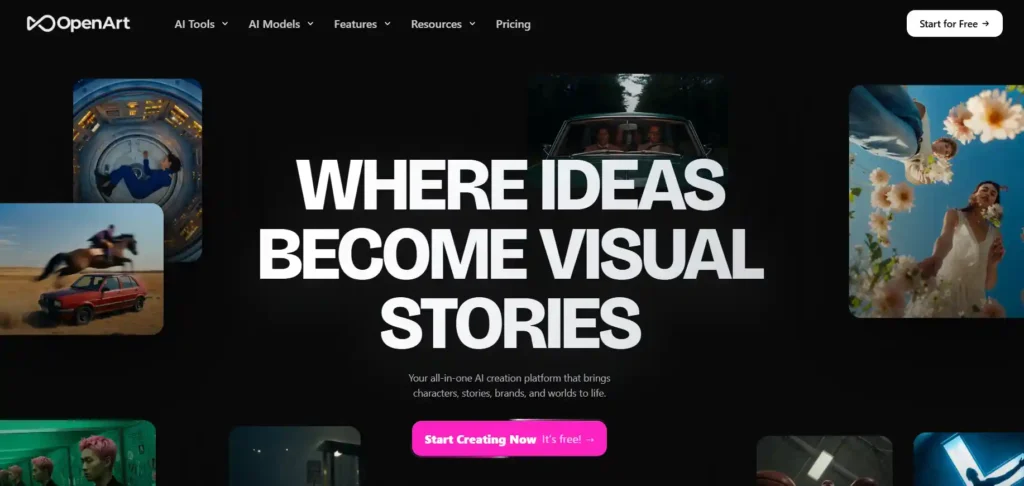
OpenArt AI works as a complete creative suite instead of a single-purpose video tool. It brings Director, Text-to-Video, Image Editing, Lip-Sync, and Motion Sync together in one dashboard.
Unlike Higgsfield’s narrower model list, OpenArt gives access to 100+ premium image, video, and audio models, including Seedance 2.0, Kling 3.0 Omni, and Nano Banana Pro.
Creators building consistent characters, One-Click Stories, or brand campaigns get more flexibility here, without switching between separate apps for editing, voiceover, and generation.
Unlock 15% Off Your OpenArt Creations Today
Use code NISHA15 at checkout and save 15% instantly on all OpenArt plans and credit packs. Limited time offer!
Pros and Cons
Pros:
- Access: 100+ premium AI models included.
- Flexibility: Consistent characters across projects.
- Workflow: One dashboard for image, video, audio.
- Speed: Parallel generations save creation time.
Cons:
- Learning curve: Many tools may overwhelm beginners.
- Credits: Higher plans needed for heavy use.
Pricing: Plans start at $14/month (4,000 credits) up to $240/month (106,000 credits), with flexible add-on credit packs available.
Best for: Creators needing an all-in-one AI studio.
Rating: 4.3/5 ⭐.
Limitations:
- Credit system can restrict frequent, high-volume video generation.
- Higher-tier plans required to unlock full model access.
My experience: Switching between tools felt tiring before. OpenArt’s single dashboard made testing multiple models faster, without losing character consistency across separate video and image projects.
Why choose OpenArt: It replaces Higgsfield’s narrower toolset with broader model access, consistent characters, and editing tools built directly into one creative workspace.
2. Pictory AI
Pictory AI takes a different route than Higgsfield. Instead of prompt-based cinematic clips, it turns text, scripts, blogs, PPTs, and URLs directly into polished, publish-ready videos.
This makes it a strong Higgsfield AI alternative for marketers and educators who start with content, not just prompts or images.
With AI avatars, ElevenLabs voiceovers, auto captions, and brand kits, Pictory focuses on speed and repurposing over cinematic effects or camera presets.
Get 20% Off Pictury AI Instantly Now
Apply code CABF20 at checkout and enjoy 20% savings on your Pictury AI subscription or credit pack. Offer won’t last!
Pros and Cons
Pros:
- Speed: Converts scripts into videos fast.
- Voices: Realistic ElevenLabs AI narration included.
- Branding: Custom brand kits across projects.
- Repurposing: One video, multiple platform formats.
Cons:
- Style: Less cinematic than Higgsfield’s presets.
- Length: Video minutes capped by plan.
Pricing: Plans start at $25/month (Starter) up to $119/month (Team), with custom Enterprise pricing available.
Best for: Marketers repurposing content into video.
Rating: 4.7/5 ⭐
Limitations:
- Less suited for cinematic, effect-heavy creative video.
- Avatar and voice minutes limited by chosen plan.
My experience: Turning an existing blog post into a finished video took minutes, not hours. Captions, voiceover, and pacing were handled automatically without manual editing.
3. Invideo AI
invideo AI positions itself around AI agents rather than single prompts. Agent One handles scripting, shot planning, and consistency across clips, storing full project context in memory.
For filmmakers, agencies, and microdrama creators, this solves a real Higgsfield gap: keeping characters, costumes, and locations consistent across dozens of shots without manual re-prompting.
With a full timeline editor, multiplayer collaboration, and access to 200+ models including Seedance 2.0, Veo 3.1, and Kling 3.0, invideo leans toward structured production rather than quick viral clips.
Pros and Cons
Pros:
- Agents: Long-term memory keeps shots consistent.
- Collaboration: Real-time multiplayer editing supported.
- Models: 200+ image, video, audio options.
- Editing: Full timeline editor included.
Cons:
- Complexity: More setup than simple prompting.
- Credits: Premium models consume credits fast.
Pricing: Plans start at $17/month (Plus) up to $900/month (Elite), billed annually with credit-based access.
Best for: Filmmakers needing multi-shot consistency.
Rating: 4.5/5 ⭐
Limitations:
- Steeper learning curve for solo beginners.
- Credit-heavy for high-volume daily generation.
My experience: Building a multi-scene story felt structured instead of scattered. Agent One remembered earlier context, so backdrops and characters stayed consistent without redoing prompts each time.
Why choose invideo: It fits creators building longer, consistent video projects, where Higgsfield’s single-clip workflow starts feeling limited.
Why choose Pictory: It works best when content already exists, turning scripts, blogs, and presentations into video faster than prompt-based tools like Higgsfield.
4. Akool
Akool focuses on avatars, face swap, and translation rather than pure cinematic generation. Streaming Avatars, Talking Photos, and Video Translation across 155+ languages set it apart from Higgsfield’s effects-heavy approach.
For global marketing teams and educators, Akool solves a specific gap: producing multilingual, personalized video content at scale without reshooting anything.
With 4K rendering, temporal identity consistency, and API access, Akool suits businesses needing repeatable, branded avatar content over one-off viral clips.
Pros and Cons
Pros:
- Avatars: Photorealistic streaming and talking avatars.
- Translation: 155+ languages with lip-sync.
- Consistency: Identity stays stable across frames.
- API: Enterprise-ready integration available.
Cons:
- Focus: Less cinematic than Higgsfield’s presets.
- Pricing: Advanced features need higher tiers.
Pricing: Plans start at $12/month (Starter) up to $174/month (Business), with custom Enterprise pricing.
Best for: Teams needing multilingual avatar videos.
Rating: 4.8/5 ⭐
Limitations:
- Fewer cinematic camera effects than Higgsfield offers.
- Higher-tier plans needed for full model access.
My experience: Creating a multilingual training video with lip-synced translation saved real production time, without hiring voice actors or filming multiple language versions separately.
Why choose Akool: It fits brands needing avatars, translation, and face swap at scale, where Higgsfield’s cinematic focus doesn’t quite fit.
5. ElevenLabs

ElevenLabs built its reputation on ultra-realistic voice generation, but ElevenCreative now adds image and video creation using models like Veo, Sora, Kling, Wan, and Seedance in one editor.
For creators needing narration, dubbing, and video in a single workflow, this fills a gap Higgsfield doesn’t cover: studio-quality audio paired directly with generated visuals.
With 70+ language voice support, music generation, and sound effects alongside video, ElevenLabs suits podcasters, filmmakers, and marketers building audio-first content.
Pros and Cons
Pros:
- Voice: Ultra-realistic speech in 70+ languages.
- Audio suite: Music, SFX, dubbing included.
- Video: Access to top-tier video models.
- API: Strong developer integration options.
Cons:
- Focus: Video is secondary to audio tools.
- Presets: Fewer cinematic camera controls.
Pricing: Plans start at $6/month (Starter) up to $990/month (Business), with custom Enterprise options.
Best for: Creators needing voice-first video content.
Rating: 4.7/5 ⭐
Limitations:
- Video generation less specialized than Higgsfield’s presets.
- Higher credit usage for combined audio-video projects.
My experience: Pairing narration with generated video in one editor removed a separate voiceover step entirely. The multilingual voice quality stood out more than the video generation itself.
Why choose ElevenLabs: It fits projects where narration and dubbing matter as much as visuals, something Higgsfield’s video-only workflow doesn’t fully address.
Higgsfield AI vs Alternatives — Which One Should You Choose?
Choosing between Higgsfield AI and its alternatives depends on what you’re actually building, not which tool has the most features.
Higgsfield AI works well for viral effects, cinematic camera presets, and quick social clips. It suits creators who want fast, stylized output without deep editing control.
The right alternative depends on your specific need:
- Broad creative flexibility: OpenArt AI covers image, video, and audio in one workspace
- Content repurposing: Pictory AI turns existing scripts or blogs into video
- Multi-shot consistency: invideo AI keeps characters and scenes aligned across longer projects
- Multilingual reach: Akool handles avatars, dubbing, and translation at scale
- Voice-first content: ElevenLabs pairs narration with generated video
None of these tools replace Higgsfield entirely. Each solves a different production bottleneck, whether that’s credit limits, clip length, or missing timeline control.
Matching the tool to the task matters more than picking a single “best” option, which the comparison table below breaks down further.
Frequently Asked Questions: Higgsfield AI Alternatives
What is the best free alternative to Higgsfield AI?
OpenArt AI offers a free tier with limited credits, giving beginners access to image and video generation models before committing to a paid subscription plan.
Which Higgsfield AI alternative is cheapest?
Akool’s Starter plan starts at $12/month, making it one of the most affordable options among AI video generators offering avatars and face swap tools.
Is there an alternative to Higgsfield AI without credit limits?
Layer AI offers open-source, self-hosted workflows with no seat fees or feature gates, letting technical users pay only for actual generation usage.
Which tool offers character consistency like Higgsfield’s Soul ID?
OpenArt AI and invideo AI both support consistent characters across scenes using personalized models and long-term project memory for multi-shot generation.
What is the best Higgsfield AI alternative for ecommerce?
Pictory AI and invideo AI both convert existing content, scripts, or product URLs into polished video ads without requiring cinematic prompt engineering.
Can I use Higgsfield AI alternatives for multilingual content?
Yes, Akool and ElevenLabs both support 70+ languages with realistic voice dubbing, lip-sync, and translation for global marketing and training videos.
Which AI video generator is best for beginners?
Pictory AI and Akool offer the simplest onboarding, converting text, scripts, or photos into videos without requiring prompt writing or technical skills.
Do Higgsfield AI alternatives include voiceover generation?
ElevenLabs and Pictory AI both include realistic AI voice generation, using ElevenLabs’ technology for narration, dubbing, and multilingual voiceover support.
Which Higgsfield AI alternative supports team collaboration?
invideo AI includes real-time multiplayer editing with live cursors, while OpenArt and Akool offer workspace and team plans for larger organizations.
Is Runway a good Higgsfield AI alternative?
Runway remains a strong choice for cinematic quality and its Gen-4 model, though it wasn’t covered in this specific comparison set above.
Final Thoughts from Nisha
Testing these Higgsfield AI alternatives over the past few months showed me one thing clearly: no single tool does everything. OpenArt suits broad creative work, Pictory speeds up content repurposing, invideo handles multi-shot consistency, Akool leads on multilingual avatars, and ElevenLabs pairs voice with video seamlessly.
The right pick depends on your workflow, not hype. Start with the one matching your actual project needs, test the free tier first, and scale up once it earns its place in your workflow.
Which tool are you trying next? Let me know in the comments below.